

Mac endpoint security concept with Apple devices and cybersecurity dashboard
Your Guide to Endpoint Security for Mac

Think of endpoint security for Mac as a comprehensive safety net protecting your macOS devices—whether that's MacBooks, iMacs, or Mac servers—from the full spectrum of cyber threats. Every device that touches your network counts as an endpoint, and these days, Macs make up a substantial chunk of that ecosystem.
Here's something that drives IT professionals crazy: people still believe Macs can't get infected. This misconception has created real problems. Sure, macOS ships with solid security features built right in. But here's the reality—cybercriminals have noticed that Macs now power roughly 23% of workplace computers as of 2026. That's a massive target they're absolutely going after with ransomware, advanced persistent threats (APTs), and credential theft campaigns.
When we talk about endpoint security for mac basics, we're covering several critical areas: stopping malware dead in its tracks, blocking unauthorized users, encrypting sensitive information both stored and transmitted, and giving administrators real visibility into what's happening across their Mac fleet.
Traditional antivirus? That's just one piece of the puzzle. Modern endpoint protection layers on behavior monitoring, network traffic analysis, application controls, and ties everything together with your broader security infrastructure—think SIEM platforms that aggregate threat data from across your organization.
The Mac threat landscape looks nothing like it did five years ago. Malware strains like Silver Sparrow infected nearly 30,000 Macs before researchers even understood what it did. XCSSET compromised Xcode projects to inject malicious code into legitimate apps. Attackers aren't just throwing generic malware at Macs anymore—they're crafting sophisticated exploits specifically designed to slip past Gatekeeper and weaponize trusted software.
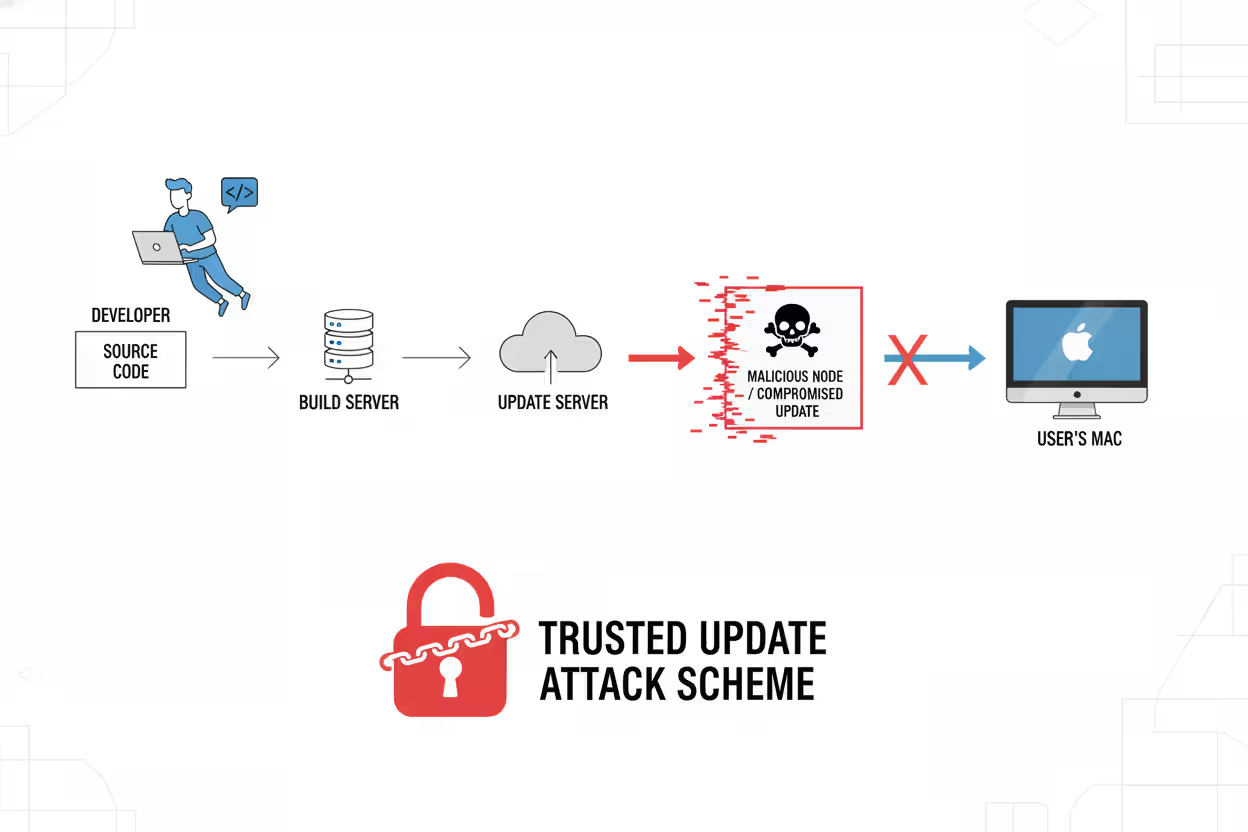
Supply chain attacks represent an especially insidious trend. Hackers compromise legitimate Mac developers, then distribute infected updates through normal channels that users trust implicitly.
Author: Ethan Caldwel;
Source: williamalmonte.net
How Endpoint Security for Mac Works
Let's break down the actual mechanics of how endpoint security for mac works across multiple protective layers running simultaneously.
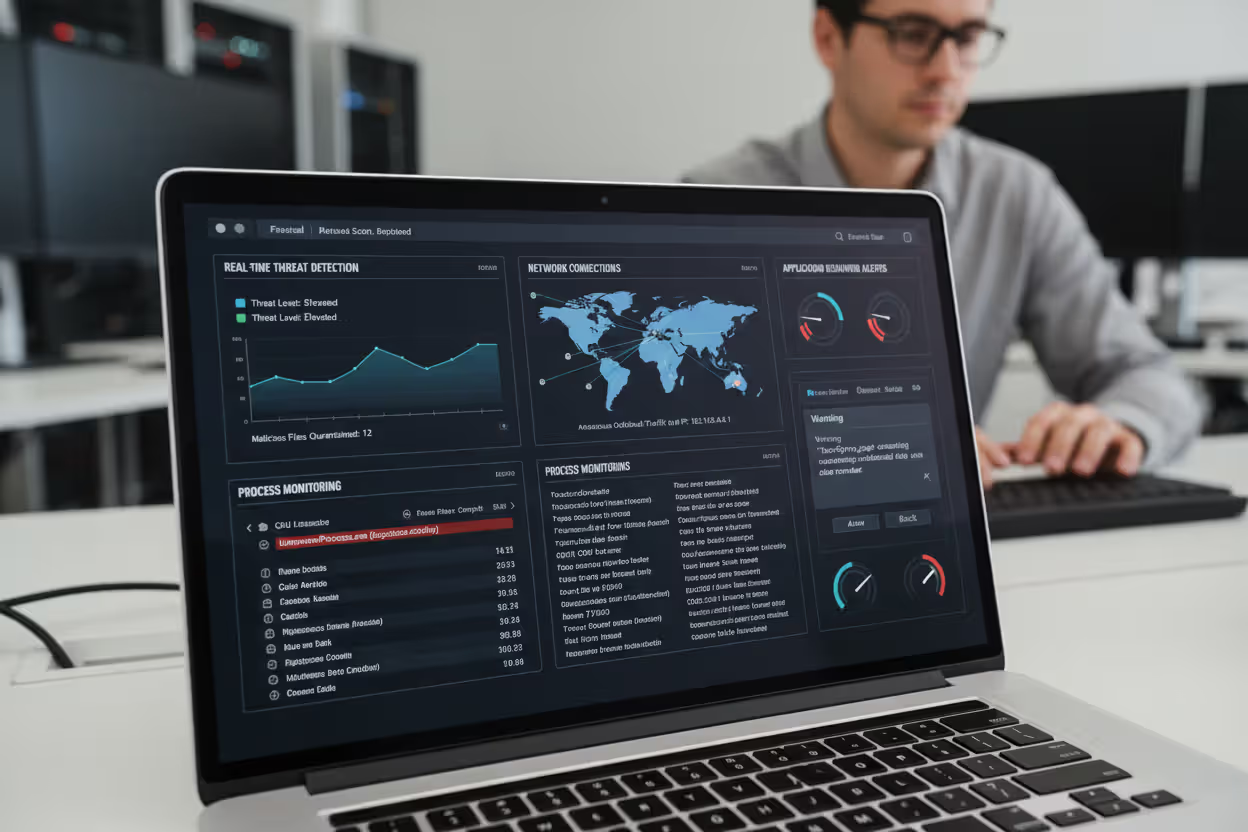
Kernel-Level Monitoring: Security solutions deploy system extensions (Apple phased out kernel extensions after macOS Big Sur) that monitor everything happening at the deepest system level. These extensions watch system calls, track file operations, and observe every new process that starts. When ransomware tries encrypting your files, this monitoring catches that pattern before the first file gets locked.
Real-Time Threat Detection: The security agent running on your Mac constantly scans downloads, email attachments, and active processes against massive threat intelligence databases. We're talking millions of known malware signatures. Download a file? Within milliseconds, the agent checks its hash value, examines its behavior, and analyzes its code structure against known bad actors.
Behavioral Analysis and Heuristics: This is where things get interesting. Instead of just matching signatures, advanced platforms use machine learning to spot suspicious activity. Let's say your normally harmless text editor suddenly tries accessing your keychain, modifying system files, or phoning home to a command-and-control server in Eastern Europe. The behavioral engine flags that immediately—even if the specific malware variant has never been seen before.
Application Whitelisting and Control: Administrators can lock down which software runs on company Macs. This prevents employees from installing that "helpful" utility that's actually cryptomining malware. When someone tries launching unauthorized software, the endpoint agent blocks execution and logs the attempt for review.
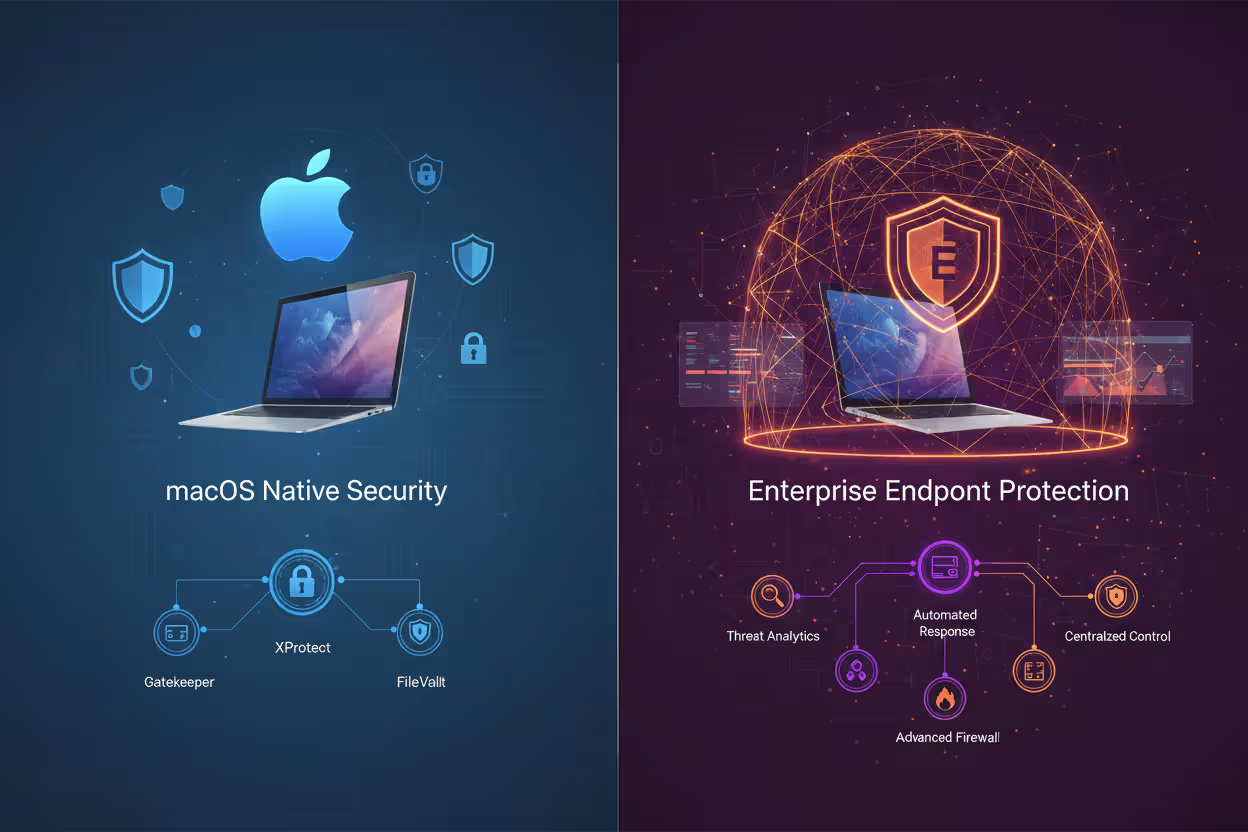
Integration with Native macOS Security: Smart endpoint solutions enhance rather than replace Apple's built-in defenses. They work alongside XProtect (Apple's malware scanner), Gatekeeper (which checks developer signatures), and the Malware Removal Tool—adding enterprise-grade capabilities these native features lack, like centralized management across 500 Macs or detailed forensic logging for compliance audits.
Network Traffic Analysis: The endpoint agent inspects traffic flowing in and out, identifying connections to malicious domains, catching data exfiltration attempts, and enforcing segmentation policies. This matters especially for remote workers whose Macs hop between home Wi-Fi, coffee shop networks, and hotel connections—each presenting different risks.
Author: Ethan Caldwel;
Source: williamalmonte.net
Core Components of Mac Endpoint Security Solutions
Antivirus and Anti-Malware Protection
Modern anti-malware engines for Mac employ three detection methods working together: signature matching for known threats, heuristic analysis for variants of existing malware, and sandboxing to safely execute suspicious files in isolated environments before they touch your actual system.
Effective solutions scan compressed archives, inspect disk images (.dmg files common on Mac), and analyze application bundles where malicious code often hides. They monitor Safari and other browsers to stop drive-by downloads and block phishing sites before you enter credentials.
Here's a critical difference from Windows antivirus—Mac-specific solutions recognize threats like Shlayer, which distributed adware to millions of Macs by disguising itself as Flash Player updates, or cryptominers masquerading as legitimate system utilities.
Real-time protection runs continuously with minimal impact on performance. Instead of those old-school scheduled scans that brought systems to their knees, modern engines scan files as you access them. Detected threats get quarantined automatically, though administrators can review potential false positives before permanent deletion.
Firewall and Network Security
macOS includes a basic application firewall, but enterprise solutions provide granular network control that goes way deeper. Advanced firewalls offer stateful packet inspection, protocol-specific filtering, and integration with zero-trust architectures where nothing's trusted by default.
Network security components watch for unusual patterns—like a Mac suddenly uploading 50GB to an unknown server at 3 AM, which probably indicates a breach in progress. They enforce VPN requirements for remote staff, ensuring encrypted tunnels when accessing company resources. Some platforms include DNS filtering that blocks malicious domains at the query level, stopping connections before they establish.
Intrusion prevention systems (IPS) integrated into endpoint security detect and block exploit attempts targeting known macOS vulnerabilities. This buys critical time between when a vulnerability gets disclosed and when patches get deployed—that window when you're most vulnerable.
Device Control and Data Loss Prevention
Device control limits which peripherals can connect to company Macs. This prevents data theft via USB drives, unauthorized network sharing, or connecting potentially infected devices. Administrators create policies allowing only corporate-issued USB devices, or block external storage entirely for employees handling customer financial data.
Data Loss Prevention (DLP) for Mac monitors file operations, clipboard activity, email attachments, and cloud uploads to catch accidental or malicious data leaks. For example, DLP policies might block copying customer databases to personal Dropbox accounts or emailing spreadsheets containing Social Security numbers outside the organization.
Content inspection engines identify sensitive information through pattern matching (credit card numbers, account credentials), keyword detection, or machine learning classification. When violations occur, the system blocks the action, alerts administrators, or requires additional authentication before allowing it.

Author: Ethan Caldwel;
Source: williamalmonte.net
Patch Management and Vulnerability Scanning
Unpatched software? That's the attack vector hackers exploit most. Endpoint security platforms automate patch management for both macOS system updates and third-party applications like Chrome, Office, or Zoom. They inventory installed software, identify outdated versions with known vulnerabilities, and deploy patches according to schedules administrators define.
Vulnerability scanning assesses Mac configurations against security benchmarks like CIS standards, finding misconfigurations such as disabled FileVault encryption, weak password policies, or unnecessary services running with elevated privileges. Automated remediation fixes many issues without manual intervention.
Endpoint Security for Mac Examples
Remote Workforce Protection: A SaaS company with 800 employees (40% on Macs) deployed endpoint security when shifting to permanent remote work. Their solution enforces VPN connections for accessing corporate resources. Behavioral monitoring caught an employee's MacBook communicating with a botnet command server—turns out a malicious browser extension had compromised the device. The endpoint agent automatically cut that Mac off from the network and alerted the security team within 90 seconds, preventing attackers from moving laterally to other systems.
BYOD Policies in Creative Agencies: A design agency lets employees use personal Macs for client work. Their endpoint security implements containerization, creating walls between corporate data and personal use. DLP prevents designers from accidentally copying work files to personal iCloud storage. Device encryption ensures protection if someone's MacBook gets stolen from their car. The solution provides security without requiring full device management—respecting employee privacy while protecting client intellectual property.
Healthcare Compliance Requirements: A medical practice with 35 Mac workstations must satisfy HIPAA regulations. Their endpoint security provides audit logs tracking every access to electronic health records, verifies encryption status across all devices, and enforces automatic session timeouts after 10 minutes of inactivity. When a physician's MacBook was stolen from their vehicle, FileVault encryption and remote wipe capabilities prevented a reportable breach that would've triggered federal fines. Compliance reporting features generate audit documentation automatically.
Financial Services Threat Detection: An investment firm uses endpoint security with advanced threat detection on analyst MacBooks. An analyst downloaded what appeared to be a legitimate financial model from a partner firm. Behavioral analysis detected hidden scripts attempting to execute when the spreadsheet opened—macro-based malware trying to establish persistence. The endpoint agent blocked execution immediately. Forensic analysis revealed a targeted attack likely originating from corporate espionage.

Author: Ethan Caldwel;
Source: williamalmonte.net
Educational Institution Management: A university IT department manages 3,000 Mac endpoints across faculty, staff, and computer labs. Their platform provides centralized visibility, letting administrators remotely investigate security incidents, push software updates to specific departments, and enforce acceptable use policies. During a campus-wide phishing campaign targeting university credentials, endpoint security blocked connections to the fraudulent login page across all managed Macs, cutting successful compromises by 94%.
Popular solutions in 2026 include CrowdStrike Falcon (lightweight agents and excellent threat intelligence), Jamf Protect (purpose-built for Apple environments), Microsoft Defender for Endpoint (tight integration with Microsoft 365 ecosystems), SentinelOne (autonomous response capabilities), and Carbon Black (behavioral detection emphasis). Each brings different strengths depending on your needs, existing infrastructure, and budget.
Built-In Mac Security vs. Third-Party Endpoint Solutions
| Security Capability | macOS Native Features | Enterprise Endpoint Platforms |
| Malware Detection | XProtect with signature-based scanning (updates lag threats) | Behavioral analysis with machine learning, continuous threat intelligence feeds |
| Firewall Protection | Application-level firewall only | Network inspection with IPS/IDS capabilities, DNS filtering |
| Data Encryption | FileVault for internal drives | FileVault plus removable media encryption plus cloud storage controls |
| Fleet Management | Requires MDM for basic configuration management | Comprehensive policy administration, remote troubleshooting, complete visibility |
| Threat Intelligence | Apple-curated signatures (delayed updates) | Real-time global threat feeds, custom IOCs, industry-specific intelligence |
| Audit and Compliance | No built-in reporting | Automated audit trails, compliance dashboards, regulatory report templates |
| Incident Response | Manual investigation with Console logs | Automated threat containment, forensic analysis tools, incident timelines |
| App Control | Gatekeeper validates developer signatures only | Granular whitelisting and blacklisting, custom execution policies |
| DLP Capabilities | No data loss prevention | Content inspection, policy-based enforcement, exfiltration detection |
| Patch Management | Software Update for Apple products only | Third-party application patching, configuration compliance |
| Support Lifecycle | Tied to macOS major version support | Continuous protection updates independent of OS version |
When Apple's Built-In Protection Works: Individual users, small businesses without regulatory requirements, and scenarios involving minimal sensitive data can often get by with macOS native security plus common sense. A freelance photographer working with non-confidential client images might find XProtect, Gatekeeper, and FileVault perfectly adequate.
When You Need Enterprise Solutions: Organizations facing compliance obligations (HIPAA, PCI-DSS, SOC 2), managing remote workforces, protecting valuable intellectual property, or operating in high-threat industries require comprehensive endpoint security. If a breach would cause significant financial damage or reputational harm, you need more than Apple's basics. The centralized visibility alone justifies investment for IT teams managing more than 10-15 Macs—manually verifying security configurations across dozens of devices becomes impractical fast.
Author: Ethan Caldwel;
Source: williamalmonte.net
Common Mac Endpoint Security Mistakes to Avoid
Believing the "Macs Don't Get Viruses" Myth: This misconception remains the most dangerous mistake. While Macs historically faced fewer attacks than Windows machines, that gap has closed dramatically. Attackers follow money and market share—as Macs became common in enterprises, they became proportionally targeted. Treating Mac security as secondary leaves gaping vulnerabilities that malware specifically designed for macOS will exploit.
Postponing Software Updates: Countless breaches exploit known vulnerabilities that patches already fix. Users who delay macOS updates or ignore third-party application updates create exploitable openings. Here's a pattern we see constantly: organizations deploy endpoint security but allow users to defer system updates indefinitely, undermining protection. Endpoint security delivers maximum value only within a comprehensive strategy including timely patching.
Getting System Permissions Wrong: macOS uses Transparency, Consent, and Control (TCC) managing application permissions for sensitive data access—location, contacts, documents. Misconfigured permissions either block legitimate endpoint security functions or grant excessive access to unvetted applications. Administrators must understand which permissions endpoint agents require and use MDM profiles to pre-approve necessary access instead of depending on users to configure permissions correctly.
Skipping User Training: Endpoint security can't protect against users who deliberately circumvent controls or fall for social engineering. An employee who disables security software because it "slows things down" or shares their admin password with a fake Apple support caller undermines every technical protection. Security awareness training specific to Mac threats—fraudulent software update prompts, malicious Safari extensions, convincing phishing emails—significantly reduces successful attacks.
Deploying Endpoint Security Without MDM Integration: Endpoint security and Mobile Device Management serve complementary roles. MDM handles device enrollment, pushes configuration profiles, and manages inventory, while endpoint security focuses on threat detection and response. Organizations deploying endpoint security without MDM miss opportunities for automated policy enforcement, streamlined troubleshooting, and lifecycle management. Integration between these systems multiplies their effectiveness.
Never Testing Incident Response: Installing endpoint security software without testing response procedures creates dangerous false confidence. When the platform alerts administrators about detected threats, does your team know how to investigate properly? Can they contain affected systems and remediate effectively? Regular tabletop exercises and simulated incidents ensure responders understand their tools and can act decisively during actual security events.
Inadequate Logging Configuration: Endpoint security generates incredibly valuable forensic data—but only when properly configured and retained. Organizations sometimes disable verbose logging to conserve storage space or overlook forwarding logs to SIEM systems. When investigating an incident weeks after initial compromise, insufficient historical data cripples root cause analysis and scope determination.
Mac-targeted attacks have increased 60% year-over-year since 2024. We're seeing sophisticated ransomware and credential stealers specifically engineered to bypass XProtect and exploit macOS vulnerabilities. As Macs approach a quarter of enterprise endpoints, threat actors have invested heavily in macOS-specific attack toolkits. Organizations treating Mac security as less critical than Windows protection are making a costly mistake—the threat landscape demands equally rigorous endpoint protection across all platforms
— Sarah Chen
Frequently Asked Questions About Mac Endpoint Security
Endpoint security for Mac has shifted from optional to essential as macOS devices proliferate in workplaces and threat actors adapt accordingly. The combination of increasingly sophisticated Mac-targeted malware, expanding regulatory compliance requirements, and complexities of hybrid work arrangements demands protection beyond what macOS provides natively.
Effective Mac endpoint security integrates multiple protective layers: real-time malware prevention, behavioral analysis spotting zero-day threats, network security monitoring traffic patterns, data loss prevention protecting sensitive information, and vulnerability management maintaining security hygiene. These capabilities work together to detect threats individual components might miss while providing centralized visibility IT teams need for managing distributed Mac fleets.
Organizations should evaluate their specific risk profiles, compliance obligations, and operational requirements when selecting solutions. A financial services firm faces different threats than a university, and security strategies should reflect those differences. Investment in robust endpoint protection pays dividends by preventing breaches, reducing incident response costs, and maintaining customer trust—benefits that far outweigh licensing expenses.
For Mac users managing corporate fleets or protecting personal devices, the question isn't whether endpoint security matters but rather how to implement it effectively within your specific context. The threat landscape will continue evolving, but one principle remains constant: proactive security measures cost far less than reactive incident response.
Related Stories
Read more

Read more




The content on this website is provided for general informational and educational purposes only. It is intended to explain concepts related to endpoint security, cybersecurity practices, threat prevention, and security technologies.
All information on this website, including articles, guides, and examples, is presented for general educational purposes. Cybersecurity requirements and implementations may vary depending on organizational needs, infrastructure, regulatory requirements, and threat environments.
This website does not provide professional cybersecurity, legal, or compliance advice, and the information presented should not be used as a substitute for consultation with qualified cybersecurity professionals.
The website and its authors are not responsible for any errors or omissions, or for any outcomes resulting from decisions made based on the information provided on this website.