

Remote employee using a laptop with secure VPN and endpoint protection concept
Endpoint Security VPN Guide

Remote work environments now support over 40% of the U.S. workforce, creating unprecedented challenges for network security teams. Traditional VPN solutions no longer provide adequate protection when employees connect from coffee shops, home networks, and shared coworking spaces using devices that may harbor malware or configuration vulnerabilities.
Endpoint security VPN represents a fundamental shift in how organizations protect their networks. Rather than simply encrypting traffic between a device and corporate resources, this approach validates the security posture of each connecting device before granting access. A laptop infected with ransomware gets blocked at the gate, regardless of correct login credentials.
The endpoint security vpn explained simply: it's a security system that combines network access control with continuous device health monitoring. Before your device connects to company resources, the system verifies antivirus status, patch levels, firewall configuration, and the absence of known threats. Only devices meeting these requirements establish a VPN tunnel.
What Is Endpoint Security VPN?
Endpoint security VPN integrates device security validation directly into the VPN connection process. Unlike traditional VPNs that authenticate users and encrypt traffic without examining the device itself, this technology inspects endpoints for security compliance before allowing network access.
The architecture consists of three primary elements: an endpoint agent installed on user devices, a policy enforcement gateway, and a centralized management console. The agent continuously monitors device health metrics—operating system patches, antivirus definitions, disk encryption status, running processes, and configuration settings. When a user attempts to connect, the agent reports these metrics to the gateway.
The gateway compares reported metrics against organizational security policies. A device running outdated antivirus software or missing critical patches receives a remediation prompt rather than network access. Some implementations offer limited access to update servers, allowing devices to resolve compliance issues before full connectivity.
This dual-layer protection approach addresses a scenario traditional VPNs cannot: compromised credentials on an infected device. An attacker who steals valid login credentials still cannot access the network if their device fails security checks. The system examines both "who you are" (authentication) and "what you're using" (device posture).
The convergence of endpoint protection and VPN technology addresses a critical gap we've seen exploited repeatedly.Stolen credentials mean nothing if the connecting device fails our security baseline checks. This dual-layer approach has reduced breach incidents by 67% among our enterprise clients
— Marcus Chen
The distinction from traditional VPNs becomes clear in breach scenarios. A standard VPN encrypts traffic from any device with correct credentials. An endpoint security VPN refuses connections from devices exhibiting suspicious behavior—unusual process activity, disabled security software, or indicators of compromise—even when credentials are valid.
Financial institutions adopted this technology rapidly after several high-profile breaches involved stolen credentials used from compromised home computers. Healthcare organizations followed suit to meet HIPAA technical safeguards requiring device-level security controls for systems accessing protected health information.
How Endpoint Security VPN Works
The technical workflow begins before users even attempt to connect. The endpoint agent runs continuously in the background, collecting security telemetry: firewall status, antivirus engine version and definition date, operating system patch level, full disk encryption status, presence of unauthorized software, and active network connections.
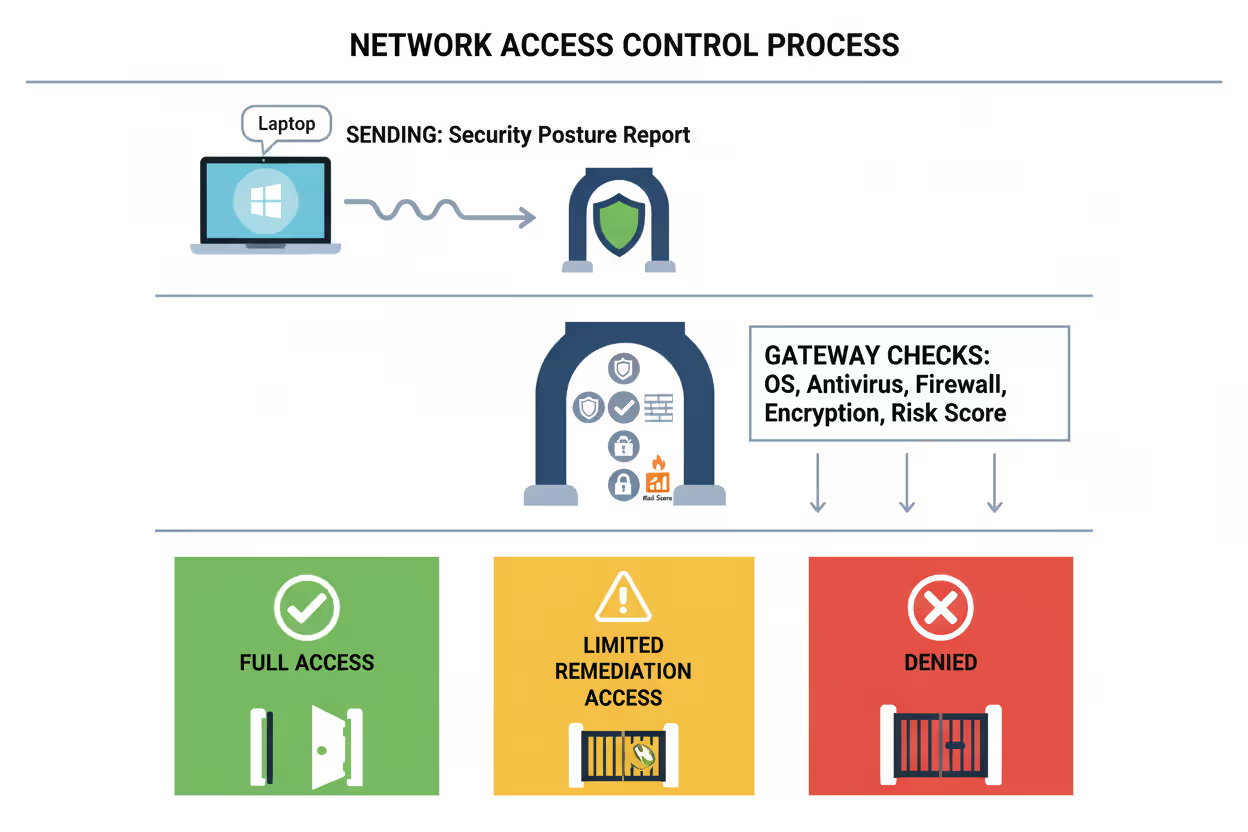
When a user initiates a VPN connection, the agent compiles a security posture report and transmits it to the policy enforcement gateway. The gateway evaluates this report against predefined security policies—minimum OS versions, required security software, prohibited applications, and acceptable risk scores from integrated threat detection platforms.
Author: Vanessa Keaton;
Source: williamalmonte.net
Three outcomes are possible: full access granted, limited remediation access provided, or connection denied. Full access occurs when all policy requirements are met. Limited access allows the device to reach update servers and security tools to resolve compliance issues. Denial happens when the device presents active threats or critical violations that cannot be quickly remediated.
After connection establishment, monitoring continues. The agent performs periodic re-checks, typically every 5-15 minutes, reporting any changes in device security posture. If antivirus software is disabled mid-session or suspicious processes launch, the system can terminate the VPN tunnel immediately.
Key Components of the System
The endpoint agent represents the frontline component. Modern agents consume minimal system resources—typically under 150MB of memory and 2% CPU during active scans. They integrate with native operating system APIs to gather security data without requiring administrative privileges for basic monitoring, though enforcement actions do require elevated permissions.
The policy enforcement gateway sits at the network perimeter, evaluating all connection requests. Enterprise-grade gateways process thousands of simultaneous authentication and posture checks, maintaining sub-second response times. They integrate with identity providers (Active Directory, Okta, Azure AD) for user authentication and with threat intelligence platforms for real-time risk assessment.
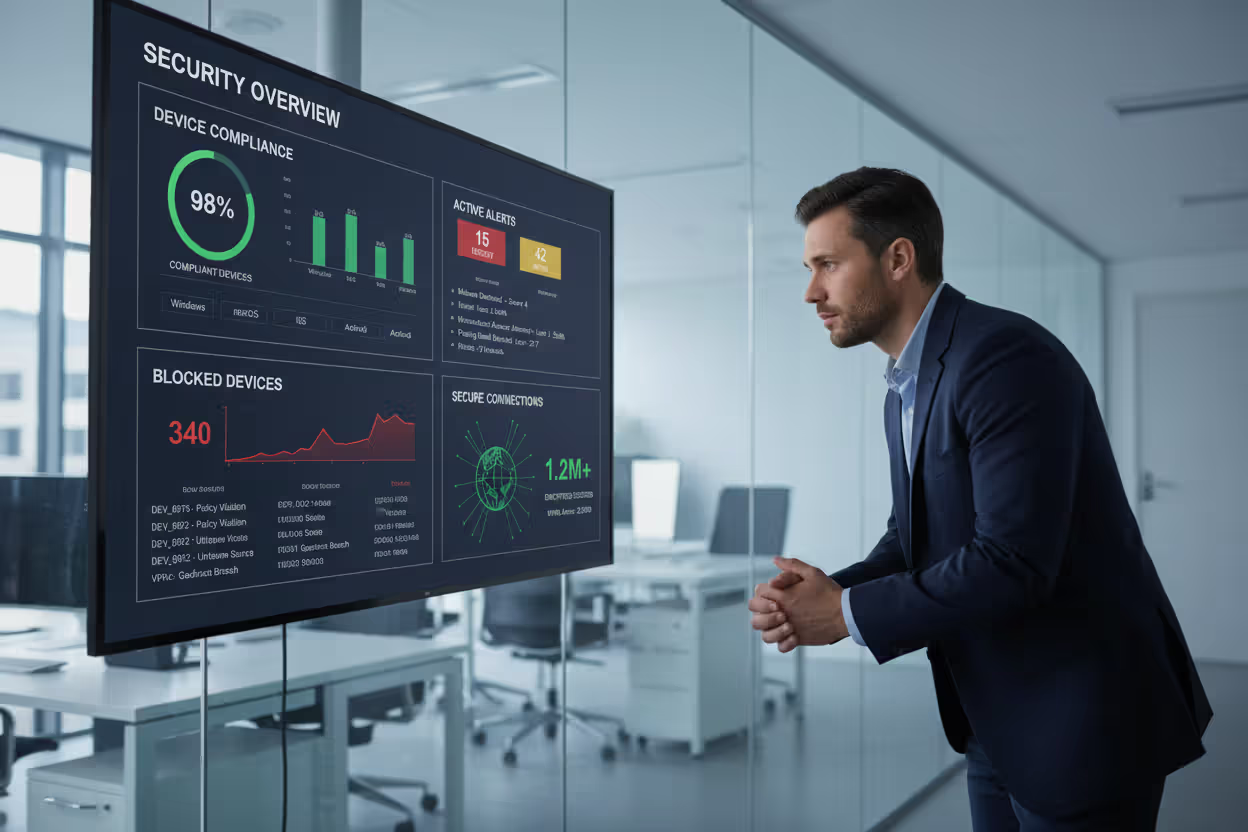
The management console provides administrators with visibility across all endpoints and connection attempts. Dashboards display compliance trends, common policy violations, and devices requiring attention. Policy configuration tools allow granular rules: different security baselines for contractors versus full-time employees, stricter requirements for accessing financial systems versus general resources, and temporary exceptions for specific business needs.
Integration points extend the system's capabilities. SIEM platforms receive event logs for correlation with other security data. Mobile device management systems share device compliance status. Endpoint detection and response tools provide advanced threat intelligence that influences access decisions.
Authentication and Access Control Process
Authentication occurs in multiple stages, each adding a verification layer. Initial user authentication validates credentials through the organization's identity provider, often requiring multi-factor authentication. This confirms user identity but says nothing about device security.
Device authentication follows, where the endpoint agent presents a certificate or unique identifier proving it's an authorized, organization-managed device. This prevents personal devices from connecting unless explicitly permitted under BYOD policies.
Posture assessment represents the third stage. The gateway examines the security report from the endpoint agent, checking each policy requirement. A typical enterprise policy might require: Windows 10 or later with patches from the last 30 days, active antivirus with definitions updated within 24 hours, firewall enabled, full disk encryption active, and no high-risk applications running.
Access control decisions can be binary (allow/deny) or granular (network segmentation). Binary decisions work for high-security environments: meet all requirements or get no access. Granular approaches provide limited access based on device compliance level—a partially compliant device might reach email and collaboration tools but not financial systems or customer databases.
Continuous authorization extends beyond initial connection. The system reassesses device posture throughout the session. A user who disables antivirus software to install a game during lunch loses network access immediately, even though they successfully connected earlier. This continuous monitoring catches threats that emerge after initial authentication.
Endpoint Security VPN vs Traditional VPN
The fundamental difference lies in what each system validates. Traditional VPNs answer one question: does this user have correct credentials? Endpoint security VPNs answer three: does this user have correct credentials, is this an authorized device, and does the device meet security requirements?
| Feature | Traditional VPN | Endpoint Security VPN |
| Security Validation | User credentials only | User credentials + device posture + continuous monitoring |
| Endpoint Health Checks | None | Comprehensive (OS patches, antivirus, firewall, encryption, threat detection) |
| Threat Detection Integration | Not applicable | Real-time integration with EDR, threat intelligence, and SIEM platforms |
| Management Complexity | Low to moderate | Moderate to high (policy management, agent deployment, compliance monitoring) |
| Typical Use Cases | Simple remote access, site-to-site connections | Enterprise remote workforce, BYOD environments, compliance-driven industries |
| Cost Range (per user/year) | $30-$80 | $85-$250 |
| Deployment Complexity | 1-2 weeks for basic setup | 4-8 weeks including policy development, agent rollout, and user training |
Cost differences reflect the additional infrastructure and management overhead. Traditional VPN concentrators handle encryption and tunneling. Endpoint security VPN systems require additional policy servers, database infrastructure for storing device telemetry, integration with security tools, and more sophisticated management interfaces.
Performance characteristics differ as well. Traditional VPNs introduce latency from encryption overhead—typically 5-15ms added to connection times. Endpoint security VPNs add posture assessment time, usually 2-8 seconds during initial connection, though this varies based on policy complexity and number of checks performed.
Management complexity represents the largest operational difference. A traditional VPN requires managing user accounts and connection profiles. An endpoint security VPN requires defining security policies, maintaining endpoint agents across diverse device types, monitoring compliance trends, handling exception requests, and coordinating with teams managing antivirus, patch management, and other security tools.
Organizations with simple remote access needs—a small team accessing non-sensitive resources—may find traditional VPNs sufficient. Those in regulated industries, managing large remote workforces, or handling sensitive data benefit substantially from the additional security layers despite increased complexity and cost.
Common Use Cases and Examples
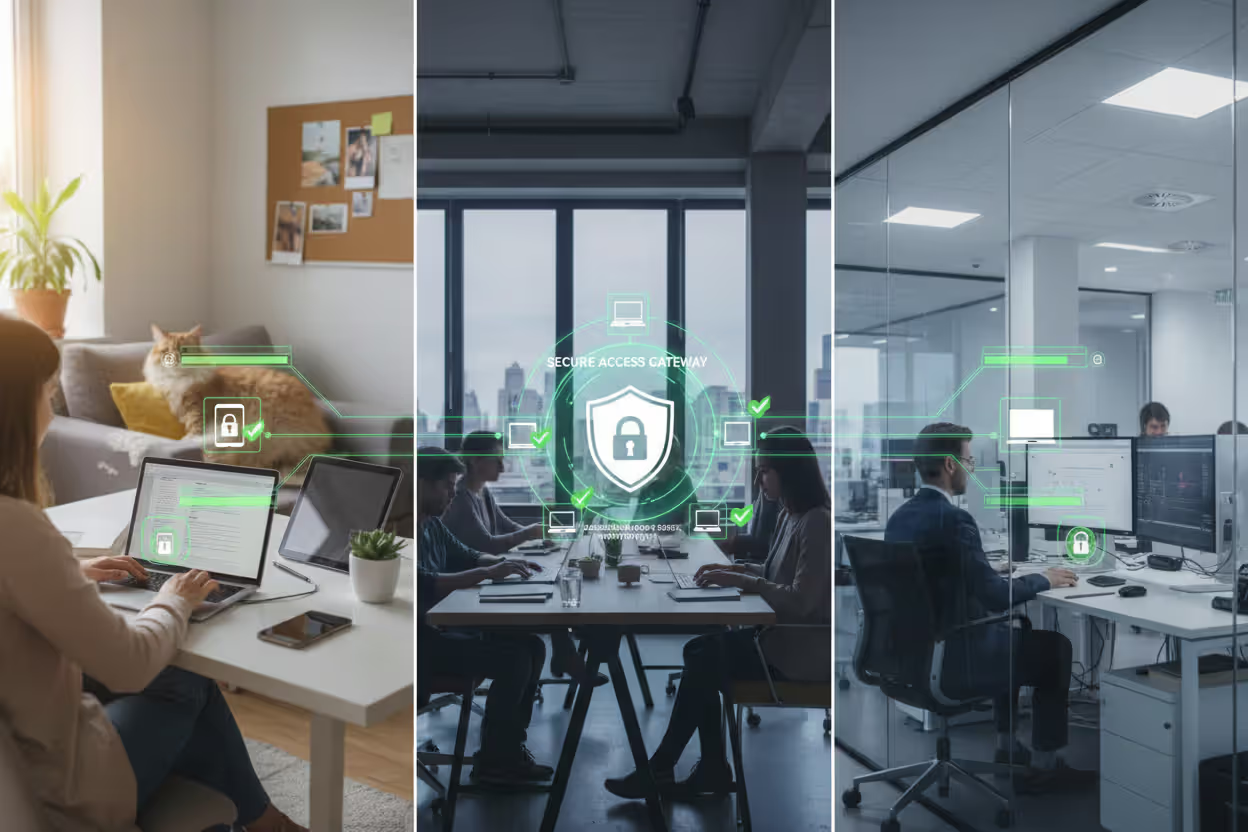
Remote workforce protection represents the most common deployment scenario. A software company with 800 remote employees uses endpoint security VPN to ensure home computers meet security standards before accessing source code repositories and customer data. Their policy requires updated antivirus, enabled firewalls, and operating systems patched within 45 days. Employees receive automated remediation guidance when their devices fall out of compliance, reducing help desk tickets by 40% compared to their previous manual verification process.
Author: Vanessa Keaton;
Source: williamalmonte.net
BYOD policies become manageable with endpoint security VPN. A consulting firm allows employees to use personal laptops for work, but only if those devices meet specific security requirements. The endpoint agent runs in a containerized environment, checking security posture without accessing personal files or applications. Employees gain access to company resources while maintaining privacy, and the firm ensures devices connecting to client networks meet contractual security obligations.
Contractor access scenarios benefit from temporary policy profiles. A manufacturing company grants third-party contractors limited network access to specific project resources. Contractor devices must meet baseline security requirements—updated OS, active antivirus, no known malware—but don't require the full suite of corporate security tools permanent employees use. Access automatically expires after project completion without manual intervention.
Healthcare compliance scenarios drove early adoption in medical settings. A hospital network uses endpoint security VPN to enforce HIPAA technical safeguards. Physicians accessing electronic health records from home workstations must use devices with full disk encryption, screen lock timeouts under 5 minutes, and approved remote desktop software. Devices failing these checks cannot reach patient data systems, creating an audit trail demonstrating compliance with federal regulations.
Financial services applications focus on fraud prevention. A regional bank requires relationship managers accessing customer account systems from branch offices to use devices meeting PCI-DSS requirements. The endpoint security VPN validates encryption standards, checks for keylogging software, and integrates with the bank's fraud detection platform. Suspicious device behavior—unusual login times, geographic anomalies, or signs of compromise—triggers immediate session termination and security team notification.
A less obvious but increasingly important use case involves supply chain security. Manufacturing and logistics companies grant suppliers and partners limited access to inventory systems and shipping platforms. Endpoint security VPN ensures these external parties' devices meet minimum security standards, reducing the risk of supply chain attacks where compromised partner systems become entry points for broader network breaches.
Benefits and Limitations
The unified security posture advantage eliminates gaps between network access control and endpoint protection. Before endpoint security VPN, these operated as separate systems. IT teams managed VPN access while security teams handled endpoint protection, creating coordination challenges and coverage gaps. Integration provides single-pane-of-glass visibility: which devices are connecting, their security status, and access granted.
Author: Vanessa Keaton;
Source: williamalmonte.net
Reduced attack surface comes from preventing compromised devices from reaching the network. Traditional approaches allowed infected devices to connect, relying on perimeter defenses and internal segmentation to limit damage. Endpoint security VPN stops threats at the entry point. A laptop infected with credential-stealing malware never reaches systems where those credentials work.
Compliance support simplifies audit processes. Regulations like HIPAA, PCI-DSS, and GDPR require demonstrable technical controls protecting sensitive data. Endpoint security VPN generates detailed logs showing which devices accessed what resources, their security posture at connection time, and any policy violations. These logs provide auditors with clear evidence of compliance controls.
Implementation complexity represents the primary limitation. Deploying endpoint agents across diverse device types—Windows, macOS, Linux, iOS, Android—requires testing and troubleshooting. Each operating system has unique security APIs and management approaches. Large organizations spend 3-6 months on initial rollout, longer if legacy systems require special handling.
Performance overhead affects user experience, particularly during initial connection. The 2-8 second posture assessment delay frustrates users accustomed to instant VPN connections. Network administrators must balance security thoroughness against user tolerance for connection delays. Overly aggressive policies that frequently block access generate help desk tickets and workarounds.
Cost factors extend beyond licensing. Organizations need staff trained in policy management, integration with existing security tools, and troubleshooting agent issues. Smaller organizations may lack dedicated security teams, making the operational overhead prohibitive. The $85-$250 per user annual cost doesn't include implementation services, training, or ongoing management time.
False positives create operational friction. A device might fail posture checks due to timing issues—antivirus updating during the connection attempt, legitimate software triggering behavioral alerts, or network delays preventing proper status reporting. Each false positive generates a help desk ticket or frustrated user, requiring careful policy tuning to minimize.
Dependency on endpoint agents introduces a single point of failure. If the agent crashes or becomes corrupted, users lose network access even if their device is perfectly secure. Organizations need robust agent update and recovery processes to prevent widespread access outages from agent-related issues.
Deployment Considerations for Organizations
Infrastructure requirements vary based on organization size and architecture. Small deployments (under 200 users) often use cloud-based solutions requiring minimal on-premises infrastructure—just endpoint agents and internet connectivity. Mid-size deployments (200-2,000 users) typically need dedicated policy enforcement gateways, either physical appliances or virtual machines in the data center. Enterprise deployments (over 2,000 users) require redundant gateways across multiple locations, load balancing, and high-availability configurations.
Compatibility assessment should happen before vendor selection. Inventory all device types in your environment: operating systems, versions, and hardware platforms. Not all endpoint security VPN solutions support every platform equally. Some have robust Windows and macOS support but limited Linux capabilities. Mobile device support varies significantly—some solutions offer full posture checking on iOS and Android, while others provide only basic connectivity.
Policy configuration represents the most time-consuming deployment phase. Start with baseline policies covering fundamental security requirements: operating system versions, antivirus presence, and firewall status. Avoid overly aggressive initial policies that block large numbers of users. Implement in monitoring mode first, observing which devices would fail without actually blocking them. Refine policies based on this data before enforcing.
User training needs are often underestimated. Users must understand why they're blocked when devices fail posture checks and how to remediate issues. Create clear documentation with screenshots showing common remediation steps: updating antivirus, enabling firewall, installing OS patches. Consider short video tutorials for non-technical users. Plan for elevated help desk volume during the first month post-deployment.
Vendor selection criteria should prioritize integration capabilities over feature lists. The best endpoint security VPN solution is one that works seamlessly with your existing security stack. Evaluate integration with your identity provider, endpoint protection platform, SIEM, and mobile device management system. Request proof-of-concept deployments testing these integrations before committing.
Rollout strategy should be phased. Start with IT and security teams who can provide feedback and help troubleshoot issues. Expand to a pilot group of 50-100 users representing diverse roles, locations, and device types. Address issues identified during pilot before organization-wide deployment. Plan 2-3 months for pilot and refinement before full rollout.
Exception handling processes need definition before deployment. Some devices or users will require policy exceptions: legacy systems running older operating systems, specialized equipment with limited security capabilities, or temporary contractors needing quick access. Define who can approve exceptions, how long they last, and what compensating controls apply.
Monitoring and maintenance plans should include regular policy reviews (quarterly), agent update procedures, capacity planning for gateway infrastructure, and integration with change management processes. When the security team deploys new antivirus software or updates firewall configurations, VPN policies need corresponding updates.
Frequently Asked Questions
Endpoint security VPN addresses the fundamental weakness in traditional remote access: trusting devices simply because users have valid credentials. The dual-layer approach—validating both user identity and device security posture—prevents compromised devices from becoming network entry points for attackers.
Implementation requires careful planning, particularly around policy development and user communication. Organizations should start with baseline security requirements, test thoroughly with pilot groups, and refine policies based on real-world feedback before full deployment. The operational overhead is real, but so are the security benefits for organizations handling sensitive data or operating in regulated industries.
The technology continues evolving. Integration with zero trust architectures, machine learning-based risk scoring, and automated remediation workflows are making systems more sophisticated while reducing management burden. For organizations committed to protecting remote access, endpoint security VPN represents a mature, proven approach that significantly reduces breach risk compared to traditional VPN-only solutions.
Related Stories
Read more

Read more



The content on this website is provided for general informational and educational purposes only. It is intended to explain concepts related to endpoint security, cybersecurity practices, threat prevention, and security technologies.
All information on this website, including articles, guides, and examples, is presented for general educational purposes. Cybersecurity requirements and implementations may vary depending on organizational needs, infrastructure, regulatory requirements, and threat environments.
This website does not provide professional cybersecurity, legal, or compliance advice, and the information presented should not be used as a substitute for consultation with qualified cybersecurity professionals.
The website and its authors are not responsible for any errors or omissions, or for any outcomes resulting from decisions made based on the information provided on this website.