

Employee using an unauthorized cloud file-sharing service on a laptop in an office environment
Shadow IT in Cyber Security Guide

Content
Content
Here's a scenario that plays out in companies everywhere: A project manager needs to share a 2GB video file with a client. The corporate file transfer system caps uploads at 100MB. Deadline's in two hours. So she creates a free WeTransfer account, uploads the file, and moves on. Problem solved, right?
Not quite. She just created shadow IT—and her security team has no idea it happened.
Shadow IT isn't about rebellious employees deliberately sabotaging security protocols. It's about people trying to get work done when official tools don't cut it. But each workaround chips away at your security perimeter, creating blind spots where threats can slip through undetected.
What Is Shadow IT in Cyber Security
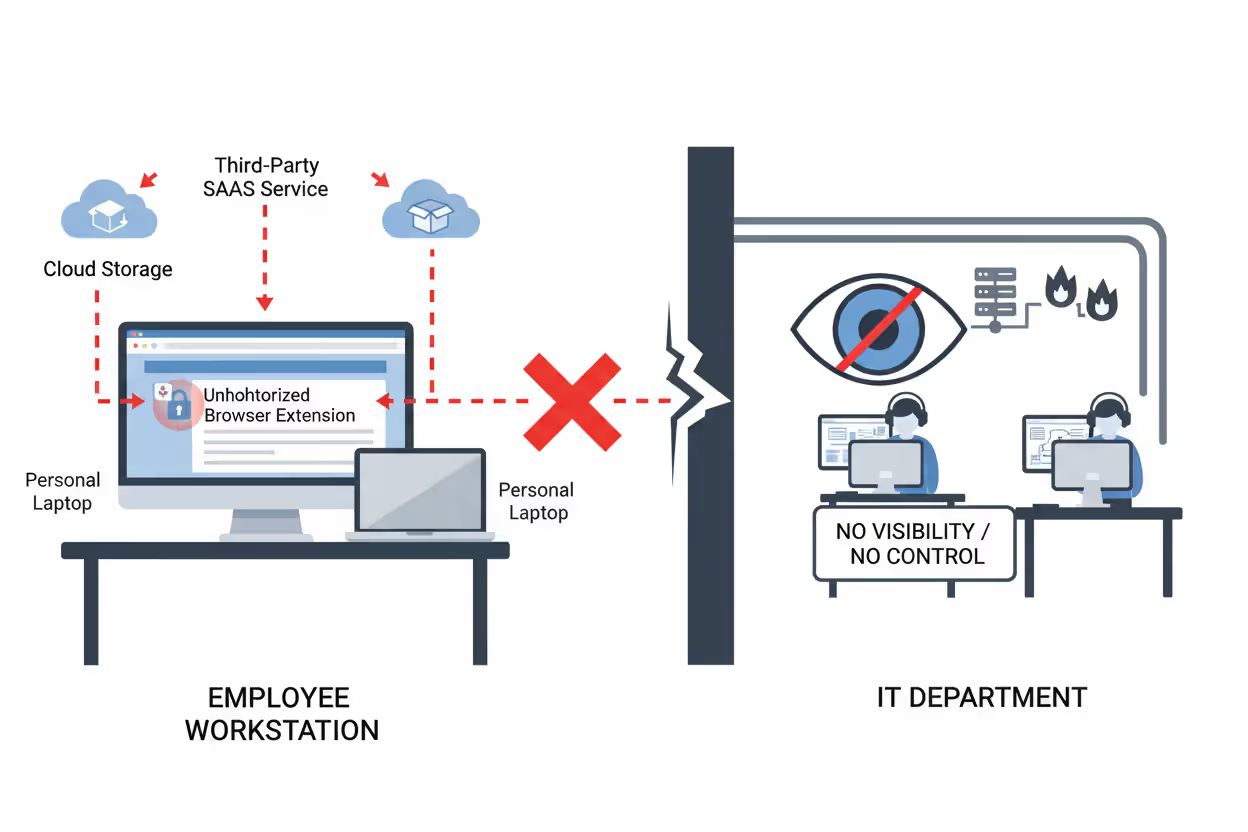
Shadow IT means any technology that people in your organization use for work without your IT department knowing about it or approving it. Could be a Chrome extension. Could be a full SaaS platform. Could be someone's personal laptop connecting to your VPN.
Here's what makes it "shadow"—there's zero IT oversight. Nobody vetted the security. Nobody's monitoring for breaches. Nobody's managing access when employees leave. The tool might be completely secure on its own, but your security team can't protect data they don't know exists.
Think about approved systems for a second. Before your IT team greenlights a new tool, they dig into its security certifications, test how it integrates with your single sign-on, verify it meets compliance requirements, and establish who owns the vendor relationship. They build monitoring into your SIEM, configure backup procedures, and document everything.
Shadow IT skips all that. It just... appears.
You'll spot shadow IT by these telltale signs: It never went through procurement. It's not in your asset management database. Your security tools can't see it. There's no support plan, no update schedule, no data retention policy. Often it spreads because your officially approved tools either don't exist for that specific need, take six months to procure, or honestly just aren't as good at solving the problem.
Author: Marcus Halbrook;
Source: williamalmonte.net
How Shadow IT in Cyber Security Works
Nobody wakes up thinking "Today I'm going to create a security vulnerability!" Shadow IT starts with genuine business problems. Your sales rep needs to record product demos but the corporate solution requires three levels of approval and IT setup. He Googles "screen recorder," finds Loom, and starts recording in five minutes flat.
That's how it begins—frustration plus convenience.
Modern SaaS companies have perfected the art of frictionless adoption. Free trials need nothing but an email address. Many tools offer permanent free tiers that never trigger your purchasing thresholds. Your employee creates an account using their work email, uploads company presentations, invites three coworkers, and boom—you've got shadow IT.
It spreads organically. Someone shares a Notion page in Slack. A colleague thinks "This is way better than our wiki" and signs up themselves. Within weeks, an entire department's documentation lives in Notion. Your IT team? Still blissfully unaware.
Traditional security controls miss this completely. Your firewall sees HTTPS traffic to legitimate websites—nothing suspicious there. Cloud applications run entirely in browsers, so endpoint detection tools see nothing installed. Mobile apps on personal phones sync through consumer cloud services that never touch your corporate network. Everything looks like normal internet activity.
Watch how this typically unfolds: First, one person or a small team quietly adopts a tool. It works well, so usage grows across departments through word of mouth. Eventually the tool becomes critical infrastructure with important business data locked inside. Discovery happens through an incident (breach, audit, compliance review) or someone proactively hunting for it. By then, the tool's supporting essential workflows, making removal a political nightmare.

Author: Marcus Halbrook;
Source: williamalmonte.net
Shadow IT in Cyber Security Examples
Cloud storage tools top the list of shadow IT culprits. Your company provides everyone with enterprise OneDrive accounts, but employees still fire up personal Dropbox or Google Drive accounts. Why? Maybe they're collaborating with contractors who don't have corporate access. Maybe they want files available on personal devices your MDM doesn't manage. Maybe they've used Dropbox for years and just prefer it.
Communication platforms multiply like rabbits in hybrid work environments. Your official standard might be Microsoft Teams, but marketing maintains a separate Slack workspace they're paying for with the department credit card. Sales coordinators run WhatsApp groups for quick responses. Your CEO uses a personal Zoom account for external meetings because setting up corporate Zoom feels like too much hassle.
Personal devices create massive shadow IT sprawl. Employees read work emails on personal iPhones. They access Salesforce from home computers. They grab their kid's iPad for client presentations. Even companies with formal BYOD programs find employees using unregistered devices—that home desktop where someone checks Slack occasionally, the Android tablet used for travel, the personal MacBook for after-hours work.
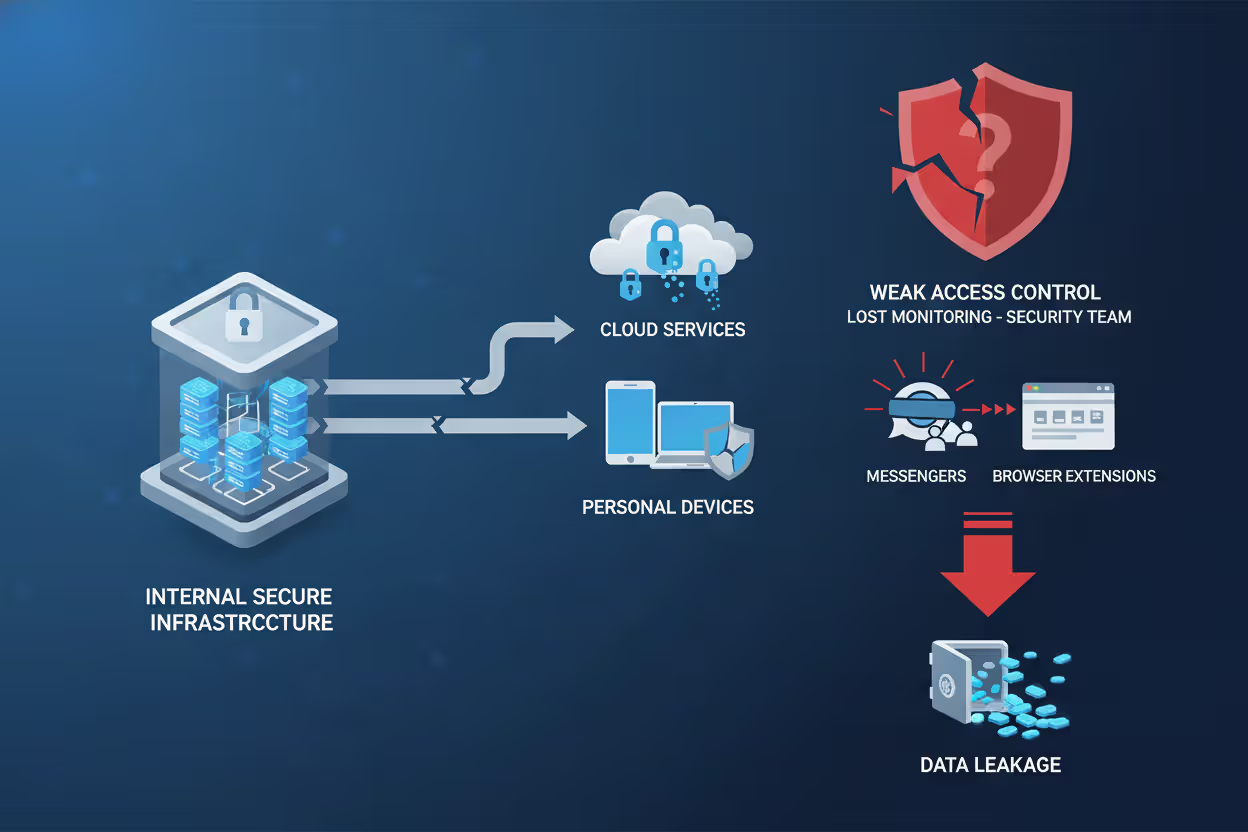
Browser extensions deserve special attention because they're nearly invisible yet incredibly dangerous. People install Grammarly, LastPass, NordVPN, and productivity trackers individually without realizing these extensions can read everything they type into web applications. Passwords, customer records, proprietary data—browser extensions with broad permissions see it all.
Shadow IT Categories and Risk Assessment
| Tool Type | Common Examples | Who Uses Them | Security Concerns |
| File Sharing | WeTransfer, Personal Dropbox, iCloud Drive | Everyone, especially external-facing roles | Critical risk—company data leaves your control entirely, lives on consumer infrastructure with weak access controls |
| Messaging | WhatsApp Business, Discord servers, Personal Slack | Sales teams, remote workers, executive assistants | High risk—confidential conversations and shared files bypass DLP, often unencrypted, compliance gaps |
| Project Tools | Monday.com, ClickUp, Notion databases | Marketing, product teams, creative departments | Moderate risk—creates isolated data pockets, complicates access management, integration nightmares |
| Developer Tools | Personal AWS, GitHub accounts, Replit | Engineers, data analysts, technical staff | Critical risk—source code exposure, API keys in repositories, infrastructure running outside security monitoring |
Why Shadow IT Creates Security Risks
When sensitive information ends up in unmanaged systems, breach risk skyrockets. That personal Dropbox account? No enterprise encryption. Data might be stored in regions your compliance team hasn't approved. Access controls are probably just "anyone with the link can view." If an employee reuses passwords and their personal account gets compromised in a credential-stuffing attack, hackers now have your company files. Worse—you might never find out because the breach happened in an account you don't monitor.
Compliance violations pile up fast with shadow IT. Healthcare organizations need ironclad HIPAA compliance, but they can't guarantee patient data protection when nurses message through personal WhatsApp. Financial services firms face regulatory penalties when customer information winds up in unauthorized cloud storage that doesn't meet data residency requirements. During audits, try explaining why you can't produce complete records of where customer data lives or who accessed it. That conversation doesn't go well.
Your security team can't defend against threats they can't see. Threat detection depends on monitoring tools that feed your SIEM, but shadow IT is invisible to these systems. If attackers compromise an employee's unauthorized application, your incident response team has no alerts, no logs, no visibility into what's happening. Vulnerability management becomes impossible—you can't patch software you don't know exists.
Data fragmentation creates operational chaos beyond just security. When sales tracks customers in Salesforce while marketing uses a shadow CRM someone found online, you get duplicate records, conflicting information, and nobody has the complete customer picture. Finance data scattered across approved ERP systems and shadow spreadsheets makes accurate reporting nearly impossible. Integration between systems? Forget it.
Shadow IT represents the collision between business velocity and security governance.Employees aren't trying to undermine security—they're solving real problems. But every unauthorized tool creates an attack surface we can't defend. The challenge isn't eliminating shadow IT entirely, which is impossible, but rather building systems responsive enough that employees don't feel compelled to work around us
— Marcus Chen
How to Detect Shadow IT in Your Organization
Start with network traffic analysis. Modern monitoring tools can spot connections to known cloud services by examining DNS queries, SSL certificate details, and traffic patterns. When thirty employees suddenly start connecting to the same file-sharing service you've never heard of, network logs tell that story. You can't inspect encrypted traffic content, but metadata reveals which external services your people are using.
Cloud Access Security Brokers (CASBs) specifically hunt shadow IT. These tools position themselves between users and cloud applications, cataloging every cloud service accessed from your networks or managed devices. CASBs maintain databases tracking thousands of cloud applications—when your employee accesses one, the CASB identifies it automatically and assigns a risk score based on the vendor's security posture, compliance certifications, and how people are using it.
Don't overlook human intelligence. Annual surveys asking employees "What tools do you actually use to get work done?" often uncover shadow IT that technical controls completely miss. Departmental audits examining software purchases, cloud subscriptions on credit card statements, and workflow documentation reveal tools operating entirely outside your networks. Exit interviews with departing employees frequently expose long-running shadow IT when they're explaining workflows to their replacements.
Author: Marcus Halbrook;
Source: williamalmonte.net
Red flags that shadow IT exists: Unexplained data transfers to external IP addresses. Employees submitting requests for access to blocked cloud services. Department credit cards showing SaaS subscription charges IT never approved. References in meeting notes to tools you don't recognize. When someone asks IT to build an integration with an application your team's never heard of, that tool has probably been running in shadow mode for months.
Managing and Preventing Shadow IT
Fix the root cause—provide approved alternatives that actually work. When employees resort to shadow IT, they're usually solving legitimate problems your official tools don't address. Build a catalog of pre-approved options for common needs: file sharing, project management, video conferencing, screen recording. Streamline how people can request new tools. If getting IT approval takes three months, you're practically forcing shadow IT into existence.
Culture matters more than controls. When people understand the "why" behind shadow IT risks instead of just hearing "no," they make better choices. Security awareness training should walk through specific scenarios: "Here's what happened when Company X had a breach through an unauthorized cloud storage account" hits harder than abstract warnings. Make requesting new tools easy and transparent so employees don't feel like they need to sneak around IT.

Author: Marcus Halbrook;
Source: williamalmonte.net
Write policies that account for reality. Zero-tolerance approaches that block everything not explicitly whitelisted just drive shadow IT underground where it's harder to detect. Not all shadow IT poses equal risk. A designer using an unapproved color-picker extension creates minimal danger compared to finance sharing customer data through personal cloud accounts. Focus enforcement on genuinely high-risk scenarios.
Accept that some shadow IT will always exist. Pursuing total elimination wastes resources better spent on detection and risk management. Provide excellent approved alternatives for the most common shadow IT use cases—that alone cuts the problem significantly. For shadow IT that persists despite your best efforts, focus on visibility and damage control rather than punishment. Work with those employees to understand what they need that they're not getting from official channels.
Frequently Asked Questions About Shadow IT
You won't eliminate shadow IT completely—that's not a realistic goal. Employees will keep adopting unauthorized tools as long as those tools solve real problems better than what IT officially provides. Instead of fighting this reality, security teams need to understand why shadow IT emerges, provide better sanctioned alternatives, and maintain visibility into unauthorized tools that inevitably persist.
Effective management combines technical detection through network monitoring and CASB platforms with cultural shifts that encourage employees to partner with IT instead of working around them. Organizations that streamline approval processes, maintain strong catalogs of pre-approved tools, and respond quickly to legitimate technology requests simply experience less problematic shadow IT. When shadow IT does surface, risk-based approaches that prioritize addressing genuinely dangerous scenarios prove more effective than chasing perfect compliance.
Your goal should be managing shadow IT to acceptable risk levels while preserving the agility and innovation that drive business success. Understanding what shadow IT is, how it emerges, and why employees adopt it enables you to develop strategies that protect security without strangling productivity. That balance—not elimination—is what effective shadow IT management actually looks like.
Related Stories

Read more

Read more




The content on this website is provided for general informational and educational purposes only. It is intended to explain concepts related to endpoint security, cybersecurity practices, threat prevention, and security technologies.
All information on this website, including articles, guides, and examples, is presented for general educational purposes. Cybersecurity requirements and implementations may vary depending on organizational needs, infrastructure, regulatory requirements, and threat environments.
This website does not provide professional cybersecurity, legal, or compliance advice, and the information presented should not be used as a substitute for consultation with qualified cybersecurity professionals.
The website and its authors are not responsible for any errors or omissions, or for any outcomes resulting from decisions made based on the information provided on this website.