

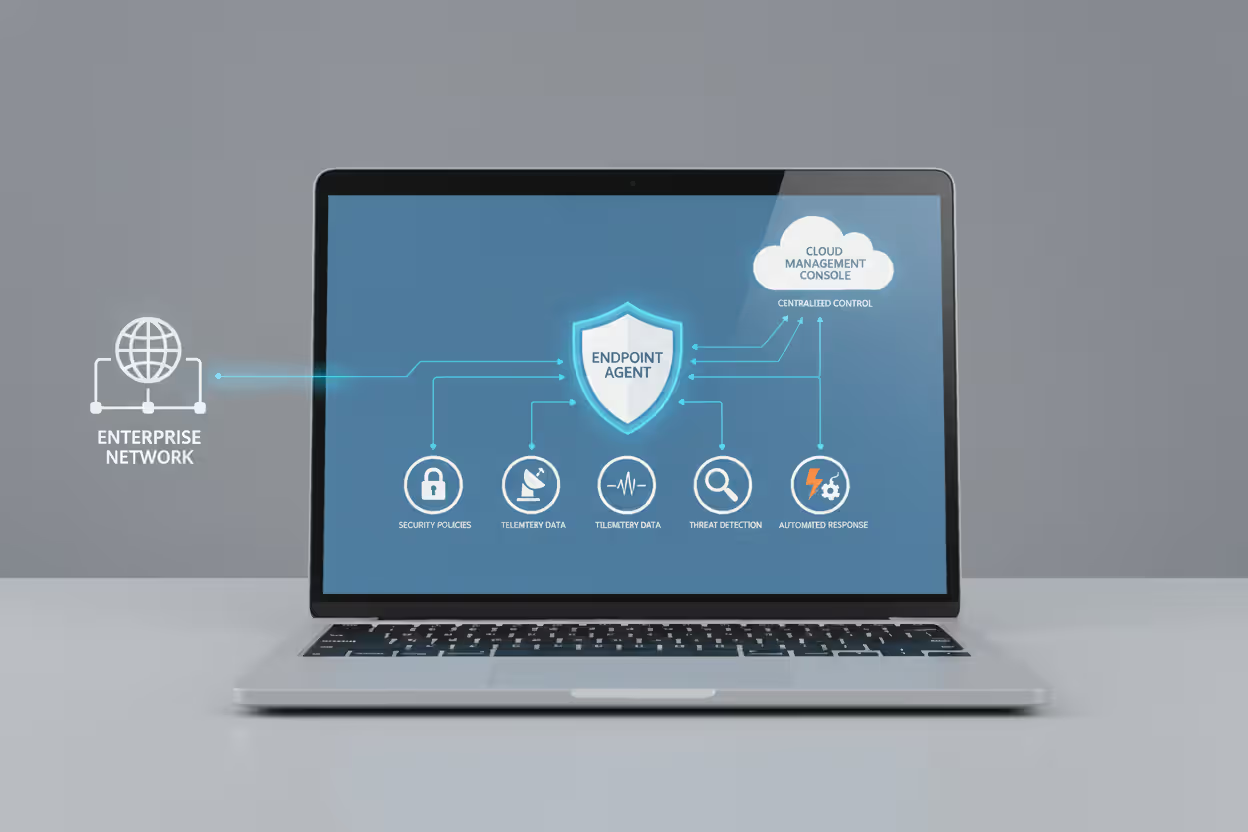
Endpoint security protecting multiple business devices
How Does Endpoint Security Work?

Think about all the devices connecting to your company's network right now. Sales reps checking email on laptops at coffee shops. Warehouse managers scanning inventory on tablets. Executives accessing files from home computers. Every single one of these devices? That's an endpoint—and a potential doorway for attackers.
Here's what makes endpoint security different from old-school perimeter defenses: instead of just building walls around your network, you're placing a security guard on every device. These guards watch everything happening on laptops, phones, tablets, and workstations, stopping threats before they spread.
When we talk about endpoint security work meaning, we're really describing this distributed defense model. Software agents live on each device, talking back to central command. They enforce rules, spot suspicious behavior, block malware, and alert your security team when something looks wrong. The endpoint security work definition includes all these pieces—the agents, management dashboards, threat databases, and automated responses—working together to catch attacks at the device level.
What Is Endpoint Security
Endpoint security is the practice of protecting individual devices that access your corporate network. But that clinical definition misses the bigger picture.
Your endpoints are where work actually happens. Employees open email attachments, download files, click links, and install software. Each action creates risk. Endpoint security sits on these devices—watching, learning, and intervening when danger appears.
Modern solutions do way more than scan for viruses. They track how programs behave. They encrypt hard drives. They control which applications can run and which USB drives can connect. They record every significant action—process launches, network connections, file changes—creating forensic trails security analysts use to investigate breaches.
The meaning of endpoint security work extends across your entire device ecosystem: company-owned Windows laptops, employee iPhones accessing corporate email, Android tablets used by field technicians, even IoT sensors in smart buildings. Each device runs an agent—lightweight software that stays running in the background, constantly communicating with management servers.
These agents receive marching orders (security policies), report what they're seeing (telemetry data), and take action when threats emerge (automated responses). Unlike network firewalls that only see traffic passing through, endpoint agents see everything happening on the device itself. That's their superpower.
Author: Ethan Caldwel;
Source: williamalmonte.net
Core Components of Endpoint Security Systems
Endpoint security platforms pack multiple defensive technologies into single solutions. Understanding these building blocks clarifies the endpoint security work explained.
Detection and Prevention Technologies
Antivirus engines still matter, even though they're not the whole story anymore. These engines maintain massive databases of known malware signatures—unique fingerprints identifying specific threats. When you download a file, the engine calculates its hash and checks whether it matches anything nasty in the database.
Next-generation antivirus (NGAV) brings machine learning into play. Instead of just matching signatures, NGAV examines file characteristics: how the code is structured, which APIs it calls, how it's packed or obfuscated. Machine learning models trained on billions of samples can spot brand-new malware by recognizing patterns typical of malicious software.
Application control takes a whitelist approach. Organizations specify which programs employees can run—either by publisher certificate, file hash, or installation path. Everything else gets blocked. This prevents users from installing random software that might contain vulnerabilities or actual malware.
Exploit prevention modules watch for common attack techniques regardless of which specific vulnerability is being exploited. Buffer overflows, DLL injection, heap spraying—these hacking methods follow recognizable patterns. The prevention module spots these patterns and shuts down the exploit attempt before attackers gain control.
Encryption enforcement makes sure hard drives stay encrypted. The agent verifies encryption status and automatically encrypts drives that aren't protected. If someone steals a laptop, they get an encrypted brick instead of a data goldmine.
Monitoring and Response Tools
Endpoint detection and response (EDR) represents the investigation layer. EDR agents record incredibly detailed logs: which processes started, what files they touched, which network connections they opened, what registry keys they modified. This creates a complete timeline that security analysts can rewind and replay when investigating suspected breaches.
Behavioral analysis establishes what's normal for each device, then flags deviations. When Microsoft Word suddenly starts encrypting hundreds of files per minute—classic ransomware behavior—the behavioral engine recognizes this isn't how Word normally acts and triggers alarms.
Network firewalls running directly on endpoints control traffic at the source. They block connections to known criminal infrastructure, prevent infected devices from spreading malware laterally across your network, and stop sensitive data from being uploaded to unauthorized cloud services.
Device control manages what can physically plug into your computers. That USB drive someone found in the parking lot? Blocked. The contractor's external hard drive? Only allowed if IT specifically authorized it. This prevents both malware infections from sketchy USB devices and data theft via unauthorized storage.
How Endpoint Security Detects and Blocks Threats
No single detection method catches everything, so modern endpoint security stacks multiple approaches. Here's how each one works:
Signature-based detection compares files against catalogs of known threats. It's fast and accurate for documented malware. When that WannaCry ransomware sample tries to execute, the signature scanner recognizes it instantly and blocks it. The downside? Zero effectiveness against brand-new threats that aren't in the database yet. Attackers know this, so they constantly modify their malware to evade signature detection.
Heuristic analysis looks at what code does rather than what it looks like. The engine examines instruction sequences, searching for suspicious behaviors: self-modification routines, anti-debugging tricks, encryption loops. Even if an attacker changes their malware's signature, heuristics can still catch it based on how the code behaves.

Author: Ethan Caldwel;
Source: williamalmonte.net
Behavioral monitoring watches running processes for malicious actions. Imagine a Word document that launches PowerShell with encoded commands, then PowerShell downloads additional files from a newly-registered domain, then tries disabling Windows Defender. Each individual action might seem okay in isolation, but the sequence screams "attack in progress!" Behavioral monitoring connects these dots and stops the attack chain.
Machine learning models analyze thousands of file attributes simultaneously. File size, when it was compiled, which libraries it imports, whether its certificate is valid, how common it is worldwide—all these factors feed into threat probability calculations. Models generalize beyond specific examples, catching malware families they've never encountered by recognizing characteristic construction patterns.
Sandboxing executes suspicious files in isolated virtual environments first. That PDF attachment opens in the sandbox—a quarantined copy of Windows that can't touch the real system. If the PDF exploits a vulnerability and tries downloading ransomware, the sandbox reveals this behavior without putting the actual computer at risk. The endpoint agent then blocks the file from opening for real.
Threat intelligence integration brings collective defense. When security researchers anywhere in the world identify a new threat, they share indicators of compromise—file hashes, malicious IP addresses, attack patterns. Threat intelligence platforms distribute this information to endpoint agents globally, often within minutes. Your endpoints benefit from threats discovered targeting completely different organizations.
The Endpoint Security Workflow in Action
Let's walk through the complete lifecycle from initial deployment through stopping an actual attack. This endpoint security work guide shows how everything fits together:

Author: Ethan Caldwel;
Source: williamalmonte.net
Agent deployment starts when IT rolls out endpoint security software. Cloud-managed platforms make this easy—push agents through your existing software distribution tools or mobile device management systems. Each agent installs, phones home to the management server, downloads policy configurations, and starts building a baseline of normal activity for that device.
Policy enforcement translates your security requirements into actual controls. Your administrator defines the rules: employees can only install software from approved publishers. Encryption must be enabled on all drives. USB storage devices are blocked except for IT-authorized drives. The agent enforces these policies constantly, blocking violations and reporting attempts to break the rules.
Continuous monitoring generates constant streams of telemetry. Every process launch, network connection, file modification, authentication event, and hardware change gets logged. This data flows to central servers or cloud platforms where correlation engines spot patterns. A single compromised device doing reconnaissance might not look suspicious. That same device plus five others all scanning for admin credentials within ten minutes? Definitely suspicious. Correlation finds these multi-device attack patterns.
Threat detection fires when monitoring identifies something wrong. Might be a policy violation. Might be a signature match. Might be behavioral anomalies or high machine learning risk scores. The agent generates an alert with full context: which file, which process, which user account, exact timestamp, and what made this suspicious.
Automated response kicks in based on threat severity. Low-risk detections quarantine files for analyst review. Medium-risk events terminate suspicious processes and block their network connections. High-risk incidents trigger full device isolation—cutting network access completely while keeping the management channel open so security teams can investigate remotely. The infected device can't spread malware, but analysts can still examine what happened.
Incident investigation uses EDR telemetry to reconstruct the complete attack timeline. Analysts answer critical questions: How did the attacker get in? Which vulnerability did they exploit? What malware did they drop? What data did they access? Did they move laterally to other systems? This forensic capability separates modern endpoint security from basic antivirus that only tells you "we found malware."
Remediation cleans up the mess. Agents delete malicious files, kill processes, remove registry entries, and reverse configuration changes. For ransomware infections, integration with backup systems lets you restore encrypted files from clean snapshots. The goal is returning affected devices to known-good states.
Reporting and compliance documentation captures everything for auditors. Dashboards show threat trends over time, infection rates by device type, policy violations by department, and how quickly threats get remediated. Compliance reports demonstrate you're meeting regulatory requirements—critical for healthcare (HIPAA), payment processing (PCI DSS), and data privacy (GDPR) obligations.
Endpoint Security Deployment Models
Organizations deploy endpoint security using different architectures depending on their infrastructure, compliance needs, and how distributed their workforce is.
On-premises deployments keep management servers in your own data centers. Endpoint agents communicate with these internal servers for policies, threat intelligence, and telemetry reporting. This model works well for organizations with strict data sovereignty requirements—healthcare companies that can't send patient data to cloud services, or financial institutions with regulatory restrictions. The tradeoffs? You're buying and maintaining hardware, managing scaling as endpoint counts grow, and manually distributing threat intelligence updates.
Cloud-based platforms shift management infrastructure to vendor-hosted services. Agents connect directly to cloud servers through encrypted channels. This eliminates server maintenance entirely, scales automatically as you add endpoints, and delivers faster threat intelligence since the vendor pushes updates centrally. Remote workers get protected without VPN connectivity—agents reach cloud services directly over any internet connection. You're dependent on internet availability, though, and geographically distant endpoints might experience latency.
Hybrid architectures split the difference. Regional gateway servers cache policies and common threat signatures locally, reducing bandwidth consumption and improving response times. The cloud platform handles heavyweight tasks—analytics, machine learning, global threat intelligence. Local components ensure basic functionality continues during internet outages. This approach suits large enterprises with offices worldwide.
Centralized management consoles give security teams unified visibility regardless of where devices physically sit. One dashboard shows every endpoint whether it's in headquarters, a branch office, or someone's home. Administrators configure policies, investigate alerts, trigger scans, and push updates from this single interface. Role-based access control ensures analysts only see data relevant to their responsibilities.
Agent-server communication happens over encrypted channels protecting telemetry and policies from eavesdropping. Agents typically check in every few minutes, polling servers for policy changes and uploading event logs. When agents detect real-time threats, they don't wait for the next scheduled check-in—they phone home immediately. Certificate pinning prevents man-in-the-middle attacks where someone might try intercepting these communications.
Real-World Examples of Endpoint Security in Use
Abstract explanations only go so far. These endpoint security work examples show how protection plays out in actual scenarios:
Ransomware blocking: Sarah in accounting opens what looks like an invoice attachment. It's actually ransomware. The executable launches and immediately starts encrypting files. Within seconds, the endpoint agent's behavioral engine notices this abnormal encryption activity. It terminates the ransomware process, quarantines the executable, and isolates Sarah's laptop from the network. Maybe a dozen files got encrypted in those first seconds, but the agent prevented the ransomware from spreading to network shares and encrypting the entire organization's data. Sarah's disruption: minimal. Company's potential data loss: millions of dollars prevented.

Author: Ethan Caldwel;
Source: williamalmonte.net
USB device control: A contractor shows up and tries plugging his personal USB drive into a workstation containing product designs. The endpoint agent checks the USB against the approved device list, doesn't find a match, and blocks access immediately. The agent logs the violation attempt—who, when, where—and alerts security operations. The contractor gets a polite explanation that only IT-approved storage devices work on company systems. This prevents both accidental data leakage (contractor copies files without thinking) and intentional theft (contractor tries stealing intellectual property).
Phishing link prevention: Mark receives a convincing spear-phishing email appearing to come from the CEO. He clicks the link, which leads to a credential harvesting site designed to steal his username and password. The endpoint agent's web filtering component intercepts this connection, checks the destination URL against threat intelligence feeds, and discovers the domain was registered yesterday and already flagged as malicious. Instead of loading the fake login page, Mark sees a warning explaining this is a known phishing site. His credentials stay safe despite falling for the social engineering trick.
Insider threat detection: An employee with legitimate database access starts copying massive amounts of customer data during off-hours. They're uploading it to personal Dropbox and Google Drive accounts. The endpoint agent's DLP integration notices these unusual upload patterns—wrong time of day, unauthorized cloud services, data volumes way higher than this employee's normal behavior. Alerts go to security operations for investigation. The agent can also block these transfers while the investigation proceeds. This catches both malicious insiders planning to sell data and compromised accounts being abused by attackers.
Zero-day exploit mitigation: Attackers discover a brand-new vulnerability in Adobe Reader that nobody knows about yet. No patch exists. No signature exists. They craft a malicious PDF exploiting this zero-day. When someone opens it, the exploit tries executing attacker code. The endpoint agent's exploit prevention module doesn't need to recognize the specific vulnerability—it recognizes the exploitation technique (heap spray followed by arbitrary code execution). It blocks the attack even though this exact threat has never been seen before. Adobe Reader crashes, but the computer stays uncompromised while Adobe develops a patch.
Common Challenges and Limitations
We've moved beyond the 'install and forget' antivirus mindset. Today's endpoint platforms assume attackers will eventually get in—the question isn't whether you'll face a breach attempt, it's how quickly you'll detect and contain it. That's why EDR capabilities matter as much as prevention. You need that forensic visibility to understand what happened and ensure you've completely removed the threat
— Dr. Sarah Chen
Endpoint security isn't perfect. Organizations need to understand and plan for these practical limitations:
Performance impact frustrates users when it's noticeable. Continuous monitoring, real-time scanning, and behavioral analysis all consume CPU, memory, and disk resources. On modern hardware with well-optimized agents, users typically don't notice anything. But older computers, or agents with inefficient code, can cause visible slowdowns—programs launching slower, system responsiveness degrading. This creates tension between security and productivity. Vendors constantly work on optimization, and many platforms now offload heavy analysis to cloud servers, but resource constraints remain a concern for older hardware.
False positives waste analyst time and erode trust. Legitimate software sometimes triggers threat detection rules. Your custom internal application built by that developer who left three years ago? Machine learning models might flag it as suspicious since almost nobody else in the world runs this program. Aggressive behavioral rules might classify legitimate system administration tools as potential threats since they perform powerful actions. Each false positive requires investigation to determine it's harmless, then whitelisting to prevent future alerts. Too many false positives and analysts start ignoring alerts—creating dangerous blind spots.
BYOD complications introduce devices with inconsistent security postures. Personal smartphones and tablets might run outdated operating systems full of unpatched vulnerabilities. They might lack encryption. Some might be jailbroken or rooted, disabling built-in protections. Endpoint agents need to protect corporate data accessed from these devices without surveilling employees' personal activities—a privacy line that's technically and legally complex. Containerization separates work and personal data, but implementation complexity increases significantly.
Zero-day vulnerabilities in endpoint security agents create ironic risks. Attackers who discover flaws in widely-deployed security software suddenly have access to millions of protected devices. The security tool becomes the attack vector. In 2021, multiple endpoint security vendors disclosed privilege escalation vulnerabilities that attackers could exploit to gain system-level control. Vendors must patch these quickly without destabilizing production systems—a delicate balancing act.
Encrypted traffic analysis gets harder as encryption becomes universal. Malware increasingly uses HTTPS for command-and-control communications, hiding malicious traffic inside encrypted channels. Endpoint agents can inspect this traffic through SSL/TLS interception—essentially acting as a trusted man-in-the-middle—but this requires deploying certificates to all devices and raises privacy concerns about inspecting encrypted communications. Alternative approaches analyze connection metadata (frequency, timing, destination reputation) without decryption, but with reduced visibility.
Offline device gaps create protection windows when endpoints disconnect. Laptops closed during commutes, field devices in locations without connectivity, tablets in airplane mode—these devices miss policy updates and threat intelligence feeds while offline. Cached signatures provide baseline protection, but agents can't report telemetry or receive new threat indicators until reconnection. If an infection occurs offline, security teams don't know about it until the device comes back online, potentially hours or days later. This delayed visibility complicates incident response.
Detection Methods Comparison
| Method | How It Works | Strengths | Weaknesses |
| Signature-based | Calculates file hashes and checks them against databases of known malware fingerprints | Extremely fast; highly accurate for documented threats; produces minimal false positives | Completely ineffective against new malware; useless against polymorphic threats that change signatures; requires constant database updates |
| Behavioral | Observes process actions and flags malicious patterns like mass file encryption or credential dumping | Catches unknown threats and fileless malware; detects attack techniques instead of specific files; works against never-before-seen threats | Generates more false positives; determined attackers can sometimes mimic legitimate behavior patterns; requires tuning for specific environments |
| Machine Learning | Evaluates thousands of file characteristics simultaneously to calculate threat probability scores | Identifies completely new malware families; scales to analyze millions of samples; generalizes beyond specific examples | Needs extensive training data; produces black-box decisions that are hard to explain; vulnerable to adversarial evasion techniques; can inherit biases from training data |
| Sandboxing | Runs suspicious files in isolated virtual environments and watches what they actually do | Provides definitive behavioral verdict through real execution; safely analyzes unknown files; reveals full attack sequence | Adds noticeable latency before files open; consumes significant resources; sophisticated malware detects sandbox environments and changes behavior to appear benign |
FAQ
Endpoint security works by placing intelligent software agents on every device accessing your network. These agents combine multiple detection approaches—signature matching, behavioral analysis, machine learning, sandboxing—to identify threats through redundant, overlapping methods. When one approach misses something, others catch it.
Protection happens through a continuous cycle: agents enforce security policies, monitor device activity constantly, compare observations against threat intelligence, detect violations or suspicious behavior, execute automated responses, alert security teams, provide forensic data for investigation, and remediate infections. This cycle runs 24/7 on every protected device.
Organizations choose deployment models matching their needs: on-premises servers for data sovereignty requirements, cloud platforms for scalability and remote workforce protection, or hybrid architectures combining local caching with cloud analytics. Centralized management consoles provide unified visibility regardless of architecture.
Real protection scenarios—blocking ransomware mid-attack, preventing USB-based data theft, stopping phishing attempts, detecting insider threats, mitigating zero-day exploits—demonstrate how endpoint security catches threats that would bypass perimeter defenses.
Challenges exist: performance impacts on older hardware, false positives requiring investigation, BYOD privacy complications, protection gaps when devices go offline. The technology isn't perfect, but it's substantially more effective than previous generations of endpoint protection.
Understanding how endpoint security works helps you make informed decisions about platform selection, deployment strategies, policy configurations, and the inevitable tradeoffs between security strength and operational flexibility. Your endpoints are where attacks start. Protecting them effectively means protecting your entire organization.
Related Stories

Read more

Read more




The content on this website is provided for general informational and educational purposes only. It is intended to explain concepts related to endpoint security, cybersecurity practices, threat prevention, and security technologies.
All information on this website, including articles, guides, and examples, is presented for general educational purposes. Cybersecurity requirements and implementations may vary depending on organizational needs, infrastructure, regulatory requirements, and threat environments.
This website does not provide professional cybersecurity, legal, or compliance advice, and the information presented should not be used as a substitute for consultation with qualified cybersecurity professionals.
The website and its authors are not responsible for any errors or omissions, or for any outcomes resulting from decisions made based on the information provided on this website.