

Endpoint security policy protecting laptops, phones, tablets, and corporate devices
Endpoint Security Policy Guide

Think of an endpoint security policy as your organization's rulebook for every device that touches company data. We're talking about the written standards that spell out exactly how laptops, phones, tablets, servers, and yes—even those networked printers in the break room—need to be locked down and monitored.
Here's the thing: these policies aren't just IT busy-work. They're your defense blueprint. Every device becomes a potential doorway for attackers, and without clear rules, you're leaving some doors wide open while bolting others shut. Not exactly a winning strategy.
The goal? Stop unauthorized access before it starts. Catch threats early. Make sure the CFO's iPhone follows the same security standards as an engineer's workstation, whether they're in the office or halfway around the world at a client site.
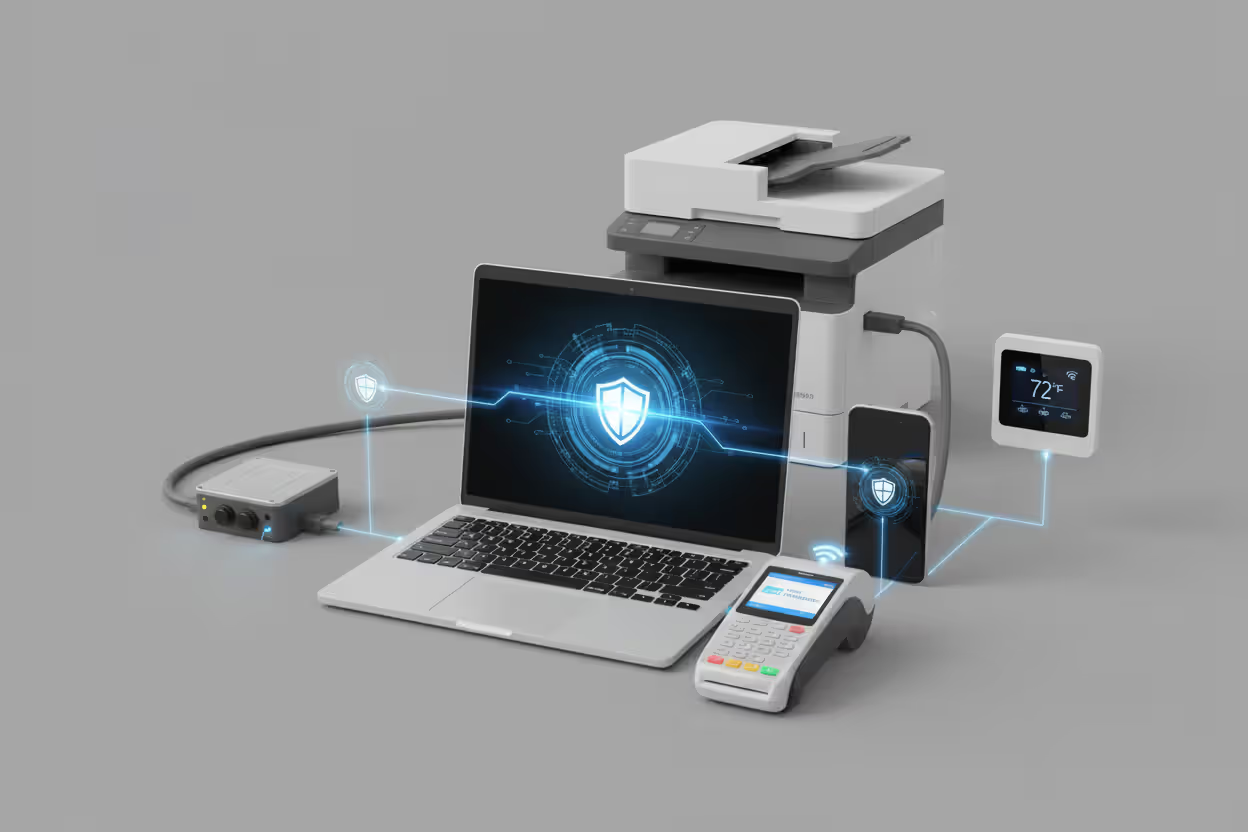
Consider what actually counts as an endpoint these days. Sure, you've got the obvious ones—employee computers and mobile devices. But what about that smart thermostat controlling your data center? The point-of-sale terminals at retail locations? Medical equipment transmitting patient vitals? IoT sensors monitoring your production line? If it connects to your network and handles information, congratulations—it needs policy coverage.
Getting endpoint security policy basics right means understanding this expanded scope. That forgotten printer in accounting that nobody's updated in three years? That's an endpoint. The tablet the warehouse manager uses for inventory? Endpoint. The HVAC system's network controller? You guessed it—another endpoint requiring protection.
Author: Marcus Halbrook;
Source: williamalmonte.net
Why Organizations Need an Endpoint Security Policy
Cybercriminals have gotten scary efficient at targeting endpoints. They've built automated scanning tools that probe thousands of devices simultaneously, jumping on newly disclosed vulnerabilities before most IT teams finish their morning coffee. Recent research from Verizon found that 68% of data breaches started with a compromised endpoint—not some sophisticated network intrusion, just an unprotected device.
Remote work changed everything. Remember when "the office" meant a physical building with a firewall protecting everything inside? Those days are gone. Now your employees connect from home networks running consumer routers with default passwords, airport Wi-Fi that anyone can intercept, and coffee shops where the person at the next table might be shoulder-surfing credentials. Without documented policies, how do you enforce consistent protection across this chaos?
Compliance auditors don't accept "we meant to do that" as an answer. Healthcare providers need to satisfy HIPAA's technical safeguard requirements. Any business processing credit cards faces PCI DSS mandates. Companies handling European customer data must meet GDPR's security provisions. Show up to an audit without documented endpoint controls, and you're looking at failed certifications and six-figure penalties.

Author: Marcus Halbrook;
Source: williamalmonte.net
The financial impact hits hard. IBM's recent breach cost analysis pegged average incidents at $4.88 million, with endpoint-related breaches running 23% higher than that average. Worse yet, companies without formal policies struggle to prove they took reasonable precautions during litigation. Courts and regulators tend to impose harsher judgments when you can't demonstrate basic due diligence.
Even cyber insurance has changed. Carriers now require documented endpoint policies before writing coverage. Underwriters want to see your patch management procedures, encryption standards, and incident response protocols in writing before they'll take on your risk. No documentation? Expect higher premiums or outright denial.
Core Components of an Endpoint Security Policy
Strong policies walk the tightrope between security requirements and operational reality. They need to specify what happens, who handles it, and how you'll verify compliance—without creating a bureaucratic nightmare that people route around.
Acceptable use sections define what's actually allowed on company devices. Can employees check personal Gmail? Stream Spotify during lunch? Shop on Amazon during breaks? These seem like minor details until someone gets fired for "misusing company resources" and claims they never knew the rules. Spell it out clearly. Most policies prohibit installing unapproved software, accessing illegal content, or running personal side businesses on corporate equipment, while permitting reasonable personal use during breaks.
Device Management and Access Control
This section determines who gets to connect to your resources and what hoops they jump through first. You'll want to cover:
- Device registration before granting network access (no random laptops joining your domain)
- Authentication requirements—multi-factor for remote connections, biometrics for mobile devices, strong passwords everywhere
- Network segmentation that keeps contractors away from your financial systems
- Provisioning procedures for new devices and proper decommissioning when equipment gets retired
Access control follows least privilege principles. Your marketing coordinator doesn't need admin rights on their laptop. They definitely don't need access to engineering source code repositories. Define role-based access tiers and create an approval workflow for privilege elevation requests.
Mobile device management deserves careful thought. Will you issue company-owned phones, allow personal devices (BYOD), or use some hybrid model? Each approach creates different security challenges. BYOD programs need crystal-clear boundaries between personal data and corporate information, plus explicit procedures for device wipes when employees leave.
Data Protection and Encryption Standards
Encryption protects information whether it's sitting on a hard drive or traveling across networks. Your policy should mandate:
- Full-disk encryption on every portable device using FIPS 140-2 validated algorithms
- Encrypted email for any message containing sensitive information
- VPN connections when accessing corporate resources from untrusted networks
- Secure file transfer protocols instead of unencrypted FTP that sends credentials in plain text
Data classification helps users understand what protection different information needs. A simple three-tier system works well: public, internal, and confidential. Public data can go on the company website. Internal data stays within the organization but doesn't need special handling. Confidential data—financial records, customer information, trade secrets—requires storage only on encrypted corporate servers, not local laptop drives.
Data loss prevention rules specify what information cannot leave the organization. You might block credit card numbers in outbound emails, prevent copying source code to USB drives, or trigger alerts when someone transfers unusually large files externally.

Author: Marcus Halbrook;
Source: williamalmonte.net
Software and Patch Management
Software management covers the entire lifecycle from installation through removal:
- Approved software lists or application whitelisting that blocks unknown programs
- Prohibition of pirated or unlicensed software (because that's both illegal and frequently malware-laden)
- Automatic updates for operating systems and critical applications
- Specific timeframes for applying patches—typically 30 days for routine updates, 72 hours for critical vulnerabilities actively being exploited
Antivirus and anti-malware requirements specify which products must run, how often they update, and what happens when threats get detected. Modern policies increasingly reference endpoint detection and response platforms that analyze behavior patterns rather than just checking signatures against known threats.
Browser security deserves explicit attention. Many policies require disabling unnecessary plugins, enabling automatic updates, and configuring safe browsing features. Some organizations mandate specific browsers for accessing sensitive applications because they've hardened those particular configurations.
How Endpoint Security Policies Work in Practice
Implementation starts with getting buy-in from people who'll actually be affected. IT security teams typically draft the initial language, but successful rollout requires input from department heads, legal counsel, HR, and executive leadership. A policy that IT can't realistically enforce or that business units view as obstructive? Dead on arrival.
Technical enforcement translates policy language into automated controls. Configuration management tools verify devices meet security baselines before granting network access. Windows Group Policy Objects can disable USB ports, enforce screen lock timeouts, and deploy security software automatically. Mobile device management platforms remotely wipe lost phones or block email access when devices fall out of compliance.

Author: Marcus Halbrook;
Source: williamalmonte.net
Monitoring systems verify ongoing adherence. SIEM platforms aggregate endpoint logs, flagging suspicious activities like disabled antivirus, unauthorized software installations, or unusual data transfers. Vulnerability scanners identify unpatched systems. Compliance dashboards show at a glance which devices meet requirements and which need remediation.
User training transforms paper policy into behavioral change. Annual security awareness sessions should include endpoint-specific scenarios: spotting phishing attempts, recognizing social engineering, reporting lost devices, and understanding why seemingly annoying restrictions actually protect them. Short quarterly refreshers work better than once-yearly marathon sessions that people tune out.
Policy updates need to happen regularly. Schedule annual comprehensive reviews to catch evolving threats, new technologies, and changing business needs. After significant incidents, evaluate whether policy gaps contributed and update accordingly. When deploying new endpoint types—maybe IoT sensors or augmented reality headsets—expand policies to cover these devices before deployment, not after a breach.
Exception processes acknowledge that rigid policies sometimes conflict with legitimate business needs. A developer might genuinely need administrative rights. An executive traveling to China might need temporary VPN requirement relaxation. Document how to request exceptions, who approves them, what compensating controls apply, and when exceptions automatically expire.
Endpoint Security Policy Examples by Industry

Author: Marcus Halbrook;
Source: williamalmonte.net
Healthcare organizations navigate HIPAA requirements that directly shape endpoint policies. A typical hospital policy might require:
- Automatic screen locks after five minutes on workstations accessing electronic health records
- Full-disk encryption on any device that could potentially access patient data
- Immediate remote wipe capability for lost or stolen mobile devices
- Absolute prohibition on storing protected health information on personal devices
- Annual access reviews ensuring terminated employees immediately lose system access
One regional medical center learned this lesson the expensive way. A nurse's unencrypted laptop got stolen from her car, containing patient names, diagnoses, and Social Security numbers. Breach notification alone cost $180,000. The subsequent Office for Civil Rights investigation found inadequate endpoint policies, resulting in a $400,000 settlement.
Financial services firms dealing with PCI DSS face stringent endpoint requirements for payment card data. A regional bank's policy typically specifies:
- Network segmentation isolating cardholder data environments from general corporate networks
- Quarterly vulnerability scans of every endpoint in the cardholder data environment
- File integrity monitoring on critical systems detecting unauthorized changes
- Strict change control requiring security review before any software updates
- Two-factor authentication for all remote access to systems handling card data
Retail organizations balance security against operational speed. A multi-location retailer might address different endpoints differently:
- POS terminals run only approved software with application whitelisting preventing unauthorized installations
- Handheld inventory scanners receive automatic security updates during overnight charging cycles
- Store manager workstations require standard corporate controls
- Seasonal employee credentials automatically expire after 90 days
Manufacturing environments include operational technology endpoints controlling physical processes. A chemical plant's policy distinguishes between IT and OT systems:
- Process control systems operate on air-gapped networks with exhaustive change control
- Engineering workstations that program controllers require additional access logging
- Administrative systems follow standard corporate policies
- USB ports physically disabled on OT systems preventing accidental malware introduction from maintenance contractor laptops
Common Mistakes When Creating Endpoint Security Policies
The biggest policy mistake I see? Treating endpoints as an IT problem instead of a business risk. Once executives grasp that an unpatched laptop could shut down operations for days and cost millions in recovery, enforcement suddenly gets funding. Translate technical controls into business continuity language that resonates with decision-makers
— Marcus Chen
Overly complex policies fail because nobody reads 80-page technical manuals. Employees click "I agree" without absorbing a single requirement. If understanding your policy requires a cybersecurity degree, you've already lost. Aim for clear language, logical organization, and realistic length—most organizations adequately cover everything in 15 to 25 pages.
Ignoring mobile devices remains shockingly common. Some policies exhaustively detail laptop protections across 20 pages while devoting two paragraphs to smartphones and tablets. Yet mobile devices access the same email, documents, and applications as desktops. They get lost or stolen more frequently. Policies must address mobile-specific risks: malicious apps, Bluetooth vulnerabilities, SMS phishing, and juice-jacking at public charging stations.
Poor enforcement undermines even well-crafted policies. Without tools to verify compliance or management support for consequences, policies become meaningless suggestions. Employees quickly figure out when rules aren't actually enforced. Automated compliance checking removes human inconsistency—devices either meet requirements or lose network access. Period.
Neglecting regular updates creates policy drift. A document written in 2023 probably doesn't address AI-powered phishing, deepfake authentication attacks, or quantum-resistant encryption. Set calendar reminders for annual reviews. Assign specific ownership—someone whose job includes keeping policy content current.
Forgetting user input during policy creation breeds resentment. When IT dictates requirements without understanding workflow impacts, policies create unnecessary friction. A graphics designer might legitimately need software installation rights for specialized creative tools. A field service technician might require offline access to technical documentation. Involve representatives from affected departments during drafting, not after deployment.
Failing to address personal device usage creates dangerous gray areas. When policies don't explicitly permit or prohibit personal device connections, employees make their own decisions—usually insecure ones. Either implement a formal BYOD program with appropriate controls or clearly prohibit personal devices from accessing corporate resources. Ambiguity helps nobody.
Comparing Endpoint Requirements Across Major Compliance Frameworks
| Compliance Standard | What Must Be Encrypted | Who Gets Access | Patch Timelines | Logging Requirements | Asset Tracking |
| HIPAA | Considered "addressable" for ePHI devices; organizations must implement or document why it's unreasonable | Unique user IDs required; automatic logoff after inactivity; emergency access procedures documented | No specific deadlines; must address known vulnerabilities | Audit controls on systems accessing ePHI; log all access attempts | Not explicitly mandated but necessary for risk analysis |
| PCI DSS | Strong encryption mandatory for transmitting cardholder data; encrypted storage required | Role-based access enforced; two-factor authentication for remote access mandatory | Critical patches within 30 days; monthly vulnerability scanning required | All access to cardholder data logged; retain logs minimum 1 year | Complete inventory of all system components within scope required |
| GDPR | Encryption must be appropriate to risk level; pseudonymization encouraged | Access restricted to necessary personnel only; data minimization enforced | No specific timelines but falls under "appropriate technical measures" | Must be capable of detecting, investigating, and reporting breaches within 72 hours | Required for demonstrating accountability and supporting data mapping |
| SOC 2 | Encryption based on data sensitivity classification determined by organization | Least privilege access model; periodic access reviews documented | Timely patching based on documented risk assessment process | Security events logged; log review procedures documented | Asset inventory maintained to support security monitoring activities |
FAQ: Endpoint Security Policy Questions
Endpoint security policies provide the foundation for protecting devices accessing organizational resources. Without documented standards, security becomes inconsistent—some devices locked down tight, others wide open, creating vulnerabilities that attackers reliably exploit.
Strong policies balance security requirements against operational reality. They specify clear technical controls while remaining understandable to non-technical staff. They adapt to evolving threats without requiring constant rewrites. They acknowledge that perfect security remains impossible, instead targeting risk reduction appropriate to your organization's threat landscape and risk tolerance.
Implementation matters as much as documentation. The most comprehensive policy fails if nobody reads it, technical controls don't enforce it, or management won't support consequences for violations. Successful organizations treat policies as living documents guiding daily decisions rather than shelf-ware that only surfaces during audits.
Start with core components—device management, data protection, and software management—then expand based on specific compliance requirements and risk assessments. Involve stakeholders beyond IT security to ensure policies reflect actual workflows. Invest in enforcement tools that automate compliance checking. Train users on not just policy requirements but why those requirements matter for protecting the business.
The threat landscape keeps evolving. New endpoint types keep emerging. Attack techniques grow increasingly sophisticated. Organizations with strong policy foundations can adapt to these changes more readily than those starting from scratch during a crisis. Building that foundation now, before the next breach makes headlines, represents one of the most cost-effective security investments available.
Related Stories

Read more

Read more




The content on this website is provided for general informational and educational purposes only. It is intended to explain concepts related to endpoint security, cybersecurity practices, threat prevention, and security technologies.
All information on this website, including articles, guides, and examples, is presented for general educational purposes. Cybersecurity requirements and implementations may vary depending on organizational needs, infrastructure, regulatory requirements, and threat environments.
This website does not provide professional cybersecurity, legal, or compliance advice, and the information presented should not be used as a substitute for consultation with qualified cybersecurity professionals.
The website and its authors are not responsible for any errors or omissions, or for any outcomes resulting from decisions made based on the information provided on this website.