

Endpoint protection across laptops, mobile devices, and servers
Endpoint Protection Guide

Think of your network as a fortress. Every laptop, phone, tablet, and server is a door that needs guarding. Endpoint protection is what locks those doors and watches for intruders trying to sneak through them. Traditional antivirus? That's like having a bouncer who only recognizes troublemakers from old mugshots. Modern endpoint protection brings an entire security team that spots suspicious behavior, learns new attack patterns, and responds automatically when threats emerge.
Remote work changed everything. Your accounting department logs in from coffee shops. Sales reps connect from hotel Wi-Fi. Contractors bring their personal devices. Each connection point multiplies your vulnerability. One compromised laptop can become patient zero for a company-wide outbreak—ransomware spreading through shared drives, credentials stolen from browser memory, or backdoors planted for future attacks.
Here's what makes current solutions different: they don't just scan files and call it done. They watch how programs behave, block exploitation attempts in real-time, and coordinate responses across your entire device fleet. When someone opens a sketchy email attachment, the system analyzes it in an isolated environment first. If that Word doc tries spawning command-line tools or making unexpected network calls, it gets quarantined before causing damage. No signature database required.
What Is Endpoint Protection?
Endpoint protection means security software that guards individual devices while giving IT teams a bird's-eye view of everything happening across their organization. It prevents malware infections, blocks unauthorized access, stops data theft, and does it all from one management console instead of requiring admins to touch each device manually.
The endpoint protection basics break down like this: you install an agent (small program) on each device. That agent continuously monitors activity, analyzes threats, automatically blocks malicious actions, and reports back to a central system. Whether someone's working from headquarters, their home office, or an airport lounge, the same protection follows them. Same policies, same visibility, same security standards.
Compare this to old-school antivirus that checks files against a list of known bad stuff. That approach worked when malware was simple and attacks were obvious. Not anymore. Today's endpoint solutions add layers traditional antivirus never considered. They restrict which applications can run, control what USB devices connect, filter dangerous websites, and identify threatening patterns that've never been documented.
Picture this scenario: your marketing coordinator receives an invoice from what looks like a regular vendor. The attachment seems legitimate—PDF icon, professional filename, no obvious red flags. Old antivirus checks its signature database, finds no match, and lets it through. Endpoint protection takes a different approach. It opens that PDF in a sandbox (isolated test environment), watches what happens next, and catches the embedded script attempting to download additional malware. Attack stopped before it starts.
Why does your business need this? Because attackers have done the math. Penetrating corporate firewalls directly takes serious skill and effort. Much easier to send 100 phishing emails and wait for one person to click. Employees make mistakes—it's human nature. They reuse passwords, connect sketchy USB drives they found in the parking lot, or install browser extensions that promise productivity but deliver spyware. Without endpoint-level security, you won't know devices are compromised until ransomware locks your file server or customer data appears for sale on dark web markets.
How Endpoint Protection Works
Installation puts a lightweight agent on each device—laptop, desktop, phone, tablet, server, whatever connects to your resources. These agents maintain constant communication with a management server that pushes out security policies, collects threat data, and orchestrates responses when problems appear. The technical workflow happens in stages, all running simultaneously.
Threat detection kicks in before files execute. Someone downloads an application or document? The agent immediately calculates its cryptographic fingerprint and queries threat intelligence databases holding signatures for billions of known threats. Positive match means instant quarantine. Unknown file triggers deeper inspection—where'd it come from, who digitally signed it, does it have a reputation score based on global telemetry from other protected devices?
Behavioral analysis watches running programs for red flags. The agent tracks everything: which system files get modified, what registry keys change, where network connections go, how processes interact with each other. Machine learning models (trained on massive datasets of both legitimate and malicious software) spot anomalies that signature-based detection completely misses. Excel launching PowerShell scripts? Suspicious. An obscure process suddenly encrypting hundreds of files? Alarm bells. Any program trying to disable security software? Shut it down now.
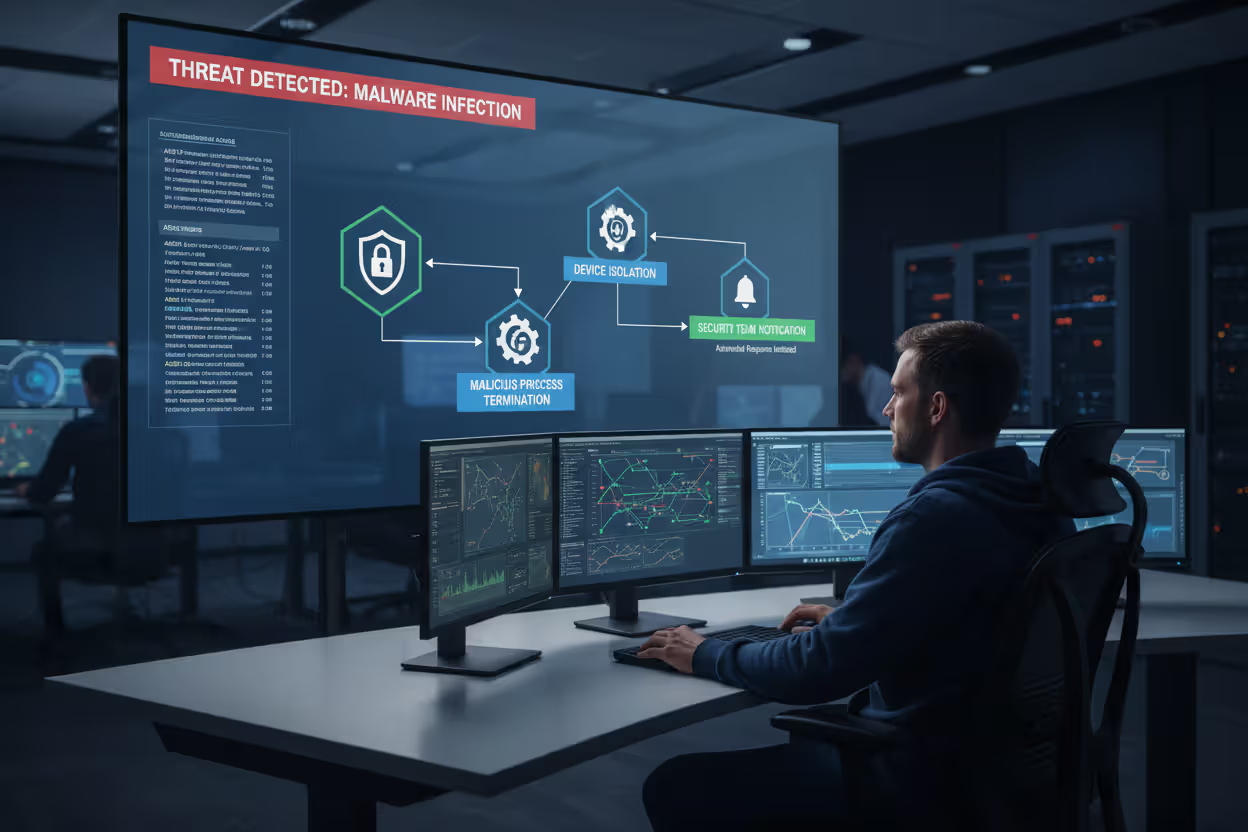
Response automation activates the moment threats are confirmed. Kill the malicious process immediately. Reverse any system changes it made. Disconnect the device from your network so infection can't spread. Alert your security team with full details for investigation. Advanced platforms even trace back to find the initial infection point—which email, which website, which vulnerability got exploited—so remediation addresses root causes rather than just symptoms.
Author: Vanessa Keaton;
Source: williamalmonte.net
Integration with your broader security infrastructure multiplies effectiveness. Endpoint protection shares data with firewalls, SIEM systems, identity management platforms, and threat intelligence services. Endpoint agent discovers new malware variant? Instantly distributes indicators to every other security tool you're running. Someone's credentials get compromised on a phishing site? Integration with your identity provider lets the endpoint agent require additional authentication or block access entirely until you verify the user.
Continuous monitoring creates activity records that security teams use for threat hunting and forensic investigations. The management console displays device status, policy compliance, detected threats, and security trends in real-time. Administrators can remotely scan any device, modify configurations, or investigate suspicious alerts without physically touching the hardware. When you suspect something's wrong, you've got detailed logs showing exactly what happened, when, and how.
Core Features of Endpoint Protection Solutions
Malware detection remains foundational—signature databases, heuristic analysis, and machine learning working together to identify and eliminate malicious software. Modern platforms refresh threat intelligence constantly (some update every few minutes) to maintain protection against newly discovered variants emerging from underground forums.
Behavioral analysis examines how applications interact with operating systems, searching for patterns associated with exploitation techniques. Here's why this matters: when legitimate software gets compromised through code injection or memory manipulation, traditional detection sees the trusted application and waves it through. Behavioral monitoring catches the abnormal activity—trusted program suddenly acting very untrusted. Particularly critical for fileless attacks that never drop traditional malware files, instead operating entirely in memory where signature scans can't touch them.
Device control manages peripheral connections. Configure policies preventing USB storage devices from transferring files. Allow only approved printers. Block smartphone tethering. A common configuration permits read-only USB access while preventing writes—employees can view files on flash drives but can't copy data out or introduce malware from external sources.
Data encryption protects information at rest and in transit. Full-disk encryption makes stolen laptops worthless to thieves. File-level encryption secures sensitive documents even if attackers breach system defenses. Some platforms enforce encryption automatically based on file classification, ensuring compliance without burdening users with additional steps.
Application whitelisting flips conventional security models upside down. Instead of blocking known threats, you define exactly which programs can run and block everything else. Dramatically shrinks your attack surface, though it requires careful management to avoid disrupting legitimate work. Organizations typically apply whitelisting in high-security environments—point-of-sale terminals, industrial control systems, specialized workstations where software rarely changes.
Centralized management delivers single-pane-of-glass visibility into your entire endpoint fleet. Deploy agents, configure policies, monitor threats, generate compliance reports—all from one console. Create policy groups based on department, device type, or risk tolerance, then assign appropriate controls. Maybe your creative team needs relaxed web filtering to access social media for campaigns, while finance gets strict restrictions and enhanced monitoring due to the sensitive data they handle.
Vulnerability assessment scans for missing patches, outdated software, and configuration weaknesses. The platform identifies which devices need updates and can automate patch deployment during scheduled maintenance windows. Closes security gaps that attackers constantly probe for initial access—remember, most breaches exploit known vulnerabilities with available patches that simply haven't been applied yet.
Author: Vanessa Keaton;
Source: williamalmonte.net
Endpoint Protection Layers and Defense Strategies
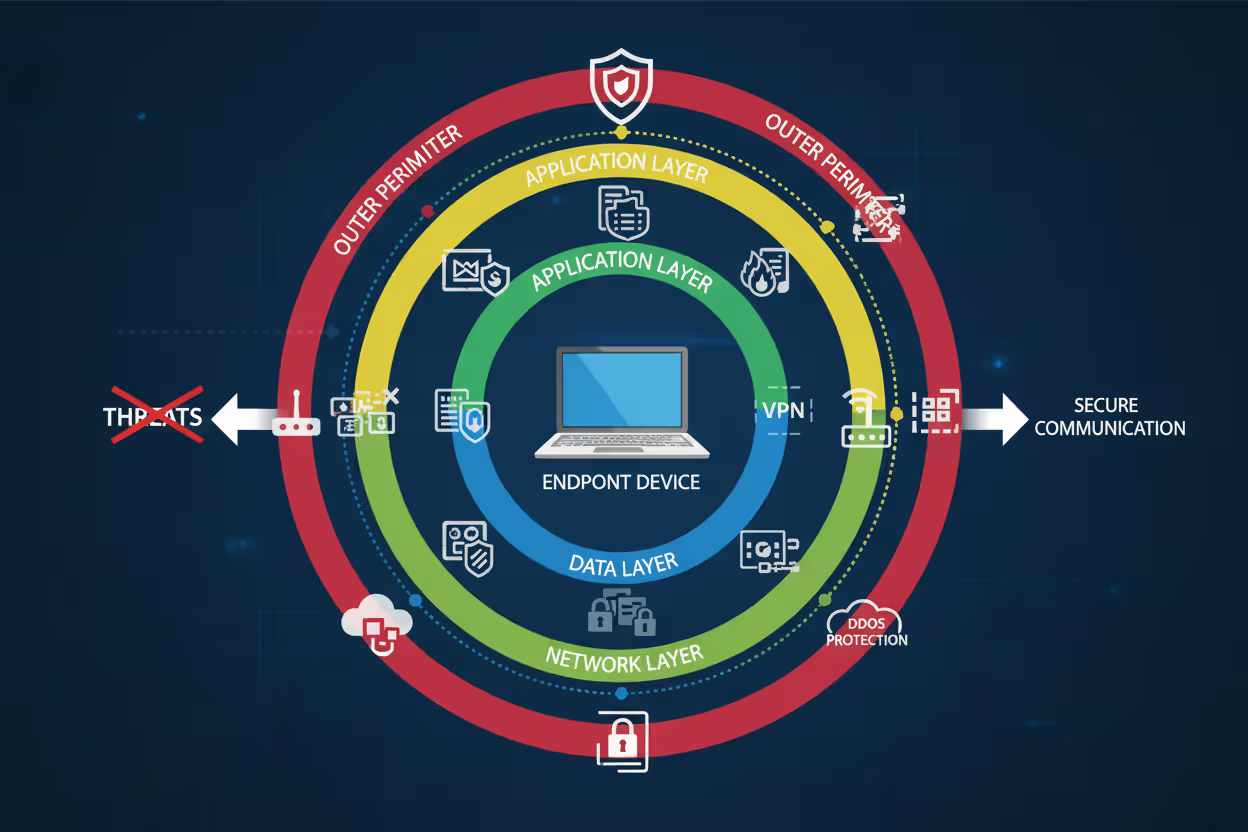
Effective endpoint security stacks multiple defensive layers so that if attackers penetrate one, others contain the breach. This defense-in-depth philosophy acknowledges that perfect security doesn't exist—every control has limitations and potential bypasses. Layered defenses force attackers to defeat multiple independent mechanisms before achieving their objectives.
Perimeter defense forms the outermost layer, blocking threats before reaching endpoints. Web filtering redirects users away from known malicious sites. Email gateways strip dangerous attachments. Network firewalls restrict unauthorized connections. When an employee clicks a phishing link, perimeter controls intercept the request and display a warning page—credential theft prevented without endpoint-level intervention needed.
Network layer monitoring examines communications between endpoints and external resources. Data loss prevention inspects outbound traffic for sensitive information patterns—Social Security numbers, credit card data, confidential document markers. Intrusion detection identifies attack signatures in network traffic. Ransomware attempting contact with command-and-control servers for encryption keys? Network layer blocks the connection and triggers alerts—ransomware can't encrypt without those keys, attack neutralized.
Application layer controls what programs execute and restricts their capabilities. Whitelisting, exploit prevention, and script control limit software actions. Even if attackers social-engineer users into downloading malware, application controls either prevent execution entirely or sandbox it to non-destructive operations. Common configuration: allow Microsoft Office applications to run but block them from launching PowerShell or modifying sensitive registry keys. Those restrictions break most macro-based attack chains.
Data layer protects information regardless of what happens at other levels. Encryption, access controls, rights management ensure that even fully compromised endpoints can't expose valuable data. Financial records stay encrypted with keys stored in hardware security modules—useless without proper authentication. Customer databases require multi-factor authentication for queries. Trade secrets carry rights management preventing copying or printing.
This defense-in-depth approach recognizes that attackers constantly innovate new evasion techniques. What works against today's threats might fail tomorrow. When ransomware evades signature detection through polymorphic code, behavioral monitoring catches the mass encryption activity. When sophisticated attacks slip past behavioral analysis using low-and-slow techniques, data layer controls prevent the actual information theft that's the attacker's ultimate goal.
Organizations adjust protection intensity based on risk profiles. Executives and finance staff—high-value targets handling sensitive data—receive maximum protection across all layers. General users get baseline controls balancing security and usability. This risk-based approach allocates resources efficiently without imposing uniform restrictions that frustrate low-risk employees and harm productivity.
Types of Endpoint Protection Controls
Endpoint protection employs different control categories serving distinct security functions. Understanding these categories helps design comprehensive strategies covering all bases.
Administrative controls establish the human side of security—policies, procedures, governance frameworks. Security awareness training teaches recognizing phishing attempts. Acceptable use policies define permitted activities. Incident response plans outline breach-handling procedures. When employees understand why they shouldn't click suspicious links, administrative controls reduce attack surface before technical measures ever activate. You're building a security-conscious culture, not just deploying technology.
Technical controls use technology enforcing security requirements automatically. Antimalware engines, firewalls, encryption, access restrictions—all technical controls operating without requiring user decisions. This ensures consistent protection regardless of individual knowledge, attention, or judgment calls. People have bad days, get distracted, make mistakes. Technology doesn't.
Physical controls restrict physical device access. Locked server rooms. Cable locks on laptops. Biometric authentication. Often overlooked when discussing endpoint protection, but critical—physical access frequently bypasses software protections entirely. Attackers with physical access can extract hard drives, install hardware keyloggers, or boot from external media to defeat operating system security.
| Control Category | Examples | Use Cases | Implementation Difficulty |
| Administrative | Security training programs, usage policies, response playbooks, audit procedures | Creating security baselines, maintaining compliance, shaping employee behavior patterns | Low to Medium—needs ongoing reinforcement and management commitment |
| Technical | Antimalware software, encryption systems, application restrictions, activity monitoring | Automated threat prevention and detection, access enforcement, policy compliance | Medium to High—demands technical expertise, thorough testing, careful tuning |
| Physical | Hardware locks, biometric scanners, secure destruction services, facility access controls | Theft prevention, unauthorized access restriction, data center protection | Low to Medium—straightforward to implement but requires infrastructure investment |
Controls also categorize by security function: preventive, detective, corrective.
Preventive controls stop threats before damage occurs. Application whitelisting prevents unauthorized software execution. Encryption prevents data theft even if devices get stolen. Web filtering prevents access to malicious sites. Organizations prioritize preventive controls because they eliminate threats without requiring incident response, investigation, or remediation.
Detective controls identify security events preventive measures missed. Behavioral monitoring detects anomalous activities. Log analysis reveals unauthorized access attempts. File integrity monitoring identifies unexpected changes. Detective controls provide visibility into your threat landscape and trigger response mechanisms when prevention fails.
Corrective controls remediate damage after successful attacks. Automated malware removal cleans infected systems. Backup restoration recovers ransomware-encrypted files. Patch deployment closes exploited vulnerabilities. Corrective controls limit impact and restore normal operations—you'll still need them because no preventive control is bulletproof.
Effective strategies balance all control types. Preventive measures handle the majority of threats. Detective controls catch sophisticated attacks that slip through prevention. Corrective controls minimize damage when breaches occur despite your other defenses. An organization might use whitelisting (preventive/technical) blocking most malware, behavioral monitoring (detective/technical) catching advanced threats, and automated system rollback (corrective/technical) restoring compromised devices. Layer in security training (administrative/preventive) reducing phishing success and hardware locks (physical/preventive) preventing device theft. Comprehensive coverage.

Author: Vanessa Keaton;
Source: williamalmonte.net
Common Threats Endpoint Protection Addresses
Ransomware locks up files and demands payment for decryption. Distribution happens through phishing emails, drive-by downloads from compromised websites, and unpatched software vulnerabilities. Endpoint solutions combat this through behavioral analysis recognizing rapid encryption patterns, exploit prevention blocking common delivery methods, and backup integration enabling file recovery without ransom payment. When ransomware starts encrypting documents, behavioral monitoring spots the unusual file modification activity and terminates the process—maybe a few files get encrypted, but not your entire file server.
Phishing attacks impersonate trusted entities to steal credentials or deliver malware. Endpoint protection addresses phishing via web filtering that blocks known phishing sites, email security identifying suspicious messages, and credential theft prevention monitoring for password harvesting attempts. An employee clicks a phishing link in their inbox? Web filtering intercepts the request and displays a warning before the fraudulent login page loads. Credentials stay safe.
Zero-day exploits leverage previously unknown vulnerabilities that lack patches or signatures. Nobody's documented them yet. No signature exists. No patch available. Endpoint defense relies on exploit prevention blocking common exploitation techniques (buffer overflows, heap sprays, ROP chains) regardless of specific vulnerability, behavioral monitoring detecting post-exploitation activity, and virtual patching preventing exploitation until official fixes deploy. Attackers exploit a browser vulnerability attempting code execution? Exploit prevention blocks the underlying memory manipulation techniques required for success.
Fileless attacks operate purely in memory without writing traditional malware files to disk—signature scanning misses them entirely. These attacks abuse legitimate administrative tools: PowerShell, Windows Management Instrumentation, scripting engines. Endpoint protection counters fileless threats through behavioral monitoring tracking script execution patterns, application control restricting scripting engine capabilities, and memory scanning detecting malicious code in RAM. Typical detection scenario: blocking PowerShell from making unexpected network connections. Legitimate administrative scripts rarely need internet access, so PowerShell reaching out to random IP addresses is highly suspicious.
Insider threats involve authorized users abusing legitimate access—stealing data, sabotaging systems, facilitating external attacks. Could be malicious or accidental. Endpoint protection addresses insider risk through data loss prevention blocking unauthorized file transfers, activity monitoring logging user actions, and behavioral analytics identifying anomalous access patterns. An employee suddenly accessing and copying thousands of customer records they've never viewed before? Behavioral analytics flag the activity for investigation before data leaves your organization.
Endpoint protection has evolved from optional security layer to absolute necessity. Attackers specifically target endpoints as the path of least resistance into corporate networks. Organizations cannot afford gaps in device-level security anymore. The question isn't whether to deploy endpoint protection—it's how quickly you can roll it out across your entire device fleet before attackers find your weak spots.
— Dr. Sarah Chen
Frequently Asked Questions About Endpoint Protection
Endpoint protection secures the devices connecting your users to corporate resources. It blocks threats at the source before they spread across networks or compromise sensitive information. The multi-layered approach—combining malware detection, behavioral analysis, device control, and centralized management—addresses both known threats and emerging attack techniques that traditional antivirus completely misses.
Evaluating solutions? Focus on detection accuracy, performance impact, management complexity, and integration capabilities with your existing security infrastructure. Cloud-based platforms offer rapid deployment and minimal maintenance overhead. On-premises solutions provide maximum control over security data and policies. Choose based on your organization's technical capabilities, compliance requirements, and risk tolerance.
Implementation requires more than just deploying agents. Configure policies appropriate to your risk profile. Train users on security best practices. Establish processes for investigating and responding to alerts. Start with baseline protections across all endpoints, then enhance security for high-value targets and sensitive data repositories. Don't aim for perfection immediately—incremental improvements consistently applied beat perfect plans that never get implemented.
The threat landscape keeps evolving. Attackers develop new evasion techniques. Vulnerabilities emerge in unexpected places. Endpoint protection platforms adapt through continuous threat intelligence updates, machine learning improvements, and new defensive capabilities rolled out by vendors. Regular evaluation ensures your endpoint strategy keeps pace with changing risks and business requirements. What worked last year might not protect you tomorrow. Stay vigilant.
Related Stories

Read more

Read more




The content on this website is provided for general informational and educational purposes only. It is intended to explain concepts related to endpoint security, cybersecurity practices, threat prevention, and security technologies.
All information on this website, including articles, guides, and examples, is presented for general educational purposes. Cybersecurity requirements and implementations may vary depending on organizational needs, infrastructure, regulatory requirements, and threat environments.
This website does not provide professional cybersecurity, legal, or compliance advice, and the information presented should not be used as a substitute for consultation with qualified cybersecurity professionals.
The website and its authors are not responsible for any errors or omissions, or for any outcomes resulting from decisions made based on the information provided on this website.