

Endpoint firewall protecting multiple enterprise devices
Endpoint Firewall Guide

Every device connected to your network represents a potential entry point for attackers. While perimeter defenses have their place, modern threats often bypass network-level controls through phishing, compromised credentials, or vulnerable applications running directly on user devices. An endpoint firewall addresses this gap by enforcing security policies at the device level, controlling which applications can communicate over the network and blocking unauthorized traffic before it reaches critical systems.
Understanding how endpoint firewalls function and where they fit in your security architecture helps you make informed decisions about protecting laptops, desktops, servers, and mobile devices across distributed environments.
What Is an Endpoint Firewall
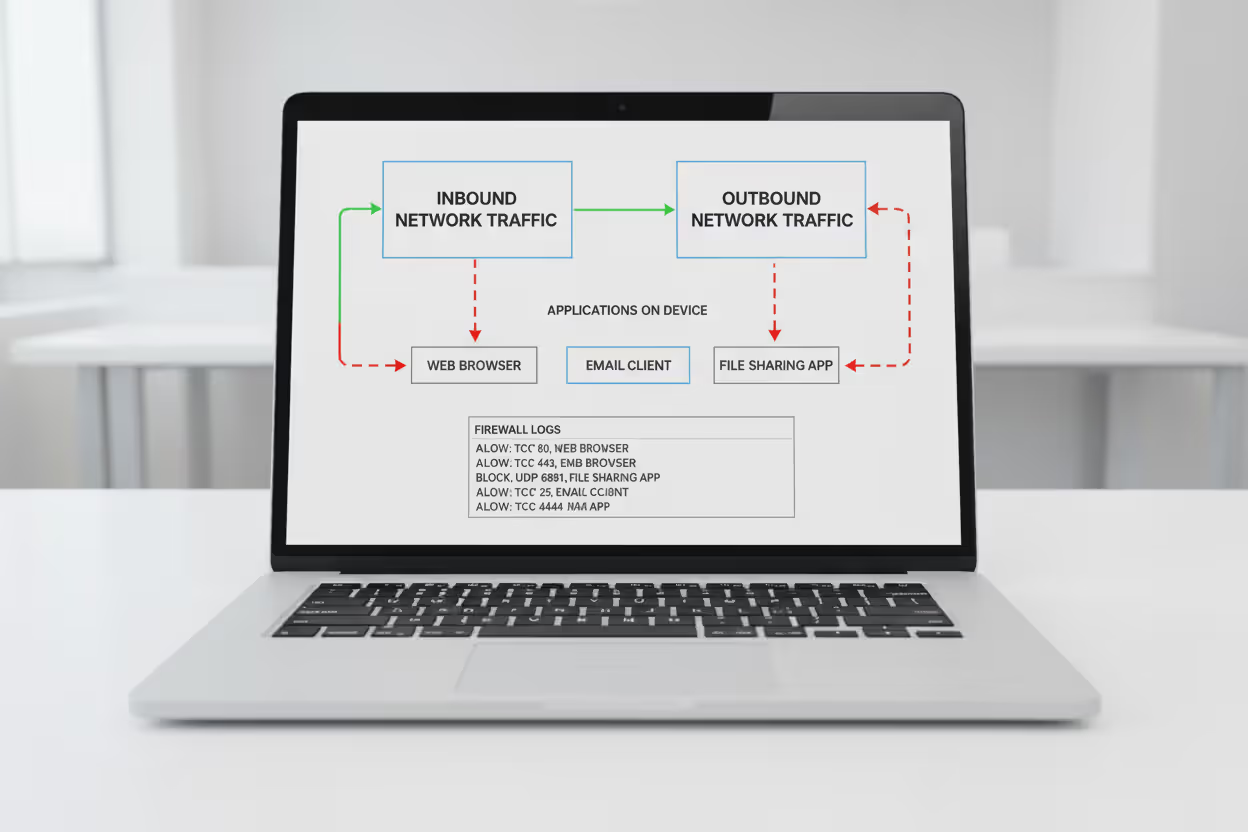
An endpoint firewall is a software-based security control installed on individual devices that monitors and filters network traffic entering and leaving that specific device. Unlike network firewalls that protect the perimeter of an entire network, endpoint firewalls operate at the device level, making independent decisions about which connections to allow or block based on predefined rules and policies.
The core function involves inspecting network packets, identifying the source and destination of traffic, determining which application initiated the connection, and comparing these details against configured rules. When a process on your laptop attempts to send data to an external server, the endpoint firewall evaluates whether that communication should proceed based on factors like the application's identity, the destination IP address, the port being used, and the direction of traffic flow.
Author: Marcus Halbrook;
Source: williamalmonte.net
This device-centric approach provides several advantages. First, it maintains protection even when devices leave the corporate network. A laptop working from a coffee shop still enforces the same security policies as it would in the office. Second, it creates segmentation between applications on the same device, preventing a compromised browser from accessing sensitive data through another application. Third, it provides visibility into which programs are attempting network communication, helping security teams identify suspicious behavior that might indicate malware.
The distinction from network firewalls matters because attack patterns have evolved. When an employee clicks a phishing link and downloads malware, that threat is already inside the network perimeter. A network firewall cannot see or control what happens on that individual device. The endpoint firewall becomes the last line of defense, blocking the malware's attempts to communicate with command-and-control servers or spread laterally to other devices.
How Endpoint Firewalls Work
Endpoint firewalls operate through a multi-layered inspection process that evaluates network traffic against rule sets before allowing or denying connections. The mechanism starts at the network stack level, intercepting packets before they reach the network interface for outbound traffic or before they reach applications for inbound traffic.
When an application initiates a network connection, the firewall first identifies the executable file making the request. This application-level awareness goes beyond simple port filtering. Rather than just blocking port 443, the firewall can allow your web browser to use HTTPS while preventing an unknown process from establishing outbound connections on the same port. This granular control relies on maintaining a database of known applications and their expected network behavior.
Rule-based policies form the decision framework. A typical rule specifies the application, protocol (TCP or UDP), port numbers, direction (inbound or outbound), and action (allow, block, or prompt). Enterprise deployments often include hundreds of rules organized by priority. When traffic matches multiple rules, the firewall applies the most specific match or follows a defined precedence order.
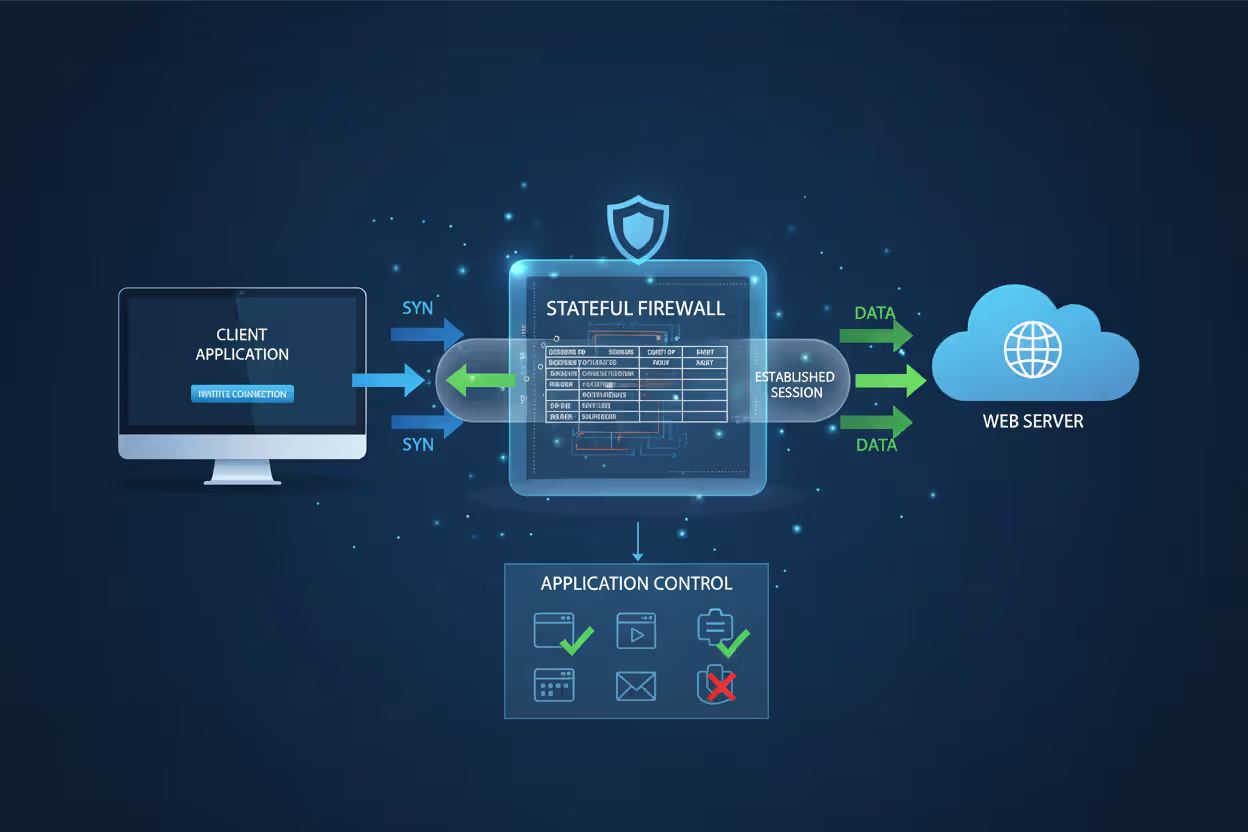
Stateful inspection adds intelligence by tracking connection states. When your device initiates an outbound connection to a web server, the firewall automatically allows the return traffic because it recognizes the packets as part of an established session. This eliminates the need for separate rules to handle response traffic while maintaining security by blocking unsolicited inbound connections.
Author: Marcus Halbrook;
Source: williamalmonte.net
Advanced implementations incorporate additional context. They may consider the user identity, device location, time of day, or security posture before making decisions. A rule might allow access to internal resources only when the device is domain-joined and has current security patches. Another might restrict certain applications during off-hours or when connected to untrusted networks.
Logging and alerting capabilities capture details about blocked and allowed connections. Security teams review these logs to identify attack patterns, troubleshoot connectivity issues, and refine policies. When a device repeatedly attempts to contact a known malicious IP address, the logs provide evidence of a potential compromise requiring investigation.
Endpoint firewalls provide the granular, host-level controls needed to stop threats that evade perimeter defenses. They are essential for enforcing policy on remote devices, limiting lateral movement, and reducing the attack surface of every endpoint
— Gartner
Types of Endpoint Firewall Solutions
Endpoint firewall implementations vary significantly in features, management approaches, and target use cases. Understanding these distinctions helps match solutions to specific requirements.
Built-In Operating System Firewalls
Modern operating systems include native firewall capabilities that provide baseline protection without additional software. Windows Defender Firewall, macOS Application Firewall, and Linux iptables/nftables offer core traffic filtering suitable for individual users and small deployments.
These built-in options excel at simplicity. They activate automatically, require no separate licensing, and integrate tightly with the operating system. For home users or small businesses without dedicated IT staff, they provide essential protection against common network-based attacks.
The limitations become apparent at scale. Managing policies across hundreds of devices requires manually configuring each system or using generic group policy templates that lack flexibility. Reporting capabilities are minimal—you cannot easily generate a report showing all blocked connection attempts across your device fleet. Integration with security information and event management (SIEM) systems requires custom scripting. Rule creation often involves navigating complex interfaces or editing configuration files directly.
Enterprise Endpoint Firewall Software
Third-party enterprise solutions add centralized management, advanced policy engines, and integration with broader security platforms. Products from vendors like Palo Alto Networks, CrowdStrike, SentinelOne, and Microsoft Defender for Endpoint provide capabilities designed for large-scale deployments.
Centralized consoles allow administrators to define policies once and deploy them to thousands of devices automatically. You can create different rule sets for departments, user roles, or device types, then assign them based on criteria like Active Directory group membership or device tags. When a new threat emerges, updating policies across the entire organization takes minutes rather than days.
Cloud-managed architectures eliminate the need for on-premises infrastructure. The management plane runs in the vendor's cloud while lightweight agents on each device enforce policies and report telemetry. This approach suits distributed workforces where devices rarely connect to corporate networks.
Integration with endpoint detection and response (EDR) and extended detection and response (XDR) platforms creates unified security visibility. When EDR detects suspicious process behavior, it can trigger the firewall to automatically isolate the device or block specific network connections. Conversely, firewall logs showing repeated connection attempts to malicious domains can trigger deeper EDR investigation.
Application control features go beyond simple allow/block decisions. They can restrict applications to specific network destinations, limit bandwidth usage, or require additional authentication before allowing certain connections. A file-sharing application might be permitted only to corporate-approved cloud storage services, not arbitrary internet destinations.
Common Endpoint Firewall Use Cases
Endpoint firewalls address specific security challenges that arise in modern computing environments. These scenarios demonstrate where device-level network controls provide measurable risk reduction.
Remote workers operating outside traditional network perimeters need consistent security regardless of location. When an employee works from home, a hotel, or a client site, the endpoint firewall maintains the same restrictions on network activity. It blocks attempts by local network attackers to exploit services running on the device and prevents malicious websites from initiating inbound connections. The security posture remains constant whether connected to a corporate VPN, public Wi-Fi, or home broadband.

Author: Marcus Halbrook;
Source: williamalmonte.net
BYOD (bring your own device) environments introduce devices with varying security configurations. Employees use personal laptops and smartphones for work, mixing corporate and personal applications on the same device. Endpoint firewalls create separation by restricting which applications can access corporate resources. Email clients and collaboration tools might connect to company servers while gaming applications and personal browsers are blocked from those same destinations. This segmentation reduces the risk of personal device compromises affecting corporate data.
Malware prevention relies on blocking command-and-control communications. Many malware variants require ongoing contact with attacker-controlled servers to receive instructions or exfiltrate data. Endpoint firewalls configured with threat intelligence feeds automatically block connections to known malicious IP addresses and domains. Even if malware executes on a device, it cannot accomplish its objectives without network connectivity. The firewall acts as a containment mechanism while remediation occurs.
Data exfiltration blocking addresses insider threats and sophisticated attacks. Rules can prevent unauthorized applications from sending data to external destinations or restrict file transfers to approved cloud services. A policy might allow web browsers to upload files only to the corporate SharePoint instance, not personal Dropbox accounts or unknown file-sharing sites. Monitoring outbound traffic volumes can flag anomalous data transfers that might indicate credential theft or intellectual property theft.
Compliance requirements in regulated industries often mandate device-level controls. Healthcare organizations subject to HIPAA need to demonstrate that devices accessing protected health information enforce appropriate security controls. Financial services firms must show that customer data cannot be transmitted to unauthorized destinations. Endpoint firewalls provide both the technical controls and the audit logs necessary to satisfy these requirements.
Endpoint Firewall vs. Network Firewall
Understanding the relationship between endpoint and network firewalls clarifies their complementary roles in a layered security architecture.
| Aspect | Endpoint Firewall | Network Firewall |
| Protection Scope | Individual device (laptop, desktop, server, mobile) | Network segment or entire network perimeter |
| Deployment Location | Installed on each device as software agent | Positioned at network boundaries as hardware appliance or virtual instance |
| Managed By | Centralized policy server pushing rules to agents | Directly configured through appliance management interface |
| Threat Types Addressed | Malware communication, unauthorized applications, lateral movement on device, data exfiltration from specific apps | External attacks, unauthorized network access, inter-segment traffic control, DDoS mitigation |
| Ideal Use Cases | Remote workers, BYOD, application-level control, device-specific policies, offline protection | Perimeter defense, network segmentation, VPN termination, bandwidth management, centralized traffic inspection |
| Scalability | Scales linearly with device count; each device needs agent and license | Scales with network traffic volume; single appliance can protect many devices |
Neither solution fully replaces the other. Network firewalls efficiently handle high-volume traffic inspection at network boundaries and prevent unauthorized access to entire network segments. They excel at protecting server farms, controlling inter-VLAN traffic, and blocking attacks before they reach internal networks.
Endpoint firewalls provide granular control that network firewalls cannot achieve. They protect devices when they leave the network, enforce application-specific policies, and prevent compromised devices from attacking others even when both are on the same trusted network segment. A device infected with ransomware might be allowed through the network firewall to access file servers, but the endpoint firewall can block that specific malicious process from making those connections.
The most effective security architectures deploy both, creating defense in depth. Network firewalls reduce the attack surface by blocking threats at the perimeter. Endpoint firewalls assume that some threats will bypass perimeter defenses and provide device-level protection as a second layer. This approach aligns with zero-trust security models that verify security at multiple control points rather than trusting anything inside the network perimeter.

Author: Marcus Halbrook;
Source: williamalmonte.net
Choosing an Endpoint Firewall Solution
Selecting an appropriate endpoint firewall requires evaluating technical capabilities against your specific operational requirements and existing security infrastructure.
Centralized management capabilities determine how efficiently you can operate at scale. The management console should allow you to create policies based on flexible criteria, assign them to device groups automatically, and monitor compliance across your fleet. Look for role-based access control that lets you delegate policy management for specific departments without granting full administrative access. The ability to stage and test policies before full deployment prevents configuration errors that might disrupt business operations.
Integration with existing security tools multiplies effectiveness. If you already use an EDR platform, choose an endpoint firewall that shares telemetry bidirectionally. Firewall events should appear in your SIEM alongside other security logs, enabling correlation analysis. Threat intelligence feeds should automatically update firewall rules to block newly discovered malicious infrastructure. Single-sign-on integration simplifies authentication and audit trails.
Policy customization depth affects how precisely you can control device behavior. Basic solutions offer only allow/block decisions. Advanced platforms let you create rules based on application, user, destination, time, device location, security posture, and custom attributes. You might need to allow database connections only from specific applications, only for certain users, only during business hours, and only when devices have current antivirus definitions. Evaluate whether the rule engine supports your most complex use cases.
Performance impact varies between implementations. Lightweight agents with efficient packet processing introduce minimal latency and CPU usage. Poorly optimized solutions can slow network connections and drain battery life on mobile devices. Request performance benchmarks and conduct pilot testing with representative workloads before committing to enterprise deployment.
Reporting and visibility features support both security operations and compliance activities. Standard reports should cover blocked connections, top applications by bandwidth, policy violations, and devices with outdated policies. Custom report builders let you answer specific questions like "which devices attempted to contact this suspicious domain" or "how many policy violations occurred in the finance department last month." Real-time dashboards help security teams monitor current activity and respond to incidents quickly.
Licensing models affect total cost of ownership. Per-device pricing is straightforward but can become expensive for large deployments. Per-user licensing suits environments where individuals use multiple devices. Bundled offerings that include firewall, EDR, and other security functions may provide better value than purchasing components separately. Factor in management overhead—a cheaper solution requiring extensive manual configuration might cost more in staff time than a premium product with automation.
Vendor stability and support matter for long-term success. Research the vendor's track record for security vulnerabilities in their own products, update frequency, and support responsiveness. Enterprise agreements should include defined service level agreements for critical issues. Consider whether the vendor has a roadmap aligned with emerging threats and technologies relevant to your industry.
Frequently Asked Questions About Endpoint Firewalls
Endpoint firewalls have evolved from simple packet filters into sophisticated security controls that provide application-level visibility and protection across distributed device fleets. They address the reality that network perimeters no longer define security boundaries in environments where employees work remotely, use personal devices, and access cloud applications.
The value proposition centers on controlling device behavior regardless of network location and creating segmentation that limits the impact of compromised systems. When combined with network firewalls, EDR platforms, and other security controls, endpoint firewalls contribute to a resilient architecture that assumes breaches will occur and focuses on limiting their consequences.
Successful implementation requires matching solution capabilities to your specific environment, integrating with existing security infrastructure, and developing policies that balance security with operational needs. Organizations that invest time in proper policy design and ongoing tuning realize the full protective value while minimizing user friction and support overhead.
Related Stories

Read more

Read more


The content on this website is provided for general informational and educational purposes only. It is intended to explain concepts related to endpoint security, cybersecurity practices, threat prevention, and security technologies.
All information on this website, including articles, guides, and examples, is presented for general educational purposes. Cybersecurity requirements and implementations may vary depending on organizational needs, infrastructure, regulatory requirements, and threat environments.
This website does not provide professional cybersecurity, legal, or compliance advice, and the information presented should not be used as a substitute for consultation with qualified cybersecurity professionals.
The website and its authors are not responsible for any errors or omissions, or for any outcomes resulting from decisions made based on the information provided on this website.