

Security analyst monitoring endpoints across enterprise devices
Endpoint Security Monitoring Guide

Endpoint security monitoring is the continuous surveillance and analysis of devices connected to a network—laptops, desktops, servers, mobile phones, and IoT devices—to detect, investigate, and respond to cybersecurity threats. Unlike traditional antivirus software that scans files against known malware signatures, endpoint security monitoring provides real-time visibility into device behavior, network connections, and user activities across an entire organization.
Modern enterprises face threats that evolve faster than signature-based defenses can adapt. A compromised employee laptop in a remote office can serve as the entry point for ransomware that encrypts critical databases within hours. Endpoint security monitoring addresses this reality by tracking what happens on each device, correlating events across the network, and alerting security teams to suspicious patterns before damage occurs.
The shift toward remote work has expanded the attack surface dramatically. When employees access corporate resources from home networks, coffee shops, and airports, the traditional network perimeter dissolves. Endpoint security monitoring becomes the primary defense layer, protecting devices regardless of their location or network connection.
What Is Endpoint Security Monitoring?
Endpoint security monitoring encompasses the technologies, processes, and policies used to observe endpoint device activity and identify potential security incidents. This practice goes beyond passive protection—it actively collects telemetry data from endpoints, analyzes that information using behavioral algorithms and threat intelligence, and provides security teams with actionable insights.

Author: Ethan Caldwel;
Source: williamalmonte.net
The distinction between endpoint security monitoring and traditional antivirus is fundamental. Antivirus software waits for threats to arrive, then attempts to block or quarantine them based on known signatures. Endpoint security monitoring observes everything: which processes are running, what network connections are established, which files are accessed, what registry keys are modified, and how these activities relate to each other over time.
Consider a scenario where an employee opens a legitimate-looking invoice attachment. Traditional antivirus might miss a zero-day exploit hidden in the document because no signature exists yet. Endpoint security monitoring, however, would detect that Microsoft Word spawned an unusual child process, that process attempted to disable Windows Defender, and that it's now connecting to an external IP address with a poor reputation. These behavioral indicators trigger an alert even without a known malware signature.
Endpoint security monitoring explained in practical terms means having a security camera and motion detector on every device, recording activities and flagging anomalies. The system doesn't just protect—it provides forensic evidence for incident investigation, helps meet compliance requirements, and offers visibility into how employees actually use company resources.
How Endpoint Security Monitoring Works
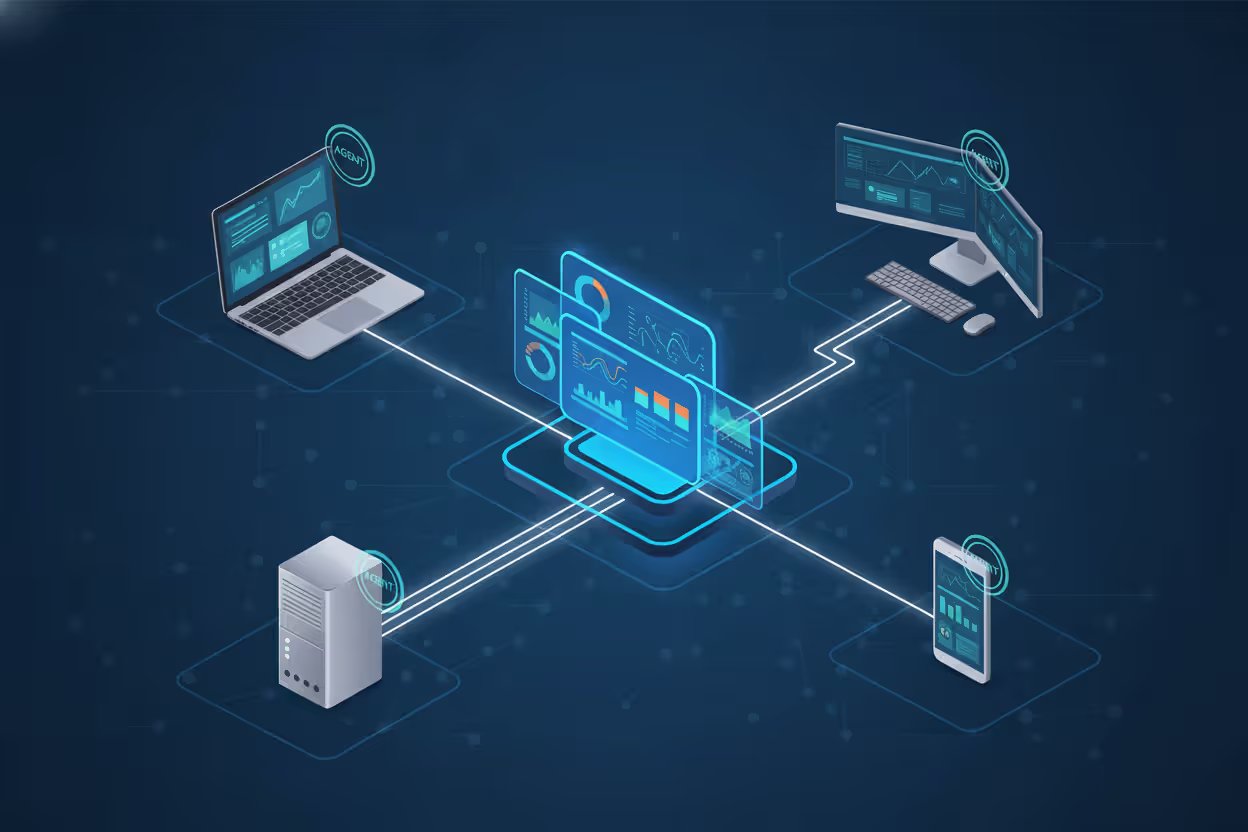
Endpoint security monitoring operates through agents—small software programs installed on each monitored device—that continuously collect data and communicate with a central management platform. These agents run with elevated privileges to observe system-level activities that normal applications cannot access.
The monitoring workflow follows a consistent pattern: collection, transmission, analysis, and response. Agents gather event data such as process creation, file modifications, network traffic, authentication attempts, and registry changes. This telemetry streams to a central server or cloud platform where analytics engines process it. When the system detects suspicious patterns, it generates alerts for security analysts or triggers automated responses like isolating the device from the network.
Real-time tracking is crucial. A delay of even a few minutes between infection and detection can mean the difference between containing a threat on one device and responding to a company-wide ransomware outbreak. Modern monitoring systems process events within seconds, correlating activities across thousands of endpoints simultaneously.
Author: Ethan Caldwel;
Source: williamalmonte.net
Key Components of Monitoring Systems
Every endpoint security monitoring solution relies on several core components working together. The endpoint agent is the foundation—it must be lightweight enough not to slow down the device while comprehensive enough to capture relevant security events. Agents typically monitor kernel-level activities, network stack operations, and user-space application behavior.
The management console provides the interface where security teams configure policies, view alerts, investigate incidents, and generate reports. A well-designed console presents complex data in understandable formats: timeline visualizations showing the sequence of events during an attack, network graphs illustrating lateral movement attempts, and risk scores prioritizing which alerts demand immediate attention.
Threat intelligence feeds enhance detection capabilities by providing context about known malicious IP addresses, domains, file hashes, and attack techniques. When an endpoint connects to a domain associated with a command-and-control server, the monitoring system can immediately flag this as high-priority even if the connection itself appears benign.
The backend analytics engine is where behavioral detection happens. Machine learning models trained on millions of security events can identify subtle deviations from normal patterns. If a user account that typically accesses three file shares suddenly attempts to open 500 files in five minutes, the system recognizes this as potential ransomware behavior or data exfiltration.
Detection Methods and Technologies
Endpoint security monitoring employs multiple detection approaches simultaneously. Signature-based detection remains useful for known threats—why reinvent the wheel when a malware sample has been thoroughly analyzed and cataloged? However, this method alone is insufficient against modern attacks.
Behavioral analysis examines how processes interact with the system. Legitimate software follows predictable patterns: a web browser downloads files, a PDF reader opens documents, an email client sends messages. Malware often exhibits unusual behavior: a document reader shouldn't launch PowerShell scripts, and a spreadsheet application has no reason to encrypt hundreds of files simultaneously.
Heuristic detection applies rules based on common attack techniques. For example, many malware families attempt to achieve persistence by modifying registry run keys or creating scheduled tasks. Monitoring systems flag these activities even when the specific malware variant is unknown.
Indicators of Compromise (IoCs) and Indicators of Attack (IoAs) serve different purposes. IoCs identify artifacts of known threats—specific file hashes, registry keys, or network signatures. IoAs detect attacker behaviors regardless of the tools used. An IoA might trigger when a process dumps credentials from memory or when lateral movement across the network matches known attack frameworks.
Types of Threats Detected by Endpoint Monitoring
Malware remains a primary concern, but the category encompasses diverse threats. Trojans disguise themselves as legitimate software to gain initial access. Worms spread automatically across networks without user interaction. Spyware silently exfiltrates sensitive data. Endpoint security monitoring detects these threats through behavioral signatures: unexpected network connections, unauthorized file access, suspicious process injections.
Ransomware has evolved into a sophisticated criminal enterprise. Modern ransomware operators often spend weeks inside a network before triggering encryption, stealing data for double extortion and disabling backups. Endpoint monitoring can detect the reconnaissance phase when attackers enumerate shares, the credential theft phase when they dump password hashes, and the lateral movement phase when they spread to additional systems—all before the encryption payload executes.

Author: Ethan Caldwel;
Source: williamalmonte.net
Insider threats present unique challenges because the activity originates from authorized users. An employee copying thousands of customer records to a USB drive or uploading proprietary source code to a personal cloud account may have legitimate credentials, but the behavior is anomalous. Endpoint security monitoring establishes baselines for normal user activity and alerts when someone deviates significantly.
Zero-day exploits target previously unknown vulnerabilities, making signature-based detection useless. However, exploitation often requires unusual system behavior: excessive memory allocation, attempts to execute code from data segments, or privilege escalation through kernel manipulation. Monitoring systems detect these technical indicators even when the specific vulnerability is unknown.
Unauthorized access attempts include brute-force attacks against local accounts, privilege escalation exploits, and credential stuffing. Monitoring systems track failed authentication attempts, unusual login times, and access to resources outside a user's typical scope. When a marketing employee suddenly accesses the finance database at 3 AM from an unusual device, the system should flag this immediately.
Endpoint Security Monitoring Tools and Examples
The endpoint security market has matured significantly, offering solutions for organizations of all sizes. Commercial platforms provide comprehensive features, dedicated support, and regular updates, while open-source alternatives offer flexibility and cost savings for technically capable teams.
CrowdStrike Falcon represents the cloud-native approach to endpoint security monitoring. The lightweight agent collects telemetry and streams it to CrowdStrike's cloud platform where advanced analytics and threat intelligence provide detection. The platform excels at investigating incidents through its timeline interface, showing exactly what happened on a compromised device. Organizations with distributed workforces appreciate that deployment requires no on-premise infrastructure.
SentinelOne combines monitoring with autonomous response capabilities. When the system detects ransomware behavior, it can automatically roll back file encryption without waiting for human intervention. This approach reduces the mean time to respond (MTTR) from hours to seconds. The platform uses AI models trained on attack behaviors rather than relying solely on signatures.
Microsoft Defender for Endpoint integrates tightly with the Windows ecosystem and other Microsoft security products. Organizations already using Microsoft 365 can extend their existing investment rather than deploying separate agents. The platform provides strong visibility into Windows-specific attack techniques and benefits from Microsoft's threat intelligence gathered across their global customer base.
Carbon Black (now part of VMware) pioneered the concept of continuous recording—capturing every endpoint event for forensic analysis. Security teams can "rewind" an endpoint to any point in time, examining exactly what processes were running, which files were accessed, and what network connections existed. This capability proves invaluable during incident investigation when understanding the full scope of a breach is critical.
Open-source options like OSSEC and Wazuh provide endpoint monitoring for budget-conscious organizations or those with specific customization requirements. These tools require more technical expertise to deploy and maintain but offer complete control over data collection, storage, and analysis. Many organizations use open-source solutions for non-critical systems while deploying commercial platforms for high-value endpoints.
| Tool Name | Deployment Type | Key Features | Best For | Approximate Price Range |
| CrowdStrike Falcon | Cloud-based | Threat intelligence, EDR, lightweight agent | Distributed enterprises | $8-15 per endpoint/month |
| SentinelOne | Cloud or on-premise | AI-powered detection, autonomous response | Organizations needing automated remediation | $10-18 per endpoint/month |
| Microsoft Defender for Endpoint | Cloud-based | Windows integration, Microsoft ecosystem | Microsoft 365 customers | $5-10 per user/month |
| Carbon Black | Cloud or on-premise | Continuous recording, deep forensics | Incident response teams | $12-20 per endpoint/month |
| Wazuh | On-premise or cloud | Open-source, customizable, compliance focus | Technical teams, budget-conscious orgs | Free (self-hosted) |
Setting Up Endpoint Security Monitoring
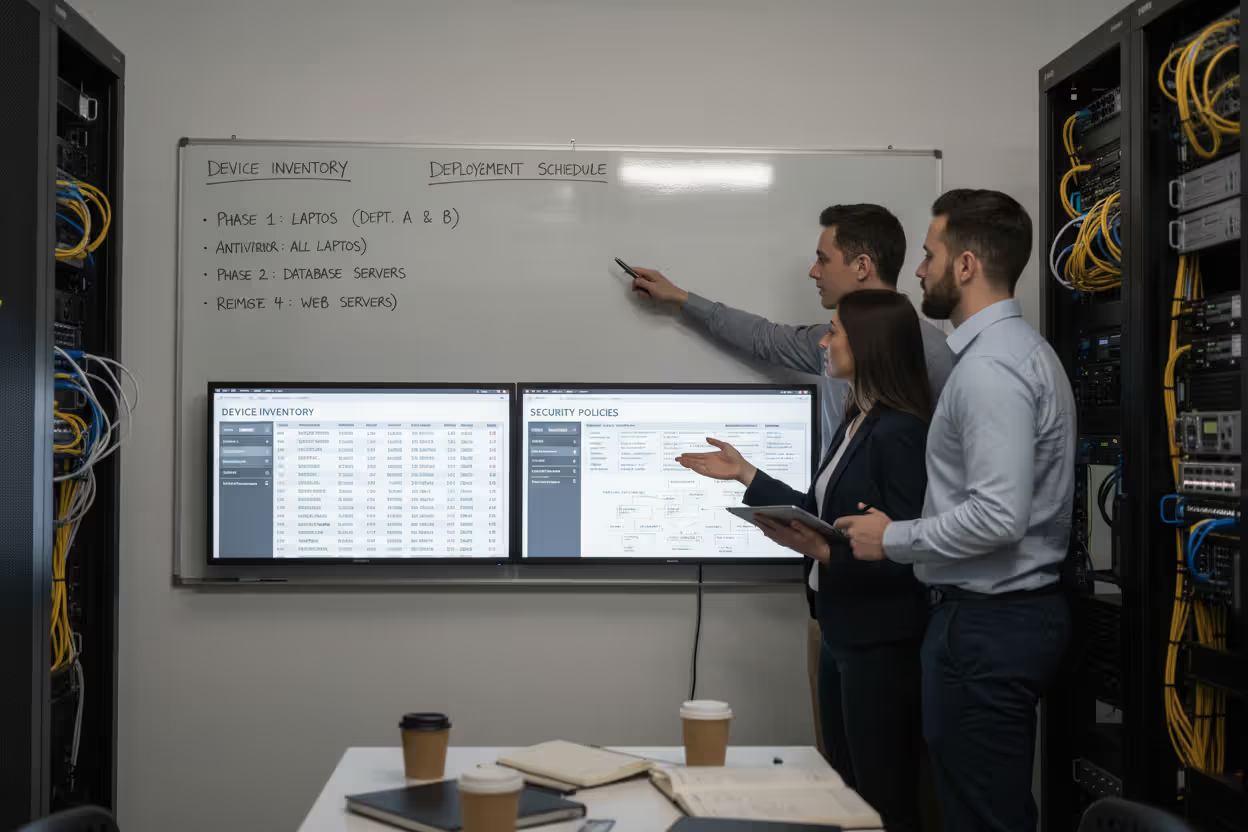
Successful deployment begins with assessment. Catalog every endpoint type in your environment: Windows workstations, macOS laptops, Linux servers, mobile devices, and any specialized systems like point-of-sale terminals or industrial controllers. Different device types require different monitoring approaches and may need separate agents.
Identify your highest-priority assets. Not all endpoints carry equal risk—a laptop used by the CFO containing financial data deserves more intensive monitoring than a kiosk displaying the cafeteria menu. Prioritization helps when budget or technical constraints prevent comprehensive coverage immediately.
Tool selection should align with your organization's technical capabilities and security maturity. A small business with no dedicated security staff needs a solution with strong default policies and minimal tuning requirements. An enterprise with a Security Operations Center (SOC) might prefer a platform offering extensive customization and integration with SIEM systems.
Deployment typically follows a phased approach. Start with a pilot group—perhaps the IT department or a single business unit—to test agent performance, validate network connectivity, and refine alert rules before expanding to the entire organization. This staged rollout identifies problems when they affect dozens of devices rather than thousands.
Author: Ethan Caldwel;
Source: williamalmonte.net
Configuration requires balancing security and usability. Overly aggressive monitoring generates alert fatigue, causing analysts to ignore warnings or users to complain about performance impacts. Start with vendor-recommended policies, then adjust based on your environment's baseline behavior. A software development company should expect developers to run debuggers and compilers—activities that might seem suspicious in a typical office environment.
Testing validates that monitoring actually works. Simulate attacks using frameworks like Atomic Red Team or MITRE Caldera to verify that your monitoring system detects common techniques: credential dumping, lateral movement, data exfiltration. If your system doesn't alert when you deliberately run Mimikatz to extract passwords, you have a detection gap to address.
Integration with existing security tools amplifies effectiveness. Endpoint monitoring shouldn't operate in isolation—correlate endpoint events with firewall logs, email security alerts, and vulnerability scan results. When the firewall blocks an outbound connection to a suspicious IP and endpoint monitoring shows which device initiated that connection, you can respond more effectively than with either signal alone.
Common Mistakes in Endpoint Security Monitoring
Insufficient coverage leaves blind spots that attackers exploit. Organizations sometimes monitor corporate laptops but ignore contractor devices, personal phones accessing corporate email, or servers assumed to be "secure" because they're not user-facing. Comprehensive monitoring means every device that touches corporate data gets visibility, regardless of ownership or location.
Ignoring alerts defeats the purpose of monitoring. Alert fatigue is real—when analysts face hundreds of low-priority notifications daily, they develop tunnel vision and miss critical warnings. Tune your system ruthlessly: disable noisy rules that generate false positives, prioritize alerts based on actual risk, and automate responses to routine events. If an alert doesn't require human action, it shouldn't notify humans.
Lack of integration creates information silos. Endpoint monitoring provides one perspective on security, but attackers operate across multiple vectors simultaneously. An endpoint might show suspicious PowerShell activity while the web proxy logs reveal the initial phishing link and the email gateway shows the delivery. Without integration, analysts waste time manually correlating these events.
Poor policy enforcement undermines security. Discovering that 30% of devices lack the monitoring agent because users disabled it or IT never installed it after hardware refresh means those endpoints are invisible during an incident. Enforce agent installation through technical controls like network access control (NAC) that blocks unmonitored devices from accessing corporate resources.
Neglecting agent updates leaves systems vulnerable. Monitoring vendors continuously improve detection capabilities, add support for new operating systems, and patch security vulnerabilities in the agents themselves. Treat monitoring agents like any other critical software—test updates in a lab environment, then deploy systematically across the organization.
Failing to establish baselines makes anomaly detection ineffective. If you don't know what normal looks like in your environment, you can't identify abnormal. Most monitoring systems need 2-4 weeks to learn typical user behaviors, application patterns, and network traffic before behavioral detections become reliable.
Underestimating storage requirements causes data loss. Endpoint monitoring generates substantial telemetry—a single endpoint might produce gigabytes of event data monthly. Plan for adequate storage with retention periods that support both real-time detection and historical investigation. Compliance requirements often mandate specific retention periods regardless of technical preferences.
Endpoint security monitoring is no longer about detecting the attack at the perimeter. The perimeter has dissolved. Monitoring focuses on detecting adversaries already inside your network and limiting their ability to achieve their objectives
— Dr. Anton Chuvakin
Frequently Asked Questions About Endpoint Security Monitoring
Endpoint security monitoring has evolved from a luxury for large enterprises to a necessity for any organization handling sensitive data. The threat landscape continues to intensify—ransomware operators have industrialized their operations, nation-state actors target supply chains, and the expanding attack surface of remote work creates new vulnerabilities daily.
Implementing effective monitoring requires more than purchasing software. It demands understanding your environment, configuring systems to match your risk profile, training staff to respond to alerts, and continuously refining detection rules based on experience. Start with high-value assets, expand coverage systematically, and integrate monitoring with your broader security program.
The organizations that fare best during security incidents are those that invested in visibility before the crisis. When ransomware strikes, when an insider exfiltrates data, when a zero-day exploit compromises devices—these scenarios demand immediate answers about what happened, which systems are affected, and how to contain the damage. Endpoint security monitoring provides those answers, transforming security teams from reactive firefighters into proactive defenders who detect and neutralize threats before they cause business impact.
Related Stories
Read more

Read more




The content on this website is provided for general informational and educational purposes only. It is intended to explain concepts related to endpoint security, cybersecurity practices, threat prevention, and security technologies.
All information on this website, including articles, guides, and examples, is presented for general educational purposes. Cybersecurity requirements and implementations may vary depending on organizational needs, infrastructure, regulatory requirements, and threat environments.
This website does not provide professional cybersecurity, legal, or compliance advice, and the information presented should not be used as a substitute for consultation with qualified cybersecurity professionals.
The website and its authors are not responsible for any errors or omissions, or for any outcomes resulting from decisions made based on the information provided on this website.