

Cybersecurity analyst workstation with endpoint protection dashboards
EDR vs Antivirus Guide

Endpoint security has evolved dramatically over the past decade. Organizations that relied on signature-based antivirus for years now face sophisticated ransomware, fileless malware, and advanced persistent threats that slip past traditional defenses. The question isn't whether you need endpoint protection—it's which type matches your risk profile, IT capabilities, and budget.
This guide breaks down the practical differences between EDR (Endpoint Detection and Response) and antivirus solutions, helping you decide which approach—or combination—makes sense for your organization in 2026.
What Is Antivirus Software
Antivirus software protects individual devices by scanning files, programs, and system activities for known malicious signatures. When you download a file or launch an application, the antivirus engine compares its characteristics against a database of malware signatures—essentially digital fingerprints of previously identified threats.
Traditional antivirus operates on a simple premise: block what we know is bad. If a file matches a known virus signature, the software quarantines or deletes it. Most antivirus products have added heuristic analysis, which examines file behavior for suspicious patterns even without an exact signature match. Some newer versions incorporate machine learning to identify anomalies.
The strength of antivirus lies in its simplicity. Installation takes minutes, resource consumption stays low, and users rarely need to interact with it beyond occasional scans. A small medical practice with ten computers can deploy antivirus across all devices in an afternoon with minimal training.
The weakness becomes apparent with novel threats. Zero-day exploits, polymorphic malware that changes its signature with each infection, and fileless attacks that operate entirely in memory bypass signature-based detection. By the time antivirus vendors update their signature databases, the damage has often occurred.
Traditional antivirus was designed for a threat landscape that no longer exists. EDR represents a fundamental shift from prevention-only to a model that assumes breach and focuses on detection, investigation, and response. Organizations that still rely solely on antivirus are operating with a blindfold in a battlefield
— Allie Mellen
What Is EDR and How It Works
Endpoint Detection and Response platforms continuously monitor endpoint activities—process execution, registry changes, network connections, file modifications—creating a detailed record of everything happening on each device. Rather than simply blocking known threats at the gate, EDR assumes some threats will penetrate initial defenses and focuses on detecting suspicious behavior patterns.
When EDR vs antivirus is explained, the behavioral analysis component stands out as the critical differentiator. An EDR system might notice that an Excel macro spawned PowerShell, which then made unusual outbound connections to an IP address in a country your organization never contacts. Each action individually might seem benign, but the sequence triggers an alert.
EDR platforms collect telemetry from all monitored endpoints and send it to a central console where security analysts can investigate incidents. If ransomware begins encrypting files on one machine, EDR can trace the attack's origin, identify which user account was compromised, determine what lateral movement occurred across the network, and isolate affected devices—all from a single interface.

Author: Ethan Caldwel;
Source: williamalmonte.net
Threat hunting capabilities separate EDR from reactive tools. Security teams can query historical endpoint data with questions like "show me all devices where Chrome.exe launched cmd.exe in the past 30 days" to proactively search for indicators of compromise before they escalate.
The trade-off: EDR demands more resources, both computational and human. The software consumes more CPU and memory than antivirus. More importantly, someone needs to review alerts, tune detection rules to reduce false positives, and respond to confirmed incidents. A manufacturing company with 500 endpoints might generate 50-100 EDR alerts daily, requiring skilled analysts to separate genuine threats from benign anomalies.
Core Differences Between EDR and Antivirus
The edr vs antivirus differences extend across detection philosophy, response capabilities, and operational requirements. Understanding these edr vs antivirus key distinctions helps you evaluate which tool addresses your specific security gaps.
| Criteria | Antivirus | EDR |
| Detection Method | Signature-based with heuristics; identifies known threats | Behavioral analysis with machine learning; identifies suspicious patterns and anomalies |
| Threat Response | Automatic quarantine/deletion; limited user intervention | Investigation tools, remote isolation, rollback capabilities; requires analyst decisions |
| Visibility Scope | Individual device; limited activity logging | Network-wide visibility; comprehensive endpoint telemetry and historical data |
| Automation Level | High; operates independently with minimal oversight | Moderate; automated detection but manual investigation and response |
| Best For | Small businesses, individual users, basic compliance, known threat prevention | Enterprises, regulated industries, advanced threat detection, incident response |
| Typical Cost Range | $20-60 per device annually | $40-120 per device annually (software only); $80-200+ with managed services |
| Implementation Complexity | Low; deploy and forget | Moderate to high; requires tuning, integration, and trained personnel |
| Threat Intelligence | Vendor signature updates | Real-time feeds, community sharing, custom IOC integration |
Detection speed illustrates another practical difference. Antivirus blocks threats in milliseconds at the point of execution. EDR might allow a suspicious process to run briefly while collecting behavioral data, then terminate it once the pattern confirms malicious intent. This slight delay provides richer forensic information but introduces marginally higher risk.
Antivirus generates few alerts—mostly "threat blocked" notifications that require no action. EDR generates alerts requiring human judgment: Is this PowerShell activity legitimate automation or credential dumping? Should we isolate this device immediately or monitor for additional indicators?
When to Use Antivirus vs When to Use EDR
Choosing between these tools depends on your organization's size, risk tolerance, regulatory obligations, and internal capabilities. The when to use edr and antivirus question often has a nuanced answer.

Author: Ethan Caldwel;
Source: williamalmonte.net
Small Business Security Needs
A 15-person accounting firm handling tax returns faces genuine cyber risk but lacks a dedicated IT security team. Antivirus makes sense as the primary defense layer. It prevents commodity malware, phishing attachments, and drive-by downloads without requiring security expertise.
Add EDR when your business stores particularly sensitive data (healthcare records, financial information, intellectual property) or when a breach would cause existential damage. A 50-person engineering firm with proprietary manufacturing designs might justify EDR's cost because a single data theft could destroy competitive advantage.
Budget constraints matter. A retail store with eight point-of-sale terminals might spend $400 annually on antivirus versus $3,200 for EDR software alone, before considering the managed service provider fees needed to actually monitor and respond to alerts.
Consider managed EDR services if you recognize the need for advanced protection but lack internal expertise. These services typically cost $80-200 per endpoint annually and include 24/7 monitoring by external security analysts who handle alert triage and incident response.
Enterprise and Regulated Industries
Organizations with 500+ endpoints, dedicated IT teams, and compliance requirements should deploy EDR as standard practice. The question shifts from "do we need EDR?" to "which EDR platform integrates with our existing security stack?"
Healthcare organizations subject to HIPAA face mandatory breach notification requirements. EDR's forensic capabilities help determine exactly which patient records were accessed during an incident—critical for accurate breach reporting. Antivirus alone provides no visibility into what data an attacker exfiltrated.
Financial services firms under SEC and FINRA oversight need to demonstrate "reasonable cybersecurity controls." Regulators increasingly expect EDR-level visibility and response capabilities, particularly after high-profile breaches demonstrated antivirus limitations.
Manufacturing and critical infrastructure sectors targeted by nation-state actors need EDR's threat hunting capabilities. These attackers use custom malware with no existing signatures, making antivirus largely ineffective. An EDR analyst can hunt for tactics, techniques, and procedures (TTPs) even when the specific malware is novel.
Can You Use EDR and Antivirus Together
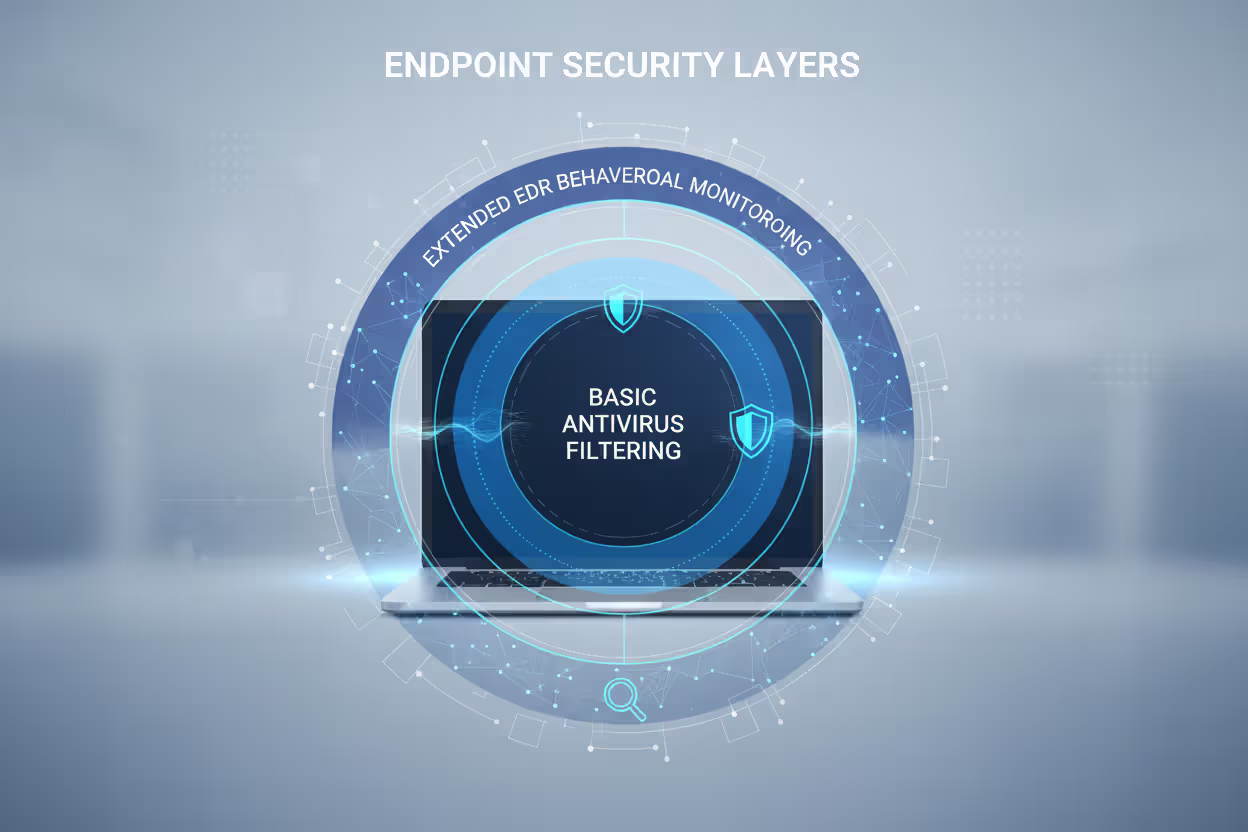
Many organizations run both, treating them as complementary layers rather than competing alternatives. Antivirus handles commodity threats efficiently, while EDR focuses on sophisticated attacks that bypass initial defenses.
Author: Ethan Caldwel;
Source: williamalmonte.net
The layered approach makes practical sense. Antivirus blocks 95% of threats—known malware, script kiddies, automated scanning attacks—with zero analyst time required. EDR focuses its resources on the remaining 5%: targeted attacks, zero-days, and advanced persistent threats that warrant human investigation.
Compatibility concerns have largely disappeared. Most EDR vendors design their products to coexist with popular antivirus solutions. Some EDR platforms include built-in antivirus capabilities, offering a consolidated agent that reduces endpoint resource consumption and management complexity.
Configuration mistakes create problems. Running two antivirus engines simultaneously causes performance degradation and conflicts as both products compete to scan the same files. The correct setup: one antivirus engine (either standalone or EDR-integrated) plus EDR's behavioral monitoring and response capabilities.
Integration amplifies effectiveness. When antivirus detects and blocks a threat, it can send that indicator to EDR, which then searches all other endpoints for the same compromise. A phishing email that infected one device gets contained before spreading across your network.
Resource planning matters. A device running both antivirus and EDR might consume an additional 200-400MB of RAM and 5-10% CPU during active scanning. For modern workstations this overhead is negligible, but older hardware or resource-constrained devices (thin clients, point-of-sale terminals) might struggle.
Common Mistakes When Choosing Endpoint Security
Organizations frequently underestimate their threat exposure, assuming "we're too small to be targeted." Ransomware operators use automated tools that indiscriminately scan the internet for vulnerabilities. Your company size is irrelevant—your security posture determines whether you're an easy target.
Choosing security tools based solely on price creates false economy. A $30 antivirus license seems attractive compared to $100 EDR, but the comparison ignores breach costs. The average ransomware payment exceeded $400,000 in 2025, not counting downtime, recovery expenses, and reputation damage. Spending an extra $7,000 annually on EDR for 100 endpoints looks reasonable against potential six-figure losses.
Ignoring scalability causes painful migrations. A startup with 20 employees might reasonably use consumer-grade antivirus, but switching to enterprise EDR at 200 employees involves ripping out the old solution, deploying new agents, training staff, and establishing new processes. Planning for growth from the beginning avoids disruptive transitions.
Overlooking the human element undermines technical capabilities. EDR without trained analysts generates alert fatigue—hundreds of unreviewed notifications that eventually get ignored. Either budget for internal security staff or contract with a managed detection and response (MDR) provider who can actually use the tool's capabilities.

Author: Ethan Caldwel;
Source: williamalmonte.net
Failing to test recovery procedures leaves you unprepared when incidents occur. EDR platforms offer powerful response tools—remote device isolation, process termination, file quarantine—but using them incorrectly during an active incident can cause additional damage. Regular tabletop exercises help teams practice incident response before facing a real breach.
Treating endpoint security as "set and forget" reduces effectiveness over time. Threat actors constantly evolve tactics. EDR detection rules need periodic tuning based on your environment's normal behavior. Antivirus signatures require regular updates. A security tool deployed in 2024 and never reconfigured will miss threats by 2026.
FAQ: EDR vs Antivirus Questions
The choice between EDR and antivirus isn't binary for most organizations. Antivirus provides essential protection against known threats with minimal overhead, making it the baseline security control for any device. EDR adds visibility, investigation capabilities, and response tools needed to detect and contain sophisticated attacks that bypass prevention-only defenses.
Small businesses with limited IT resources should start with quality antivirus and add managed EDR services when handling sensitive data or facing elevated risk. Mid-size companies with some internal IT capability benefit from deploying both tools in a layered approach. Enterprises and regulated industries should treat EDR as mandatory, either managing it internally or partnering with an MDR provider.
The threat landscape of 2026 demands more than signature-based prevention. Zero-day exploits, ransomware, and targeted attacks require the behavioral detection and forensic capabilities that only EDR provides. Evaluate your organization's risk tolerance, compliance obligations, and internal capabilities to determine which combination of endpoint security tools matches your needs—then test your incident response procedures to ensure you can actually use them when it matters.
Related Stories
Read more

Read more




The content on this website is provided for general informational and educational purposes only. It is intended to explain concepts related to endpoint security, cybersecurity practices, threat prevention, and security technologies.
All information on this website, including articles, guides, and examples, is presented for general educational purposes. Cybersecurity requirements and implementations may vary depending on organizational needs, infrastructure, regulatory requirements, and threat environments.
This website does not provide professional cybersecurity, legal, or compliance advice, and the information presented should not be used as a substitute for consultation with qualified cybersecurity professionals.
The website and its authors are not responsible for any errors or omissions, or for any outcomes resulting from decisions made based on the information provided on this website.