

Cybersecurity analyst monitoring data loss prevention dashboard in modern office
What Is DLP in Cyber Security?

Content
Content
Think of Data Loss Prevention—that's what DLP stands for—as a security guard who checks briefcases and bags as people leave the building. Except instead of physical items, this guard watches for sensitive digital information trying to sneak out through emails, USB drives, cloud uploads, or any other exit route from your network.
Here's a scenario that happens more often than you'd think: Sarah from accounting finishes her expense report spreadsheet at 4:45 PM on Friday. She's running late for her kid's soccer game, so she quickly emails the file to her personal Gmail account to finish at home. Problem? That spreadsheet contains Social Security numbers for 200 employees. Without DLP, that data just landed in a personal email account with zero enterprise security controls.
Or consider this: Ransomware gets past your antivirus. Before encrypting everything and demanding payment, the malware quietly copies your customer database to an overseas server. A properly configured DLP system would've spotted that massive unauthorized data transfer and slammed the brakes on it.
Organizations everywhere—regardless of size or industry—now face this reality: IBM's 2026 research pegged the average data breach cost at $4.88 million. That's not just an IT problem. That's a "might put us out of business" problem.
DLP in Cyber Security Meaning and Core Functions
So what exactly does dlp in cyber security mean? At its core, DLP identifies where your sensitive data lives, watches how it moves, and enforces rules about who can do what with it. Unlike your firewall (which guards the perimeter against external attacks) or antivirus (which hunts malicious code), DLP focuses on your actual data—stopping it from ending up where it shouldn't, whether someone's stealing it deliberately, leaking it accidentally, or losing it through sheer carelessness.

Author: Daniel Prescott;
Source: williamalmonte.net
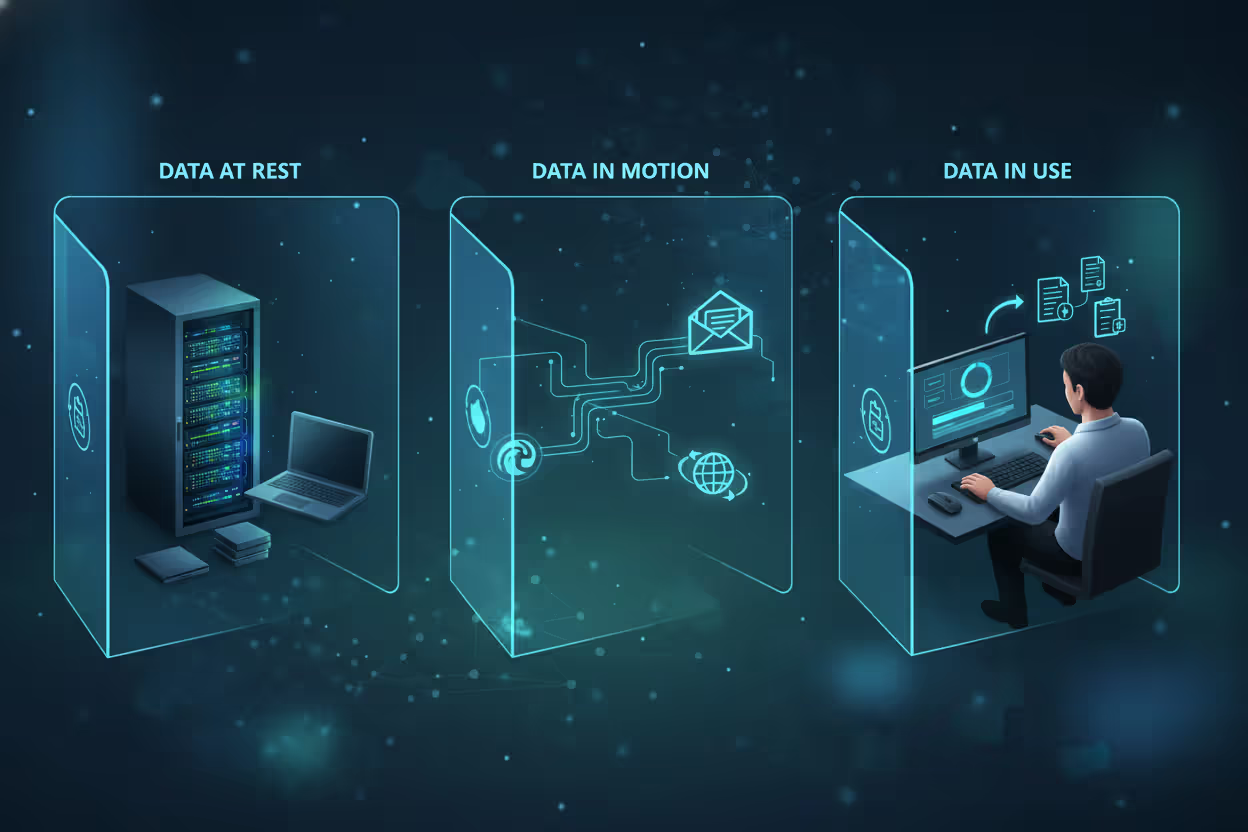
DLP watches data in three states, each requiring different protection strategies:
Data at rest sits in storage—your file servers, employee laptops, USB drives, cloud buckets, database tables. A DLP system scans these locations looking for sensitive patterns. Credit card numbers follow predictable formats. Patient names appear next to diagnosis codes. Engineering blueprints contain specific metadata. When your developer saves a customer list to their desktop as "backup.xlsx," endpoint DLP can immediately flag that file, encrypt it automatically, or even prevent the save operation entirely depending on your policies.
Data in motion travels somewhere—outbound emails, FTP transfers, web form submissions, Slack messages, anything crossing a network boundary. Network DLP sits at these chokepoints watching traffic flow past. An employee uploads a file to personal Dropbox? DLP inspects the file content before it leaves. If it contains your organization's sensitive information, the transfer gets blocked mid-stream. The file never reaches Dropbox's servers.
Data in use means someone's actively working with it—viewing, editing, copying, printing, screenshotting. This proves trickiest to monitor because you're watching user behavior in real-time. Modern DLP solutions track actions like copying sensitive data to clipboard, printing confidential contracts, or taking screenshots of payroll information. Context matters enormously here. Your payroll manager printing W-2s in January? Probably fine. A temp contractor printing those same documents? Red flag.
Detection methods have evolved way beyond simple keyword matching:
Content inspection examines what's actually inside files using pattern recognition, exact matching, or document fingerprinting. Looking for credit cards? Scan for 16-digit numbers matching Visa, Mastercard, or Amex formats with valid check digits. Protecting a specific contract? Create a digital fingerprint of that document so DLP recognizes it even if someone renames the file or changes formatting.
Contextual analysis evaluates the circumstances. Who's touching this data? Your CFO accessing financial records at 2 PM Tuesday? Normal. The same CFO downloading those records at 3 AM Saturday to an unfamiliar IP address? That needs investigation. Where's the data going? Internal email to your accounting team gets different treatment than external email to competitor.com.
User behavior analytics learns what "normal" looks like for each person. Your customer service reps typically access 30-50 customer records daily? That's their baseline. When one rep suddenly pulls 3,000 records in an hour, behavioral DLP flags this anomaly even if technically they have permission to access those records.
Author: Daniel Prescott;
Source: williamalmonte.net
Why Organizations Need DLP Solutions
Let's walk through scenarios that keep security teams up at night—all preventable with DLP:
A medical office clerk sends a patient appointment reminder email. She types "J" in the "To" field and autocomplete suggests "John Smith" (the patient). She hits send without noticing autocomplete actually filled in "Jennifer Smith" (a different patient entirely). That email just disclosed Patient A's medical condition to Patient B. HIPAA violation. Mandatory breach reporting. Potential fines up to $50,000 per violation. Email DLP would've caught the protected health information and either blocked the message or required manual review before sending.
Your senior product manager accepts a job offer from your biggest competitor. During his two-week notice period, he casually copies three years of product roadmaps, customer pricing agreements, and competitive analysis documents to a USB drive. He walks out the door with intellectual property worth millions in R&D investment. Endpoint DLP monitoring removable media would've blocked those transfers or at minimum alerted security to investigate suspicious copying behavior.
Ransomware infiltrates through a phishing email. Before deploying its encryption payload (which your backup strategy can recover from), the malware spends 48 hours quietly exfiltrating copies of everything sensitive to an attacker-controlled server. They've got your data regardless of whether you pay the ransom. Network DLP detecting unusual outbound traffic volumes to suspicious destinations could've quarantined the infected system before significant data loss occurred.
Regulations make DLP less optional and more mandatory:
HIPAA requires healthcare organizations to implement technical safeguards preventing unauthorized disclosure of patient information. During audits, you need to demonstrate these controls actually work. DLP provides both the technology and the audit trail proving compliance.
GDPR demands appropriate security measures for personal data belonging to EU citizens. Article 32 specifically requires ability to ensure ongoing confidentiality of processing systems and services. DLP delivers this technical capability plus the alerting required to meet GDPR's 72-hour breach notification deadline.
PCI-DSS prohibits storing specific payment card data elements and requires encryption for cardholder data transmission. DLP enforces these requirements automatically, detecting policy violations before they become compliance failures during your quarterly scans.
Beyond compliance checkboxes, breaches hit your bottom line hard. Companies with mature security automation (including DLP) cut breach costs by $2.2 million compared to those without, according to IBM's research. Customer churn following publicized breaches averages $1.5 million in lost business—and that's just the measurable impact.
Reputation damage? That sticks around. When a law firm leaks client privileged communications or a hospital exposes patient HIV status, no amount of subsequent investment rebuilds that trust overnight. Customers, partners, and regulators all remember.

Author: Daniel Prescott;
Source: williamalmonte.net
How DLP Technology Detects and Prevents Data Loss
Implementing DLP starts with translating business requirements into enforceable technical policies. Your legal team says "We can't let customer financial data leave the company via personal email." You translate that into: "Block outbound email to non-corporate domains when message body or attachments contain 5+ credit card numbers, 5+ bank account numbers, or files matching customer financial database schema."
Policy creation requires balancing specificity against practicality. Make rules too broad ("block any file containing numbers") and you'll generate thousands of useless alerts daily. Make them too narrow ("block files named exactly 'Q4_Earnings_2026.xlsx'") and attackers rename the file to bypass your controls.
Effective policies layer multiple detection techniques together:
Protecting your customer database might trigger when: file content matches your customer table schema (content inspection) AND the person accessing it works outside your customer service department (contextual analysis) AND this access happens at 2 AM on Sunday (behavioral analysis). Any single factor alone might be explainable. All three together? That's worth immediate investigation.
Real-time monitoring runs continuously, evaluating every monitored action against your ruleset within milliseconds. Speed matters because blocking a file upload means intervening before the transmission completes—after the file reaches someone's personal cloud account, you've already lost control of it.
Alerting mechanisms route notifications based on severity tiers. Low-risk violations generate log entries that security analysts review weekly looking for patterns. Medium-risk events trigger email alerts to your SOC. High-risk incidents immediately page on-call security engineers and auto-escalate if not acknowledged within 15 minutes.
Response actions span a spectrum from passive observation to aggressive blocking:
Alert logs the event and notifies administrators but allows the action. You'll use this during initial deployment when gathering baseline data before enforcing policies.
User notification displays a pop-up explaining the policy violation and asking for business justification. Many violations stem from legitimate needs rather than malicious intent—this gives users a path to request exceptions through proper channels.
Block prevents the action completely. The email doesn't send. The file doesn't upload. The print job doesn't execute. Users see a message explaining the policy violation and how to request access if needed.
Quarantine moves the data to a secure holding area where administrators review context before deciding whether to release or permanently block. Useful when automated rules lack confidence but the action seems suspicious.
Encrypt permits the action but applies encryption protection. Your sales director can email that proposal to the prospect, but DLP automatically encrypts the attachment so only authorized recipients can decrypt it.
Integration with your existing security stack multiplies DLP effectiveness. Connect DLP to your identity management system and policies can enforce based on Active Directory groups and role-based access controls. Feed DLP alerts into your SIEM platform and correlation engines can detect coordinated data theft attempts combining DLP violations with other security events. Link DLP to your data classification tools and policies automatically adjust as information sensitivity changes over time.
Types of DLP Solutions and Deployment Models
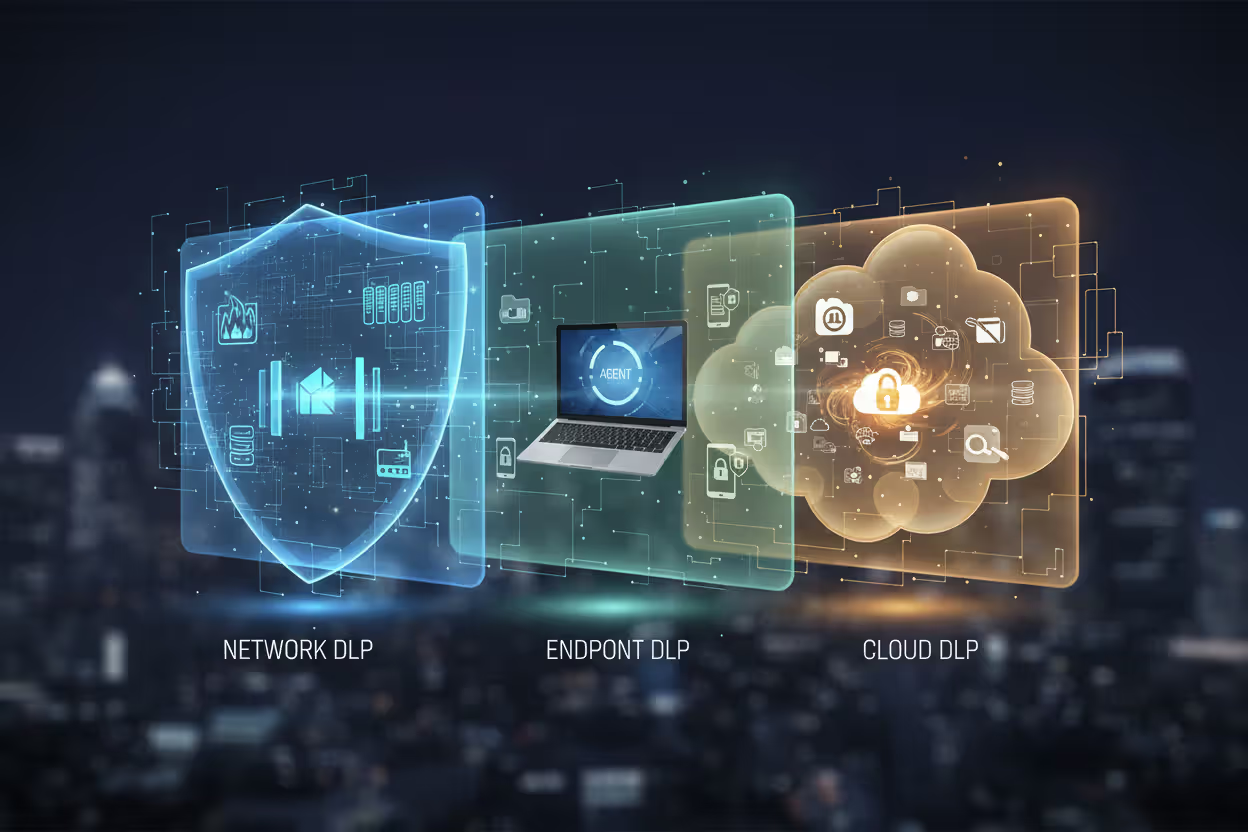
Organizations typically deploy DLP in three complementary layers, each protecting different attack surfaces:
Author: Daniel Prescott;
Source: williamalmonte.net
Network DLP monitors information crossing your network perimeter. Deployed as appliances or virtual machines at network exit points, these systems inspect email traffic, web uploads, FTP transfers, instant messages, and other protocols. Network DLP excels at preventing data exfiltration through communication channels—you're examining everything at the border before it leaves. The catch? You can't monitor data stored locally on endpoints, and encrypted sessions require SSL decryption (which introduces its own complexity). Also useless if the laptop leaves your network entirely.

Author: Daniel Prescott;
Source: williamalmonte.net
Endpoint DLP installs lightweight agents on individual devices—laptops, desktops, servers, smartphones. These agents watch local file operations, clipboard activity, screen captures, printing, and transfers to USB drives or external hard drives. Endpoint DLP protects your data regardless of network connectivity, making it essential for remote workers or employees traveling. Challenges include deploying and managing agents across Windows, macOS, Linux, iOS, and Android while minimizing battery drain and performance impact that annoys users.
Cloud DLP extends protection into SaaS applications and cloud infrastructure through API connections or inline proxies. As workloads migrate to Microsoft 365, Google Workspace, Salesforce, Box, Dropbox, and AWS, cloud DLP follows your data there. Cloud-native solutions leverage provider APIs for deep integration but may offer fewer policy options compared to mature on-premises products. You're also dependent on API capabilities the vendor exposes.
| Deployment Model | What It Protects | Primary Use Cases | Key Advantages | Limitations | Best For |
| Network DLP | Information crossing network boundaries via email, web, file transfer protocols, messaging apps | Monitoring outbound email, preventing web uploads to personal cloud storage, blocking unauthorized file transfers | Centralized administration, no software required on endpoints, complete visibility into network traffic flows | Can't monitor offline laptops, struggles with encrypted traffic without SSL inspection, misses local file operations like USB copying | Organizations with primarily on-site workers, industries requiring email monitoring for compliance, companies wanting visibility without endpoint deployment |
| Endpoint DLP | Files and actions on individual devices including local storage, removable media, printing, screenshots | Remote workforce protection, preventing USB data theft, controlling local file operations and printing, monitoring clipboard usage | Functions without network connectivity, protects mobile workers anywhere, controls device-level actions like printing | Requires deploying and updating agents on every device, can impact device performance, users may disable agents if they have admin rights | Companies with distributed or remote workforces, organizations worried about insider threats and USB data theft, environments with BYOD policies |
| Cloud DLP | Data in SaaS platforms, cloud storage services, and IaaS environments | Microsoft 365 email and files, Google Workspace documents, Salesforce records, Dropbox folders, AWS S3 buckets | Native integration with cloud platforms, scales automatically with cloud growth, minimal on-premises hardware requirements | Depends entirely on vendor API capabilities, may lack advanced features of established solutions, potential latency inspecting cloud traffic | Cloud-first companies, organizations using multiple SaaS platforms, businesses minimizing data center footprint, startups without legacy infrastructure |
Most organizations deploy integrated strategies combining all three. A pharmaceutical company might use network DLP catching drug formulas in outbound email, endpoint DLP preventing research scientists from copying clinical trial data to USB drives, and cloud DLP protecting collaboration documents stored in Microsoft Teams and SharePoint.
Real-World DLP in Cyber Security Examples
Healthcare: Protecting Patient Records
Regional Medical Center implemented DLP after discovering an employee's stolen laptop contained unencrypted records for 1,200 patients—triggering mandatory breach notifications, OCR investigation, and $125,000 in HIPAA penalties. They deployed endpoint DLP on all devices accessing their EHR system and email DLP scanning outbound messages.
Six months later, a nurse needed to send patient lab results to a specialist for consultation. Instead of using the hospital's secure health information exchange, she tried emailing through her personal Yahoo account (because the specialist's office hadn't set up their HIE credentials yet). DLP blocked the email mid-send, displaying a message explaining the HIPAA violation and directing her to use the proper channel.
The nurse contacted IT support, who walked her through the HIE portal. Patient data stayed protected. No breach notification required. The hospital's DLP system prevented 47 similar incidents in its first year—each representing potential $10,000-$50,000 fines that would've totaled over $1.5 million in penalties.
Financial Services: Preventing Credit Card Data Leaks
PaymentTech processes 5 million credit card transactions daily. PCI-DSS requirements strictly prohibit storing full magnetic stripe data, CVV codes, or PIN blocks after authorization completes. They implemented network DLP to enforce this policy automatically.
During a system upgrade, a database administrator created a full production backup for migration testing. That backup inadvertently included track data from recent transactions—a clear PCI violation. When the DBA attempted transferring this 200GB backup file to the development server, network DLP scanned the transfer, detected patterns matching magnetic stripe data, and immediately quarantined the file before it reached the dev environment.
Security reviewed the incident, confirmed the violation, worked with the DBA to implement proper data masking procedures, and documented the controls prevented unauthorized storage. Without DLP catching this, their next PCI audit would've found the violation, likely resulting in failed certification and potential suspension of payment processing—which would've shut down their entire business.
Corporate: Stopping Intellectual Property Theft
TechDesign Inc. develops proprietary chip architectures worth $50+ million in R&D investment per generation. A senior engineer's LinkedIn activity suggested job searching, triggering behavioral monitoring. DLP flagged unusual access when the engineer downloaded complete design files for their next-generation processor—documentation he hadn't touched in 9 months despite working on a different product line.
Three days later, the engineer attempted uploading these files (2.3GB of CAD drawings, simulation data, and specifications) to a personal Google Drive account. Endpoint DLP blocked the upload and immediately alerted security. Investigation revealed the engineer had accepted a position with a competitor and planned to take the designs with him.
TechDesign terminated employment, pursued legal action for trade secret theft, and preserved evidence for potential criminal prosecution. The blocked transfer prevented intellectual property loss that would've given their competitor a two-year development advantage and cost TechDesign hundreds of millions in market positioning.
Government: Securing Classified Information
DefenseContractor LLC handles programs requiring Secret and Top Secret clearances. Their DLP implementation enforces strict separation between classified and unclassified systems per NIST 800-171 and CMMC requirements.
A program manager working late accidentally copied a document marked "SECRET" from the classified network to an unclassified shared drive—intending to grab an unclassified version but selecting the wrong file. Endpoint DLP on the unclassified system immediately detected the classification marking embedded in the document metadata, blocked the file write operation, deleted the temporary copy, and generated an incident report within 2 seconds of the attempted save.
Security investigated within 30 minutes, confirmed no unauthorized disclosure occurred (the file never persisted on the unclassified system), documented the incident, and scheduled remedial training. Without DLP, this would've constituted an actual security violation requiring investigation by the Defense Counterintelligence and Security Agency, potential suspension of classified access, and possible contract termination affecting 300 employees.
Common DLP Implementation Challenges and Solutions
False Positives and Alert Fatigue

Author: Daniel Prescott;
Source: williamalmonte.net
GlobalManufacturing deployed email DLP and immediately faced 3,000+ alerts daily—far exceeding their three-person security team's capacity to investigate. After a week, analysts started ignoring alerts entirely. Most flagged legitimate business activities: sales emailing product specs to customers, HR sending offer letters containing SSNs, engineering sharing technical documentation with partners.
They pivoted to a 60-day learning phase, running DLP in monitor-only mode without blocking anything. Analysis revealed 60% of alerts came from three specific workflows: sales sending quotes (contained customer financial data), HR onboarding (contained PII), and partner collaboration (contained product designs). They created targeted policy exceptions for these scenarios—sales could email quotes to domains on an approved customer list, HR could send offer letters using designated templates, engineering could share designs with domains on their partner whitelist.
After tuning detection thresholds and implementing these exceptions, daily alerts dropped to approximately 150 with false positive rates below 15%. Security could actually investigate meaningful incidents rather than drowning in noise.
User Resistance and Productivity Concerns
LawFirm LLP implemented endpoint DLP and immediately heard complaints from attorneys discovering they couldn't email case files from personal devices or print client documents at home offices. Partners viewed DLP as surveillance technology impeding their ability to serve clients effectively. Several attorneys began using personal tablets and phones to photograph documents as workarounds.
The firm's approach to fixing this involved transparency and attorney involvement. They held town halls explaining DLP protected client confidentiality (a professional responsibility requirement) rather than monitoring attorney behavior. They involved partner representatives in policy development to ensure rules accommodated legitimate workflows.
They implemented a self-service exception request portal where attorneys could provide business justification for blocked actions. "Need to email merger documents to outside counsel at Sullivan & Cromwell for negotiation" would route to the supervising partner for approval. Approved requests created temporary policy exceptions lasting the duration of that matter.
User adoption improved dramatically when attorneys understood DLP protected them from accidental malpractice while still supporting necessary work. The firm also addressed the productivity concern by deploying an approved secure file sharing platform with integrated DLP controls as an alternative to email.

Author: Daniel Prescott;
Source: williamalmonte.net
Balancing Security with Usability
TechStartup Corp's security team blocked Dropbox, Google Drive, and personal email to prevent data leakage. Within weeks, they discovered employees were working around these restrictions using personal devices, unauthorized cloud services, and even FTP servers set up by individual teams. Shadow IT exploded because security said "no" without providing acceptable alternatives.
The revised strategy? Block unapproved services while simultaneously deploying approved alternatives meeting both security and business needs. They implemented Box as their enterprise file sharing platform with integrated DLP monitoring. Policies evolved from "block all cloud storage" to "block unapproved storage services; approve Box for external collaboration with automatic DLP scanning."
They trained employees on Box usage, demonstrated it actually met their collaboration needs, and monitored adoption. Policy violations dropped 70% because employees had sanctioned tools that worked for their actual workflows rather than forcing them to choose between security compliance and getting their jobs done.
Cost and Resource Requirements
SmallBusiness Inc. (200 employees, limited IT budget, one-person security team) couldn't justify $75,000+ for enterprise DLP solutions requiring dedicated hardware, implementation services, and ongoing management.
They implemented cloud DLP for Microsoft 365 at $12 per user monthly ($2,400/month total), eliminating hardware costs and reducing implementation complexity. The cloud solution deployed in two weeks—connecting APIs, configuring policies for their most sensitive data (customer PIs and financial records), and training their security admin.
For organizations even smaller or lacking internal expertise, managed security service providers offer DLP monitoring starting around $500-$1,500 monthly depending on user count and service levels. You're essentially renting security expertise rather than building it internally.
The lesson? Start focused rather than comprehensive. Protect your highest-risk data types first (SSNs, payment cards, patient records) or highest-risk channels (email to external domains, uploads to personal cloud storage). Demonstrate value with limited scope before expanding DLP coverage across your entire environment.
There are only two types of companies: those that have been hacked, and those that will be. And even they are converging into one category: companies that have been hacked and will be hacked again
— Mueller Robert
Frequently Asked Questions About DLP
DLP has evolved considerably from early systems that simply blocked emails containing "confidential" in the subject line. Modern platforms leverage machine learning, behavioral analytics, and contextual awareness to distinguish genuine threats from legitimate business activities with increasing accuracy.
Organizations implementing DLP effectively gain visibility into data flows they never knew existed, uncover shadow IT usage putting data at risk, and prevent breaches that would've triggered regulatory fines, lawsuits, and reputation damage costing millions.
Success requires more than purchasing software and flipping it on. You need to understand what data actually requires protection (not everything does), where that data currently lives and travels (often surprising), how your business processes depend on that data movement (blocking legitimate workflows creates resistance), and what threats you're actually defending against (prioritize accordingly).
Policies balancing security requirements against operational realities work. Policies ignoring how people actually do their jobs drive users toward shadow IT workarounds that bypass your controls entirely and eliminate visibility.
DLP delivers value beyond breach prevention. You'll gain data governance capabilities supporting compliance initiatives, business intelligence about information workflows across your organization, and security controls scaling with cloud adoption and remote work. As data volumes grow and privacy regulations multiply, DLP evolves from "nice to have" to "can't operate without."
Start focused. Involve business stakeholders in policy development so you understand legitimate workflows before blocking them. Commit to ongoing tuning based on real-world feedback. Organizations taking this approach position themselves to realize DLP's full potential rather than ending up with expensive shelfware users despise and security teams ignore.
The question isn't whether to implement DLP anymore. It's how to deploy it effectively for your specific risk profile, regulatory requirements, and business model.
Related Stories

Read more

Read more


The content on this website is provided for general informational and educational purposes only. It is intended to explain concepts related to endpoint security, cybersecurity practices, threat prevention, and security technologies.
All information on this website, including articles, guides, and examples, is presented for general educational purposes. Cybersecurity requirements and implementations may vary depending on organizational needs, infrastructure, regulatory requirements, and threat environments.
This website does not provide professional cybersecurity, legal, or compliance advice, and the information presented should not be used as a substitute for consultation with qualified cybersecurity professionals.
The website and its authors are not responsible for any errors or omissions, or for any outcomes resulting from decisions made based on the information provided on this website.