

Cybersecurity team monitoring software patch management dashboards
Patch Management in Cyber Security Guide

Content
Content
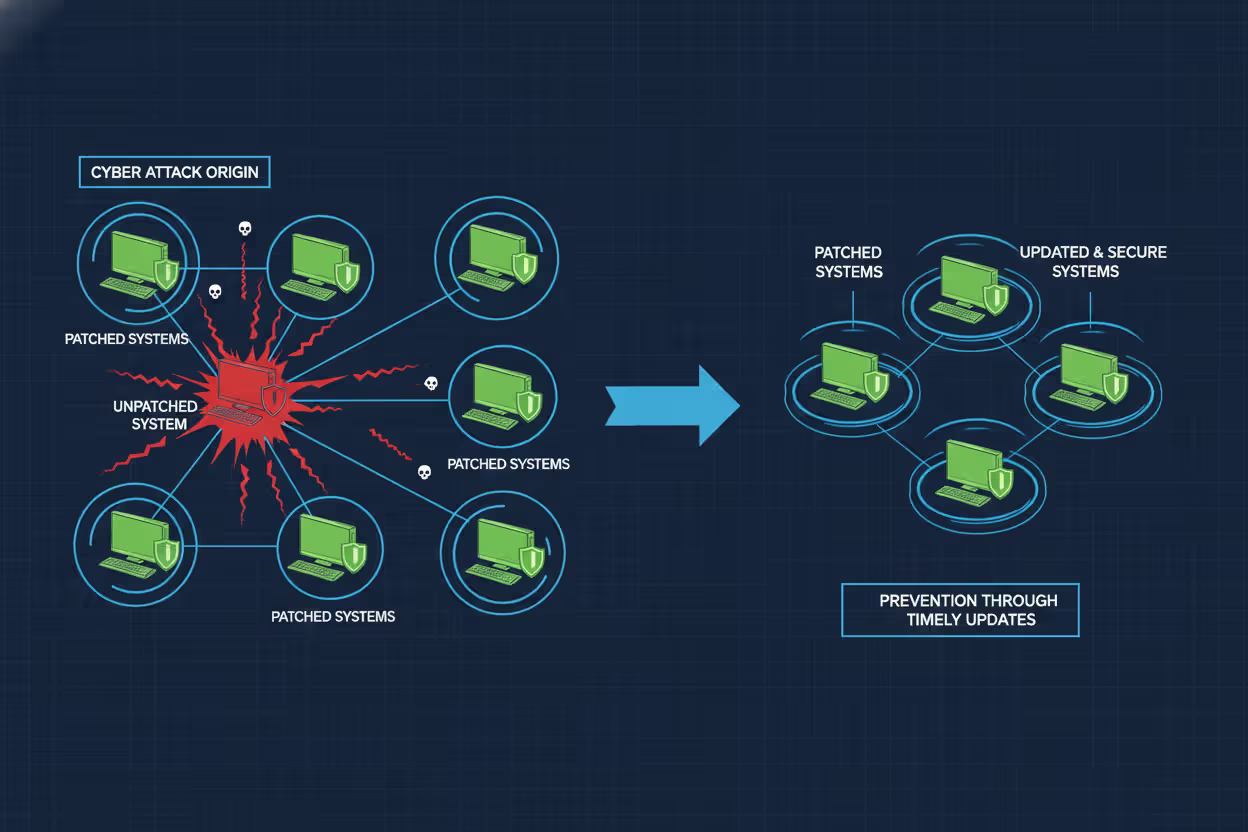
Vulnerabilities in software are discovered constantly. Vendors release fixes—patches—to close these security gaps before attackers exploit them. Patch management is the systematic process organizations use to identify, acquire, test, and install these code changes across their IT infrastructure. Without a disciplined approach, even one unpatched system can become the entry point for a devastating breach.
The WannaCry ransomware attack in 2017 encrypted files across 200,000 computers in 150 countries. Microsoft had released a patch for the exploited vulnerability two months earlier. Organizations that failed to apply it paid the price. More recently, the MOVEit Transfer vulnerability exploited in 2023 affected hundreds of organizations worldwide, exposing sensitive data from companies that delayed patching a critical file transfer application. These incidents underscore a simple truth: patch management isn't optional infrastructure maintenance—it's a fundamental security control.
What Is Patch Management in Cyber Security
Patch management in cyber security refers to the structured methodology for managing updates to software applications, operating systems, firmware, and embedded systems throughout an organization's technology stack. A patch is a piece of code that modifies existing software to correct vulnerabilities, improve functionality, or fix bugs that could impact performance or security.
Three primary categories of patches exist:
Security patches address discovered vulnerabilities that attackers could exploit. These receive the highest priority because they directly protect against active threats. When a researcher discovers that an authentication bypass allows unauthorized database access, the vendor develops a security patch to close that specific weakness.
Author: Marcus Halbrook;
Source: williamalmonte.net
Feature patches add new capabilities or enhance existing functions. While not always security-critical, these updates sometimes include hardening measures that improve the overall security posture. A feature patch might add multi-factor authentication support to an application that previously relied solely on passwords.
Bug fix patches correct software defects that cause crashes, data corruption, or unexpected behavior. Though not explicitly security-focused, bugs can create denial-of-service conditions or unpredictable states that attackers manipulate. A memory leak that crashes a firewall after 72 hours of uptime creates a predictable window for intrusion.
The patch management in cyber security basics involve understanding that each component in your environment—from the operating system kernel to third-party libraries embedded in custom applications—requires ongoing attention. A web application might depend on dozens of libraries. When a critical vulnerability emerges in a widely-used logging framework, every application incorporating that code becomes vulnerable until patched.
Modern environments complicate this picture. Cloud infrastructure, containerized applications, IoT sensors, mobile devices, and legacy systems each demand different patching approaches. A database running in a cloud provider's managed service receives automatic patches, while a self-hosted database requires manual intervention. This heterogeneity makes comprehensive patch management in cyber security explained as both a technical and organizational challenge.
Why Patch Management Matters for Security
Unpatched systems represent known weaknesses. Attackers don't need to discover novel vulnerabilities when they can exploit documented flaws with readily available tools. Public vulnerability databases like the National Vulnerability Database (NVD) catalog these weaknesses, complete with severity scores and often proof-of-concept code. Once a patch releases, attackers reverse-engineer it to understand the vulnerability, then scan the internet for unpatched targets.
The Equifax breach in 2017 exposed personal information of 147 million people. The entry point was an unpatched Apache Struts vulnerability—a patch had been available for two months. The organization knew about the vulnerability and the available fix but failed to apply it to a critical system. The financial and reputational damage exceeded $1.4 billion in costs.

Author: Marcus Halbrook;
Source: williamalmonte.net
Every unpatched vulnerability expands your attack surface—the sum of all points where an unauthorized user could enter your systems. Reducing this surface requires systematically eliminating known weaknesses. Consider a hospital network with 500 workstations, 50 servers, 200 medical devices, and 1,000 IoT sensors. If each device runs five patchable software components, that's 8,750 potential vulnerability points. Without structured patch management, tracking which components need updates becomes impossible.
According to a 2025 analysis by the Cybersecurity and Infrastructure Security Agency (CISA), attackers exploit known vulnerabilities within 14 days of patch release in 60% of successful breaches. The race between defenders applying patches and attackers weaponizing vulnerabilities has shortened dramatically. Organizations that patch quarterly now operate with a three-month window where their systems are known to be vulnerable.
Compliance frameworks recognize this reality. PCI DSS requires organizations handling credit card data to install critical security patches within one month of release. HIPAA's Security Rule mandates regular software updates as part of required security management processes. Failing to patch isn't just risky—it can violate regulatory requirements and expose organizations to fines and legal liability.
How Patch Management Works
Effective patch management follows a repeatable cycle. Ad-hoc patching—applying updates whenever someone remembers—creates gaps and inconsistencies. A structured process ensures comprehensive coverage while minimizing operational disruption.
Discovery and Vulnerability Assessment
The process begins with knowing what you have. Asset inventory tools scan networks to identify all devices, operating systems, installed applications, and firmware versions. You cannot patch what you don't know exists. Shadow IT—systems deployed without central IT knowledge—often becomes the weakest link because it falls outside regular patching schedules.
Once you've cataloged assets, vulnerability scanners compare installed software versions against databases of known vulnerabilities. These tools generate reports showing which systems need which patches, typically ranked by severity. A critical vulnerability affecting an internet-facing web server demands immediate attention. A low-severity bug in an isolated development system might wait for the next maintenance window.
Prioritization requires context beyond severity scores. A critical vulnerability in software you don't actually use poses less risk than a moderate vulnerability in your authentication system. Understanding your environment's unique risk profile—which systems are exposed, which contain sensitive data, which support critical business functions—shapes intelligent prioritization.
Testing Before Deployment
Patches occasionally cause problems. A security update might conflict with custom configurations, break integrations with other software, or introduce performance degradation. Deploying untested patches directly to production systems risks trading a potential vulnerability for a certain outage.
Establishing a test environment that mirrors production allows you to validate patches before widespread deployment. Install the patch on representative systems, run automated tests, verify that critical functions still work, and monitor for unexpected behavior. For complex environments, this testing might take several days.
The challenge is balancing thoroughness with speed. A critical zero-day vulnerability being actively exploited demands rapid deployment, potentially with abbreviated testing. A routine monthly patch bundle allows more comprehensive validation. Document your testing criteria for different severity levels so the team knows when accelerated deployment is justified.

Author: Marcus Halbrook;
Source: williamalmonte.net
Rollout and Monitoring
Deployment strategies vary based on environment size and risk tolerance. Phased rollouts apply patches to small groups first, monitoring for issues before expanding to larger populations. If problems emerge, you've limited the impact to a subset of systems.
Automated deployment tools push patches to thousands of systems simultaneously, but automation requires careful configuration. Schedule deployments during maintenance windows to minimize user disruption. Build in rollback capabilities so you can quickly revert if a patch causes unexpected problems.
After deployment, verify that patches installed successfully. Systems might be offline during the deployment window, network issues might interrupt the installation, or conflicts might cause silent failures. Verification scans confirm that the intended patch level was achieved across all target systems.
Documentation closes the loop. Record what was patched, when, by whom, and any issues encountered. This audit trail supports compliance requirements and provides historical context when troubleshooting future problems. If a system starts behaving strangely two weeks after a patch deployment, your documentation helps correlate the change with the symptom.
Patch Management Process Examples
Real-world implementation varies significantly across different technology stacks. Understanding common scenarios helps translate general principles into specific practices.
Windows Server Environment: A financial services company manages 200 Windows servers supporting various business applications. They subscribe to Microsoft's update channels and use Windows Server Update Services (WSUS) to control patch distribution. Each month, Microsoft releases patches on "Patch Tuesday." The team downloads these to their WSUS server, deploys them to a test environment containing replicas of critical servers, and runs automated test scripts that verify database connectivity, web application functionality, and authentication services. After three days of testing, they schedule weekend deployments to production servers in groups of 20, monitoring each group for 24 hours before proceeding to the next. Emergency patches for actively exploited vulnerabilities bypass this schedule, deploying within 48 hours with abbreviated testing.
Cloud Infrastructure: A SaaS provider runs containerized applications on Kubernetes clusters in AWS. Their approach differs significantly from traditional server patching. Container base images are rebuilt monthly incorporating the latest security patches for the underlying Linux distribution and application dependencies. Automated scanning tools check these images for known vulnerabilities before deployment. The team uses blue-green deployments, running new patched containers alongside existing ones, shifting traffic gradually while monitoring for errors. If issues arise, they instantly roll back to the previous version. The cloud provider handles patching the underlying hypervisor and hardware, but the SaaS company remains responsible for everything in their containers—operating system libraries, application frameworks, and custom code dependencies.
IoT Devices: A manufacturing facility operates 500 industrial sensors monitoring production equipment. These devices run embedded firmware that rarely changes, but occasionally critical vulnerabilities emerge. The challenge is that many sensors lack remote update capabilities and require physical access for firmware updates. The facility maintains an inventory of all sensors, their firmware versions, and physical locations. When a critical vulnerability affects their sensor model, technicians schedule updates during planned production downtime, physically connecting to each device to install new firmware. For newer sensor models with remote update capabilities, they deploy updates to a small subset first, monitor for connectivity or functionality issues, then roll out to remaining devices in batches.
Third-Party Software Management: A healthcare organization uses 40 different third-party applications—electronic health records, billing systems, imaging software, and specialized medical applications. Each vendor releases patches on their own schedule with varying levels of urgency and documentation. The IT team monitors vendor security bulletins, evaluates each patch's relevance and risk, and coordinates with application owners to schedule testing and deployment. Some vendors provide automatic update mechanisms, but the organization disables these in favor of controlled deployments to avoid unexpected downtime during clinical operations. This creates significant workload—tracking dozens of vendor patch schedules, testing each update in their environment, and scheduling deployments around clinical workflows.
Common Patch Management Challenges
Even with solid processes, organizations encounter recurring obstacles that complicate consistent patching.
Legacy systems pose the most stubborn challenge. A manufacturing company might operate a 15-year-old industrial control system running an unsupported operating system. The vendor no longer provides patches, but replacing the system costs millions and requires production shutdown. The organization accepts the risk, isolating the system on a separate network segment, implementing strict access controls, and monitoring aggressively for suspicious activity. This compensating control approach acknowledges that patching isn't always possible.
Author: Marcus Halbrook;
Source: williamalmonte.net
Downtime concerns create tension between security and availability. A 24/7 e-commerce platform can't easily schedule maintenance windows. Every minute offline translates to lost revenue. Organizations address this through redundancy—patching half the server pool while the other half handles traffic, then switching. This requires infrastructure investment but enables patching without customer-facing downtime. For systems without this redundancy, the calculation becomes risk-based: Is the vulnerability serious enough to justify planned downtime, or can we wait for the next scheduled maintenance?
Resource constraints limit patch management capacity, especially in smaller organizations. A three-person IT team supporting 500 employees struggles to maintain comprehensive patching across servers, workstations, mobile devices, and applications. They prioritize ruthlessly—critical systems first, internet-facing second, internal systems third. Automation helps, but implementing and maintaining automation tools requires expertise and time these teams don't have. The result is often a patchwork approach where some systems receive timely updates while others lag months behind.
Patch compatibility issues emerge when updates conflict with existing configurations or other software. A database patch might require application code changes to maintain compatibility. Deploying the database patch without updating the application breaks functionality. Coordinating these interdependent updates across different teams—database administrators, application developers, QA testers—adds complexity and delays. Some organizations maintain compatibility matrices documenting which versions of different components work together, but keeping these current demands ongoing effort.
Vendor delays frustrate even well-run patch programs. You discover a vulnerability in a critical application, but the vendor takes six weeks to develop and release a patch. During this window, you're aware of the risk but powerless to directly fix it. Workarounds might reduce exposure—disabling vulnerable features, implementing additional access controls, increasing monitoring—but these compensating controls add operational burden and don't eliminate the underlying weakness.
Patch Management Tools and Automation
Given enough eyeballs, all bugs are shallow
— Eric S. Raymond
Manual patch management doesn't scale beyond small environments. Tracking patch status across hundreds or thousands of systems, testing updates, scheduling deployments, and verifying success requires automation.
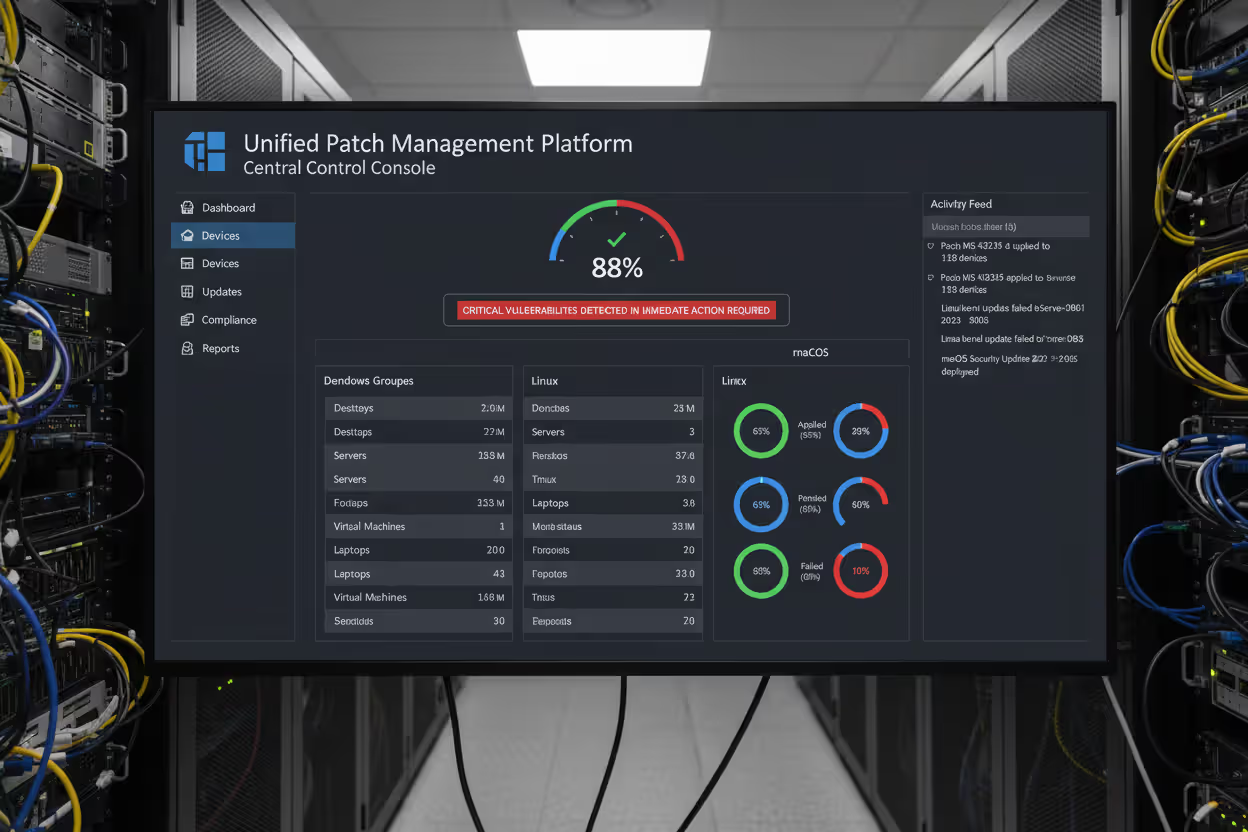
Centralized management platforms provide a single interface for managing patches across diverse systems. These tools inventory assets, identify missing patches, facilitate testing workflows, deploy updates, and generate compliance reports. For Windows environments, Microsoft Endpoint Configuration Manager (formerly SCCM) offers comprehensive patch management. Linux environments might use Red Hat Satellite or open-source tools like Ansible for automated patching. Cross-platform solutions like Ivanti or ManageEngine handle heterogeneous environments with Windows, Linux, and macOS systems.
Vulnerability scanners complement patch management tools by identifying weaknesses beyond missing patches—misconfigurations, weak passwords, unnecessary services. Tools like Nessus, Qualys, or Rapid7 scan systems, correlate findings with vulnerability databases, and prioritize remediation. Integration between vulnerability scanners and patch management platforms creates a closed loop: scanning identifies gaps, patch management tools deploy fixes, subsequent scans verify remediation.
Automated versus manual approaches present trade-offs. Full automation deploys patches immediately upon release without human intervention. This minimizes the vulnerability window but risks deploying problematic patches that break systems. Manual approaches provide control and validation but introduce delays that extend exposure. Most organizations adopt hybrid strategies—automate low-risk patches to workstations, manually control patches to critical servers, and maintain emergency procedures for actively exploited vulnerabilities.
| Deployment Strategy | Speed | Risk Level | Resource Requirements | Best Use Cases |
| Manual | Slow (days to weeks) | Low (thorough testing) | High (staff time for each deployment) | Critical systems, complex applications, environments with frequent compatibility issues |
| Automated | Fast (hours to days) | Medium (limited pre-deployment testing) | Low (after initial setup) | Standardized workstations, low-complexity environments, non-critical systems |
| Hybrid | Moderate (varies by system tier) | Low to Medium (risk-based testing) | Medium (automation infrastructure + oversight) | Mixed environments with varying criticality levels, most enterprise deployments |
The trend toward infrastructure-as-code and immutable infrastructure changes the patching paradigm. Rather than patching existing systems, organizations deploy entirely new infrastructure with updates already incorporated, then decommission old infrastructure. This approach eliminates patch state inconsistencies but requires significant architectural maturity.
Frequently Asked Questions About Patch Management
Patch management in cyber security requires balancing competing demands—security versus availability, speed versus stability, automation versus control. No single approach fits every organization. A small business with 20 employees needs different processes than a global enterprise with 50,000 systems.
Start with asset inventory. You can't patch what you don't know exists. Implement vulnerability scanning to identify gaps. Establish testing procedures appropriate to your risk tolerance and resources. Automate where possible, but maintain human oversight for critical systems. Document everything—what you patched, when, and why.
The threat landscape continues evolving. Attackers exploit vulnerabilities faster than ever. Vendors release patches more frequently, sometimes multiple times per week. Organizations that treat patch management as an afterthought rather than a core security control will continue experiencing preventable breaches. The question isn't whether you'll invest in patch management, but whether you'll invest proactively or reactively after an incident forces your hand.
Build patch management into your security culture. Train staff to understand that updates aren't annoying interruptions but essential protections. Allocate budget for tools and staff time. Measure and report on patch compliance rates. When leadership sees that 95% of critical patches deploy within your SLA while 5% require exception handling, they understand both your effectiveness and your resource needs.
Patch management won't prevent every security incident, but it eliminates the easiest attack vectors. When you close known vulnerabilities promptly, attackers must work harder, use more sophisticated techniques, and take greater risks of detection. That's the goal—making your organization a harder target than the next one.
Related Stories

Read more

Read more




The content on this website is provided for general informational and educational purposes only. It is intended to explain concepts related to endpoint security, cybersecurity practices, threat prevention, and security technologies.
All information on this website, including articles, guides, and examples, is presented for general educational purposes. Cybersecurity requirements and implementations may vary depending on organizational needs, infrastructure, regulatory requirements, and threat environments.
This website does not provide professional cybersecurity, legal, or compliance advice, and the information presented should not be used as a substitute for consultation with qualified cybersecurity professionals.
The website and its authors are not responsible for any errors or omissions, or for any outcomes resulting from decisions made based on the information provided on this website.