

Employee laptop passing endpoint security checks before network access
End Point Authentication Guide

Picture this scenario: Your IT team discovers an employee logged into your company's financial systems from a laptop riddled with three-month-old malware. The username and password? Completely legitimate. The employee? Authorized to access those systems. The problem? Nobody checked whether that specific device was safe before letting it through the digital door.
This gap between "who's logging in" and "what they're logging in from" creates massive security holes. End point authentication bridges this gap by examining both the person AND their device before granting network access.
What Is End Point Authentication?
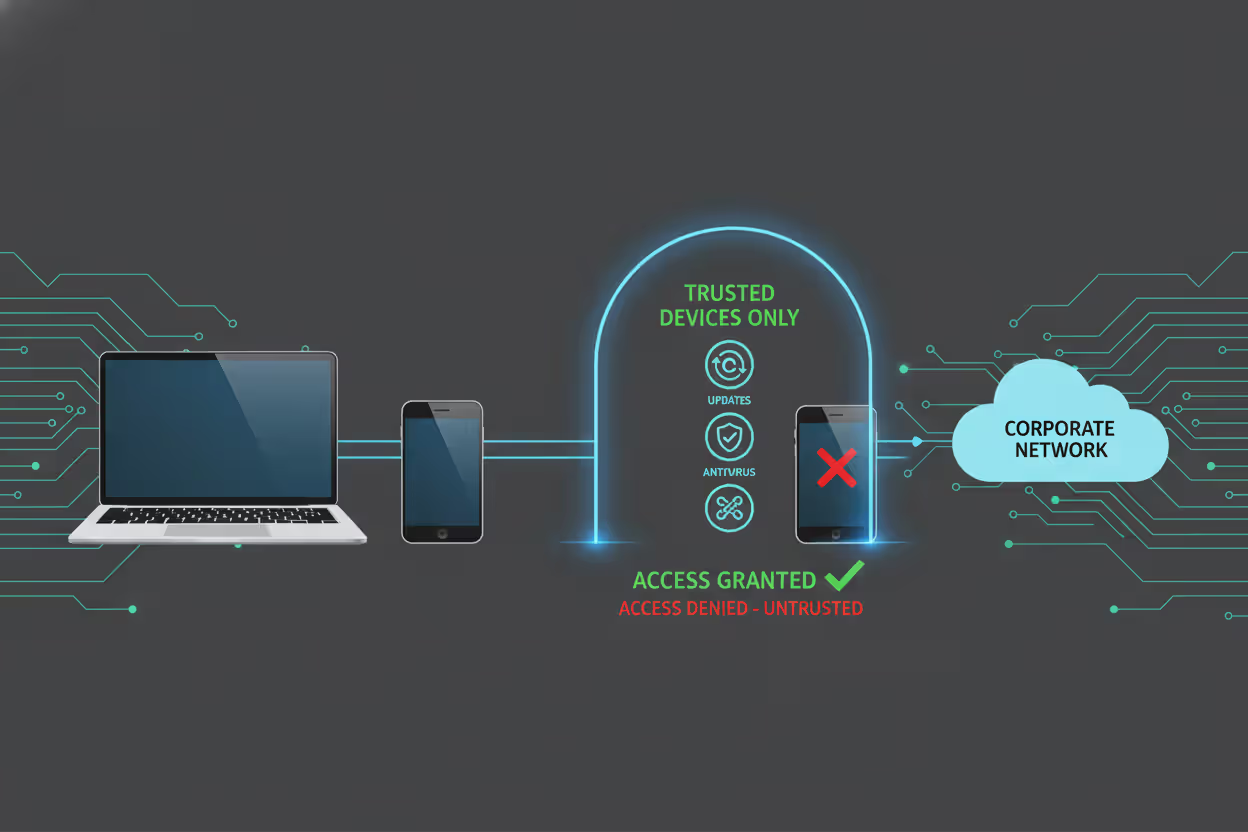
Think of end point authentication as a security checkpoint that scrutinizes devices—laptops, phones, tablets, IoT gadgets—before they can touch your network or applications. It's not asking "Who are you?" but rather "What are you connecting from, and is that device trustworthy?"
Here's what gets checked during this process: Has someone registered this device with our systems? Does it carry the right security certificates? Are critical software patches installed? Does it meet our corporate security standards?
The device passes these inspections, or it doesn't get in. Period.
Why does this matter? Because stolen credentials on compromised hardware spell disaster. An attacker steals Sarah's laptop, figures out her password, and boom—traditional authentication systems wave them right through. They've got the right username and password, after all.
But endpoint authentication? It notices something's off. Maybe the device lost its security certificate when the attacker wiped it. Perhaps malware altered system files. The device fails inspection and gets blocked, even with perfect credentials.
Network teams deploy this technology alongside their other defenses. Firewalls manage traffic patterns. Antivirus hunts for malware. End point authentication stands at the gate, making sure sketchy devices never make it past the entrance. This becomes absolutely critical when your workforce connects from home offices, airports, and coffee shops instead of your nice, controlled corporate network.
Author: Marcus Halbrook;
Source: williamalmonte.net
How End Point Authentication Works
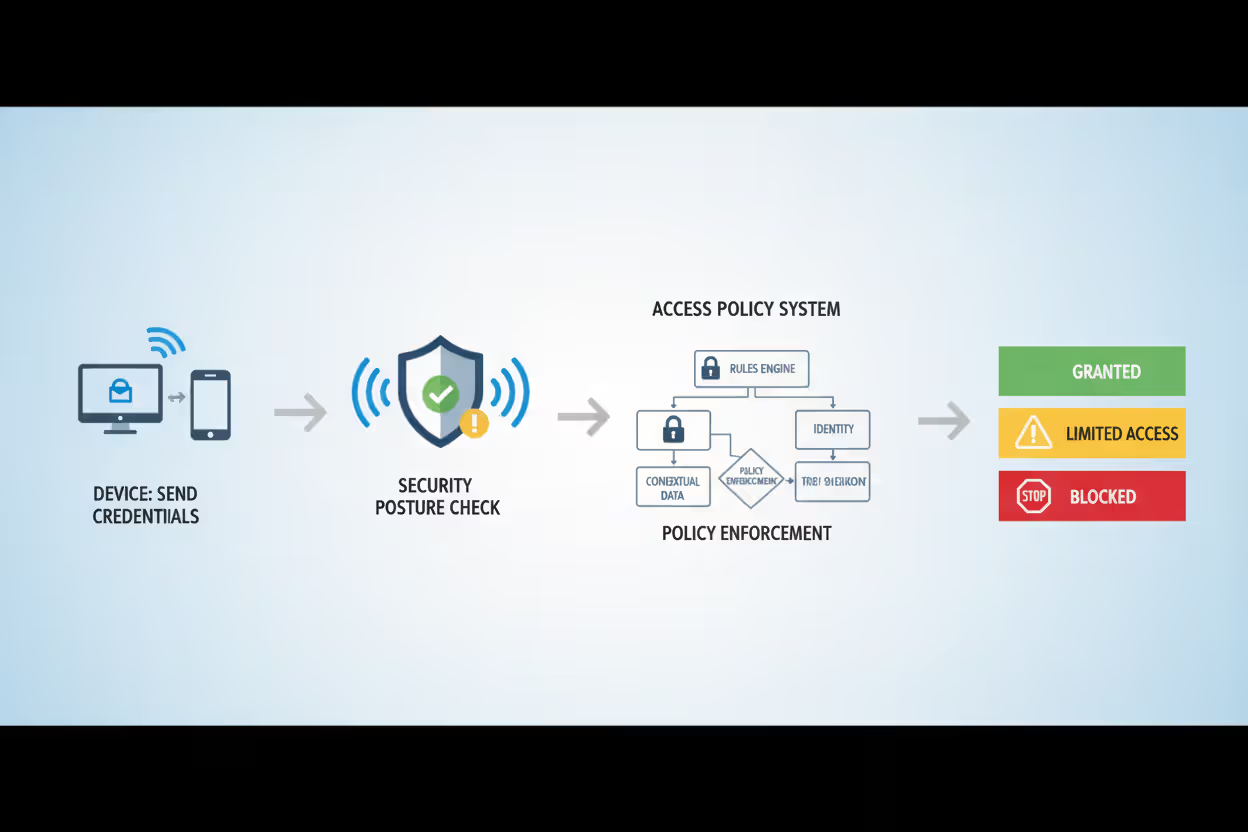
The verification sequence kicks off the moment a device requests network or application access. Think of it as a multi-stage security interview for hardware.
Stage one: The device presents its credentials—maybe a digital certificate, hardware ID, or cryptographic token. The authentication server checks its database: "Have I seen this device before? Did someone with proper authority register it?"
Stage two gets more interesting. The system runs a health inspection on the device itself. What version of Windows or macOS is running? When did it last install security patches? Is endpoint protection software active? Is the hard drive encrypted? A device running six-month-old software with disabled antivirus? That's getting denied access or shunted to a quarantine network for emergency updates.
Stage three involves policy evaluation. The system considers who's using the device, what type of device it is, and which resources they're requesting. Your IT director's company MacBook gets broader access than a contractor's personal laptop—even if both devices are technically compliant.
Finally, the verdict: full access, complete denial, or restricted access with guardrails. Some sophisticated setups keep watching even after granting access, ready to yank permissions if security posture degrades mid-session.
Author: Marcus Halbrook;
Source: williamalmonte.net
Certificate-Based Authentication
Digital certificates work like high-tech ID badges for devices. Organizations issue unique X.509 certificates to approved hardware, each containing identification details plus a public key that's been cryptographically signed by the company's certificate authority.
When the device connects, it flashes this certificate. The server validates the digital signature, confirms the certificate hasn't been revoked, and checks whether it came from a trusted authority. Thanks to public-key cryptography, these certificates are nearly impossible to fake without also stealing the device's private key—a significantly harder task.
This approach shines for company-owned gear where IT can pre-install certificates during initial device setup. The headache? Managing certificate lifecycles. Someone needs to track expiration dates, handle renewals every year or two, and maintain secure processes for distributing certificates to new devices.
Token-Based Authentication
Tokens—either physical gadgets or software apps—generate temporary codes that prove device identity. Hardware tokens might be USB security keys or smart cards storing cryptographic secrets. Software tokens run as programs on the device.
During authentication, the device's token creates a unique code based on the current timestamp and a secret key it shares with the authentication server. The server independently calculates what that code should be at this exact moment. Codes match? Device is authenticated.
Tokens offer deployment flexibility across various device types without complicated setup. The security trade-off: Software tokens are vulnerable to malware that might extract the secret key from compromised devices. Hardware tokens avoid this problem but cost more and require physical distribution.
Biometric Authentication Methods
Fingerprint readers, facial recognition cameras, even typing pattern analysis—biometrics increasingly factor into endpoint authentication, especially for smartphones and tablets. These systems confirm that an authorized person is actually operating the device right now.
Maximum effectiveness requires combining biometrics with device-level verification. Check both that the device appears on your approved list AND that the current user matches stored biometric profiles. This layered defense prevents scenarios where thieves steal legitimate devices but can't bypass fingerprint or face scans.
The complications? Privacy concerns about storing biometric data, plus accuracy issues that frustrate users. Nobody likes getting locked out because the facial recognition system doesn't recognize them wearing new glasses. Most organizations treat biometrics as one component in a multi-factor approach rather than the sole authentication mechanism.
Common End Point Authentication Methods and Examples
Corporate VPN deployments represent the most familiar use case. Remote workers fire up the VPN client, which immediately presents a device certificate while checking laptop security—firewall running? Disk encrypted? Antivirus definitions current? Compliant devices get their encrypted tunnel. That employee connecting from Starbucks on a six-month-old laptop without recent patches? No tunnel until they run Windows Update.
Cloud platforms bake endpoint authentication into their identity services. Take Microsoft Azure's Conditional Access policies—they inspect device compliance before unlocking Office 365 or other cloud tools. You might nail the username and password on your Android phone, but if that device isn't enrolled in mobile device management and lacks a PIN lock, you're viewing an access denied message.

Author: Marcus Halbrook;
Source: williamalmonte.net
IoT environments in factories and hospitals depend heavily on endpoint authentication. A hospital network might host 3,000+ connected medical devices—insulin pumps, cardiac monitors, MRI machines. Each receives a unique certificate during installation. When a device phones home to hospital systems, certificate verification confirms it's actual medical equipment rather than an attacker's rogue hardware dropped onto the network.
Banks implement endpoint authentication for both employee workstations and customer applications. Bank employees accessing core systems must use company-issued laptops with TPM (Trusted Platform Module) chips storing cryptographic keys. The authentication system verifies that TPM signature before allowing access to customer financial data.
Mobile device management platforms governing smartphones and tablets authenticate devices before enabling corporate email or internal applications. Your iPhone must be enrolled in the MDM system, protected by a passcode, and running current iOS. Jailbroken device or failed compliance check? Email sync stops cold.
Why Organizations Use End Point Authentication
The top reason? Blocking compromised or unmanaged devices from accessing anything important. Old-school perimeter security assumed everything inside the network was safe—a fantasy in today's threat landscape where malware often spreads from infected endpoints that sailed right past the firewall. End point authentication creates internal checkpoints continuously validating device trustworthiness.
Regulatory frameworks increasingly demand device-level controls. HIPAA for healthcare providers, PCI DSS for payment processors, GDPR for companies handling EU citizen data—all include requirements about controlling device access to sensitive information. Organizations deploy endpoint authentication partly to show auditors they verify device security before granting access to protected data.
End point authentication has become non-negotiable in our zero-trust architecture. We've blocked over 2,300 connection attempts in the past year from devices that had valid user credentials but failed our security posture checks—including 47 devices with active malware infections that traditional antivirus missed
— Sarah Chen
Remote and hybrid work arrangements make endpoint authentication essential. Employees working from home offices, coworking spaces, or airport lounges connect outside your physical network perimeter. End point authentication provides confidence that remote devices meet security standards regardless of connection location.
Unexpected benefit: cost reduction. Yes, implementing authentication systems costs money upfront. But organizations avoid breach-related expenses. A single ransomware infection spreading from an unmanaged device can trigger millions in recovery costs, operational downtime, and brand damage. End point authentication prevents these incidents by blocking non-compliant devices before they reach critical systems.
The technology also enables secure BYOD (bring your own device) initiatives. Employees want using personal phones and laptops for work tasks. IT needs security controls. End point authentication lets organizations verify personal devices meet minimum standards without demanding full device management—checking for encryption, screen locks, and current OS versions while respecting employee privacy on personal hardware.
End Point Authentication vs. Other Security Measures
Organizations frequently mix up endpoint authentication with adjacent security technologies. Clarifying the differences helps when building comprehensive security architectures.
| Security Approach | Verification Target | Best-Fit Scenario | Setup Difficulty |
| End Point Authentication | Device identity, security compliance, current posture | Guaranteeing only trustworthy, secure devices reach network resources | Medium complexity - needs device enrollment systems, certificate infrastructure, policy frameworks |
| Multi-Factor Authentication (MFA) | User identity via multiple proof methods | Validating that legitimate users are requesting access | Low to medium complexity - mostly software-driven, minimal hardware |
| Network Access Control (NAC) | Device compliance plus network segment restrictions | Managing which network areas devices can access | High complexity - demands network infrastructure changes and enforcement hardware |
| Zero Trust Architecture | Ongoing verification of users, devices, context | Removing implicit trust assumptions across infrastructure | Very high complexity - requires architecture redesign and comprehensive policy rework |
Multi-factor authentication zeroes in exclusively on user identity. It might demand a password plus a smartphone app code, but it won't examine whether the device itself is secure. Attackers who compromise a user's device could potentially circumvent MFA by intercepting that second factor. End point authentication supplements MFA by adding device scrutiny.
Network Access Control operates at the network layer, determining which network segments devices can reach. NAC might isolate non-compliant devices onto a remediation network, whereas end point authentication typically makes binary approve/deny decisions at the application or service level. Many organizations run both—NAC for network-level isolation and end point authentication for application access decisions.
Zero Trust Architecture represents a comprehensive security philosophy where end point authentication serves as one puzzle piece. Zero trust rejects the notion that any device or user deserves automatic trust, demanding continuous verification instead. End point authentication handles the device verification component, while other technologies manage user authentication, network isolation, and ongoing monitoring.
The essential difference: endpoint authentication specifically tackles the "what" (which device), while MFA tackles the "who" (which user). NAC tackles the "where" (which network segment), and zero trust orchestrates these elements into a cohesive system.
Setting Up End Point Authentication in Your Organization
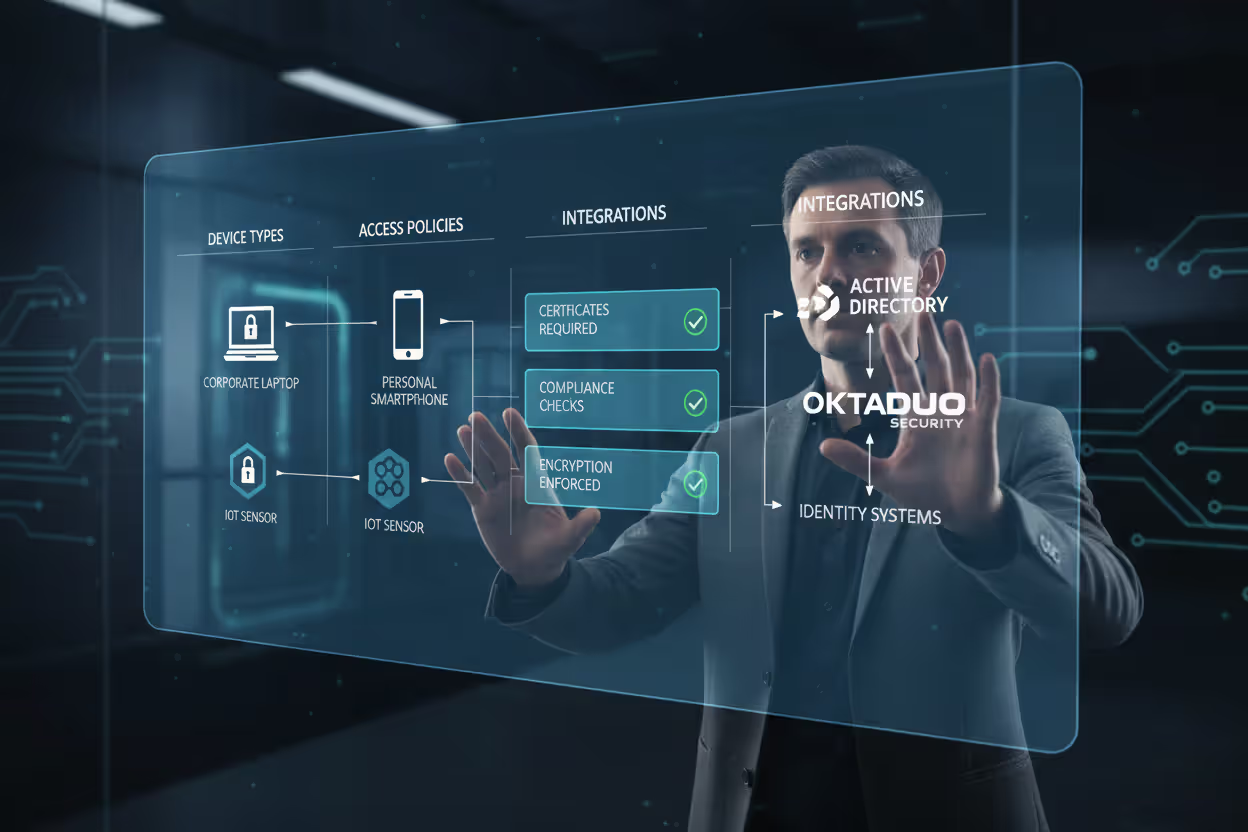
Begin by cataloging every device needing network access. Build categories: company-owned laptops, employee smartphones, contractor devices, IoT sensors, plus any other endpoints. Each category demands different authentication strategies based on management level and risk tolerance.
Select authentication methods matching each device category. Corporate laptops usually get certificate-based authentication since IT can provision certificates during initial deployment. Mobile devices might combine MDM enrollment with token-based authentication. IoT devices with limited processing power might rely on simpler shared secrets or hardware IDs.
Establish security policies before buying any technology. What makes a device compliant in your environment? Minimum OS versions? Required security software? Encryption requirements? Patch recency standards? Document these policies exhaustively because they'll drive your authentication rules. A frequent mistake: deploying authentication technology without defined policies, resulting in either too-permissive rules or constant user complaints about blocked access.
Author: Marcus Halbrook;
Source: williamalmonte.net
Run a pilot program with a small group before organization-wide rollout. Pick a technically skilled department that can deliver detailed feedback. Watch authentication logs obsessively during the pilot, hunting for false positives (legitimate devices wrongly blocked) and false negatives (non-compliant devices wrongly approved).
Prepare for certificate lifecycle management when using certificate-based authentication. Certificates expire. Devices get replaced. Employees quit. You need automated renewal workflows and certificate revocation procedures. Organizations that ignore lifecycle management face widespread outages when certificates expire simultaneously across hundreds of devices.
Connect your endpoint authentication to existing identity and access management infrastructure. Authentication should leverage your current user directories (Active Directory, Azure AD, Okta) instead of creating separate user databases. This integration maintains consistent access policies and simplifies administration.
Deliver clear user communication and support documentation. Employees will encounter authentication failures—sometimes legitimately when their devices need updates. Build documentation explaining why authentication failed and remediation steps. A self-service portal where users check their device compliance status reduces help desk ticket volume.
Mistakes worth avoiding: Rolling out authentication without executive sponsorship invites pressure for exceptions when senior leaders face inconvenience. Skipping tests across all device types and network conditions produces unexpected failures in production. Ignoring authentication logs means missing both security incidents and usability problems that push users toward workarounds.
Allocate funds for ongoing maintenance beyond initial deployment. Authentication systems need regular updates, certificate renewals, policy adjustments, and integration with new applications. Organizations treating authentication as a one-time project instead of an ongoing program struggle with system deterioration and emerging security gaps.
Frequently Asked Questions About End Point Authentication
End point authentication has shifted from optional security enhancement to foundational requirement for defending contemporary networks. As organizations adopt remote work models, cloud services, and BYOD approaches, the traditional network perimeter has vanished. Confirming device identity and security posture before allowing access provides crucial protection against compromised endpoints that user authentication alone can't detect.
Making it work demands more than purchasing technology. Organizations need defined security policies, suitable authentication methods for various device categories, integration with current identity systems, and sustained management of certificates and compliance rules. The upfront investment in planning and deployment delivers returns through prevented breaches, satisfied compliance mandates, and capability to securely accommodate flexible work patterns.
The security landscape keeps shifting, but one principle endures: trust requires earning and verification, never assumptions. End point authentication guarantees that every device touching your network has earned that trust by demonstrating compliance with your security requirements.
Related Stories

Read more

Read more




The content on this website is provided for general informational and educational purposes only. It is intended to explain concepts related to endpoint security, cybersecurity practices, threat prevention, and security technologies.
All information on this website, including articles, guides, and examples, is presented for general educational purposes. Cybersecurity requirements and implementations may vary depending on organizational needs, infrastructure, regulatory requirements, and threat environments.
This website does not provide professional cybersecurity, legal, or compliance advice, and the information presented should not be used as a substitute for consultation with qualified cybersecurity professionals.
The website and its authors are not responsible for any errors or omissions, or for any outcomes resulting from decisions made based on the information provided on this website.